
socratesc67055960
Participant
May 1, 2019
Question

Import PDF changes page sizes to be the same

  • May 1, 2019
  • 6 replies
  • 10147 views

If i export a PDF from illustrator with multiple different size pages and open that in photoshop
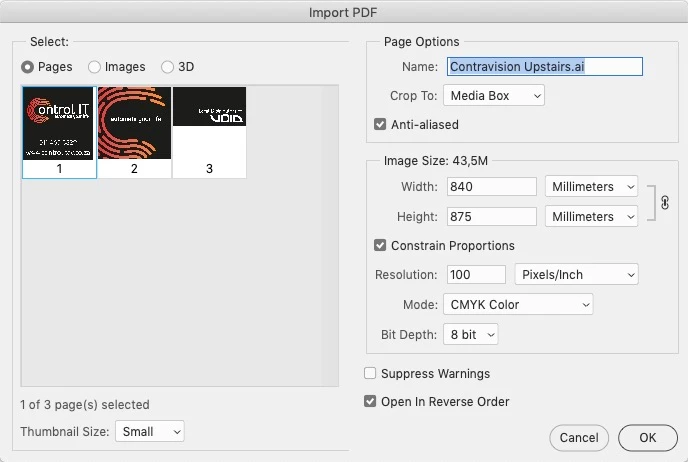
Selecting all 3 and clicking ok now changes the size of the pages to be the same size

this is suppose to be page 3 with the size of 540x290mm, so now i must open each page 1 by 1 and this never use to happen it would keep the pages to original size

    This topic has been closed for replies.

    6 replies

    Stephen Marsh
    Community Expert
    Community Expert
    August 11, 2022

    The following script will rasterize all pages at each unique page size. Thanks to the late JJMack for the code to iterate over all pages!


    Change the various PDF options as necessary (colour mode, resolution, page box etc.)


    /*
    Rasterize Multi-Page PDF using Variable Mediabox Size.jsx
    v1.0 11th August 2022, Stephen Marsh
    https://community.adobe.com/t5/photoshop-ecosystem-discussions/import-pdf-changes-page-sizes-to-be-the-same/td-p/10423186
    
    NOTE: Pages at 32,000+ pixel width or height limit will become distorted!
    
    Based on a script from the late John J. McAssey (JJMack)
    https://community.adobe.com/t5/photoshop-ecosystem-discussions/open-pdf-pages-as-layers/td-p/10425413
    */
    
    #target photoshop
    app.bringToFront();
    
    // Save the current ruler units and set to pixels
    var savedRuler = app.preferences.rulerUnits;
    app.preferences.rulerUnits = Units.PIXELS;
    
    var pdfOpenOpts = new PDFOpenOptions();
    pdfOpenOpts.antiAlias = true;
    pdfOpenOpts.bitsPerChannel = BitsPerChannelType.EIGHT;
    // MEDIABOX | CROPBOX | BLEEDBOX | TRIMBOX | ARTBOX
    pdfOpenOpts.cropPage = CropToType.MEDIABOX;
    pdfOpenOpts.mode = OpenDocumentMode.RGB;
    pdfOpenOpts.resolution = 300;
    pdfOpenOpts.suppressWarnings = true;
    pdfOpenOpts.usePageNumber = true;
    
    var theFile = File.openDialog("Select your PDF file", "Select:*.pdf");
    app.displayDialogs = DialogModes.NO;
    var check = true;
    var page = 1;
    
    while (check === true) {
        try {
            pdfOpenOpts.page = page;
            var thePdf = app.open(theFile, pdfOpenOpts);
    
            if (activeDocument.width.value >= 32000 || activeDocument.height.value >= 32000) {
                app.beep();
                alert("The rasterized page content may be distorted as the width or height is 32,000 pixels or higher!");
            }
    
            page++;
        } catch (e) {
            check = false;
        }
    }
    
    // Restore the ruler units
    app.preferences.rulerUnits = savedRuler;


    https://prepression.blogspot.com/2017/11/downloading-and-installing-adobe-scripts.html

    Participating Frequently
    August 11, 2022

    cool thanks! Haven't givn this a shot yet but will do.  Working in a large format shop we regularly get multi page PDFs for wall graphics/ window backlits.  Lots of time is wasted opening a 900mb pdf serveral times just because of page size variations.... This would help a-lot ! thanks agin  

    Stephen Marsh
    Community Expert
    Community Expert
    August 11, 2022

    A WF/GF shop should have one or more capable APPE RIPs driving the various printers. Photoshop would be a very unproductive alternative.

    Participant
    August 13, 2020

    (removed) this just happened to me on an 16 page document, just now found out all these came back on boards from the printers as wide as the BIGGEST one (1000mm across!) !!! And they were meant to be frame infills for filming a tv show!! I've been ordering things this way for 5 years from my older software so I never checked that after upgrading everything would be WRONG! haaaaa!!! This is a fresh (removed) indeed!

    Participating Frequently
    August 10, 2022

    anyone find a solution to this yet?  This is a problem for me too

    jane-e
    Community Expert
    Community Expert
    May 1, 2019

    socratesc67055960  wrote

    If i export a PDF from illustrator with multiple different size pages and open that in photoshop
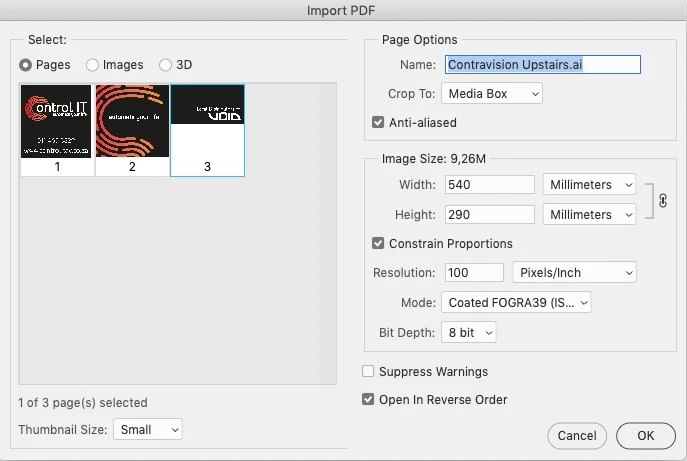
    Selecting all 3 and clicking ok now changes the size of the pages to be the same size
    Hi Socrates,

    Try Bounding Box instead of Media Box with Constrain Proportions. That's what worked for me.

    If not, play with the other options, such as bleed and crop (put a bleed and crop in Illustrator first). You may have had these settings in a previous version of Photoshop and lost them when you upgraded.

    ~ Jane

    JJMack
    Community Expert
    Community Expert
    May 1, 2019

    I do not import PDF Pages into Photoshop in my work. However I tested what you wrote.

    Yes it seems to be a change made in CC 2019 prior of Photoshop will import PDF pages as different size document when Pages sizes in a document differ from other in a document.  Each page is open as a document.  This behavior surprised me for there is only one Image size setting in the Import PDF Dialog???? 

    It turns out that if you change the image size setting in the dialog  All Photoshop versions of Photoshop open all selected pages the size image document the size set in the dialog.   Perhaps Adobe changed the import PDF pages behavior in CC 2019 to make it be consistent with dialog's One Image Size settings.

    It would be nice if Adobe made Photoshop's Transforms behavior consistent again.   Adobe support should be better.....

    JJMack
    c.pfaffenbichler
    Community Expert
    Community Expert
    May 1, 2019

    As an aside: Why do you convert/import the pdf with Photoshop?

    socratesc67055960
    Participant
    May 2, 2019

    i sometimes work at 10% of the size in illustrator and just rasterise in photoshop add a colour profile and send to my printers rip, even them i could open a few pages select all od them and add the zero at  the end of the size and it would scale all the pages up to thier proper 100% sizes

    c.pfaffenbichler
    Community Expert
    Community Expert
    May 2, 2019

    You are aware that you are degrading image quality that way by converting vector data to pixel data?

    c.pfaffenbichler
    Community Expert
    Community Expert
    May 1, 2019

    and this never use to happen

    In which version do you claim that this behaviour was different?

    socratesc67055960
    Participant
    May 2, 2019

    everything before CC 2019 i used to do it often for my printers rip its easier to send single pages to it