
Known Participant
May 26, 2022
Answered

Improve low-resolution images: how to quickly clean the edges of objects?

  • May 26, 2022
  • 3 replies
  • 1919 views

I am searching for a simple and fast method (eg. through a filter) to convert low-resolution images objects' edges...


Hair apart, this is what I am searching for (simply a clean line, without fake sharpen/contrast effects):
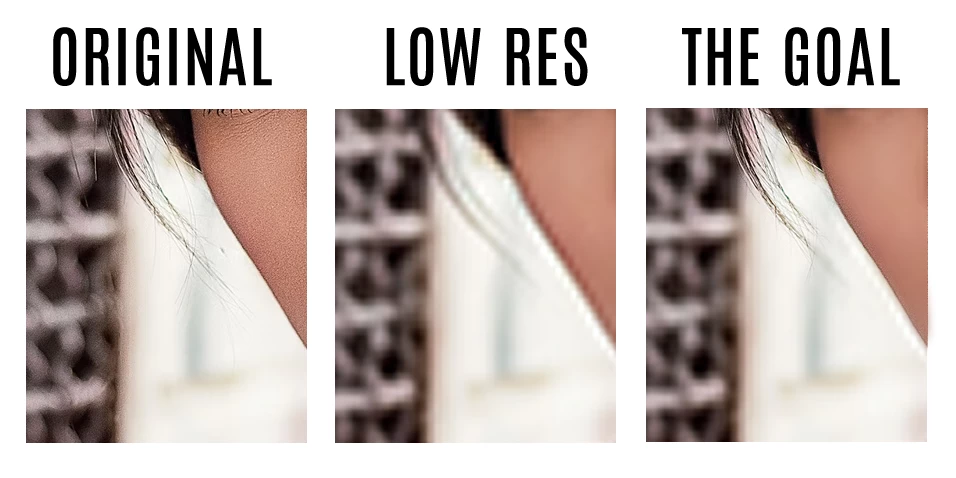
Note: in this example, I am using a portion of a face but I am searching for something that works on any kind of object (a dress, a table a leg, etc.).
This topic has been closed for replies.
Correct answer c.pfaffenbichler

Your expectation is unrealistic. 

In the images you posted it is obviously impossible to recreate the individual pieces of hair that form a »solid« strand in the lores image from that. (Unless you are speaking about a layered lores image in which the original image is embedded as a Smart Object, but I wouldn’t expect you do.) 


You could check out Topaz Gigapixel, in some cases it might produce better results than Photoshop’s resampling methods. 

3 replies

c.pfaffenbichler
Community Expert
c.pfaffenbichlerCommunity ExpertCorrect answer
Community Expert
May 27, 2022

Your expectation is unrealistic. 

In the images you posted it is obviously impossible to recreate the individual pieces of hair that form a »solid« strand in the lores image from that. (Unless you are speaking about a layered lores image in which the original image is embedded as a Smart Object, but I wouldn’t expect you do.) 


You could check out Topaz Gigapixel, in some cases it might produce better results than Photoshop’s resampling methods. 

j_will_iAuthor
Known Participant
May 27, 2022

Thanks, maybe topaz could be the right solution.

c.pfaffenbichler
Community Expert
Community Expert
May 28, 2022

I think they recently released some facial reconstruction feature … but bear in mind: If an application creates detail for hair, eyelashes, irises etc. that is simply not present in the source image then the resulting image should be considered more like a painting than a photograph. 

Ranjisha Sengupta
Legend
May 26, 2022

Hi there,


Thanks for reaching out. We understand your concern and are here to help.

Which version of Photoshop are you using? As you know, Photoshop is very powerful software; there are hopes to get the picture back in form.

There are different tools and procedures to do it. I am listing a few youtube tutorials below; please have a look;

https://www.youtube.com/watch?v=eZXT2mMr-IU  (For 2 colors)

https://www.youtube.com/watch?v=uWAtYPMqPkw

https://www.youtube.com/watch?v=xaxd39KNS6k


Let us know if this helps.


Regards

Ranjisha

j_will_iAuthor
Known Participant
May 27, 2022

Thanks but I have already seen them, I am searching for something like a total redraw of the line...

Kevin Stohlmeyer
Community Expert
Community Expert
May 26, 2022

Have you tried the new Neural Filter for JPG Artifact Removal?

D Fosse
Community Expert
Community Expert
May 26, 2022
quote

Have you tried the new Neural Filter for JPG Artifact Removal?


By @Kevin Stohlmeyer


I've tried it, and I was actually very impressed. It absolutely works as advertised, and it will also remove some of the halos you can see here, which is specifically a jpeg compression artifact (not sharpening artifact).


But a one-click automatic solution to get perfectly crisp edges (like the examples) is IMO unrealistic. I would expect some further filtering to be required here.