
Known Participant
May 15, 2025
Answered

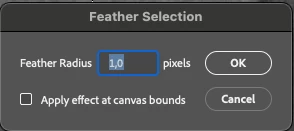
Inconsistent Keyboard Arrow Behavior in Feather Selection Radius Field — Photoshop 26.6

  • May 15, 2025
  • 13 replies
  • 811 views
  • App Version: Adobe Photoshop 26.6.1

  • Platform/OS: macOS Sequoia 15.3.2 (MacBook Pro M2 Max)

Description:
In previous versions of Photoshop, it was possible to fine-tune the Feather Selection radius using keyboard arrows in a logical way. For example, I could type 1, then press the down arrow to reduce it to 0.9, 0.8, etc. — this allowed precise control using the keyboard.

However, in the latest version (26.6), this behavior has changed:

  • If I type 1 and press the down arrow, it jumps to 0.1 instead of decreasing gradually.

  • If I type 0.1 and press the up arrow, it jumps to 1.0 instead of increasing to 0.2.

This makes it impossible to adjust the value smoothly or logically using the arrow keys, and breaks a workflow habit that was efficient and predictable.

Expected Result:
Arrow keys should increment or decrement the value in small steps (0.1) regardless of how the initial number was entered, and should behave consistently.

Actual Result:
Arrow keys cause unexpected jumps between 0.1 and 1.0, preventing precise keyboard-based control of the Feather radius.

Why this matters:
This disrupts precise selection refinement, especially for users who work with subtle feathering (e.g. 0.8, 1.2, etc.). It breaks long-established interaction patterns and slows down professional workflows.

Of course, you can enter 0.8 directly from the keyboard, but I was comfortable with the old way.
 

Correct answer Jacob Co.

Photoshop 26.6.1 does not have the change, you need to have 26.7 as I mentioned above. If 26.7 is not yet available in your Creative Cloud app yet, then check again tomorrow.

13 replies

MyronKaAuthor
Known Participant
May 21, 2025

Yes I have just updated Adobe Photoshop to 26.7 it is solved

Jacob Co.Community ManagerCorrect answer
Community Manager
May 19, 2025

Photoshop 26.6.1 does not have the change, you need to have 26.7 as I mentioned above. If 26.7 is not yet available in your Creative Cloud app yet, then check again tomorrow.

MyronKaAuthor
Known Participant
May 19, 2025

This is how it works in Beta Photoshop 26.8. But not in Photoshop 26.6.1

Community Manager
May 19, 2025

The 0.1 increment functionality should be working in the 26.7 release that is starting to roll out.


Expected behavior for feather selection on Mac:

  • 0.1: Opt +Up / Down
  • 1.0:Up / Down
  • 10.0 Shift + Up / Down
Community Manager
May 16, 2025

@MyronKa update on alt/opt not working:

We determined this more granular support was added recently, after 26.6 was released. So it should be working in the latest beta and I believe should also be in the next public dot release for all customers.


I recommend checking out the beta if you ever can, as the feedback cycle is fast compared to our full releases and helps ensure the next release goes well.


Sorry for the inconvenience on this one, but if the next version doesn't work with alt/opt, please do let us know!

Community Manager
May 16, 2025

@MyronKa thanks for reporting the alt/opt key issue. I have not seen it myself, it works well on my Mac. I let my team know, we'll try to reproduce and diagnose. Completely losing 0.1 precision would be a bug, and not by design.

MyronKaAuthor
Known Participant
May 15, 2025

On my MacBook with the latest version, I can’t change the step to 0.1 using Alt/Opt — only steps of 1 or 10 with Shift are available. I can only enter an exact value manually.
If I need to quickly enter 0.8, it’s actually faster to hit 1 and press the down arrow twice than to type 0.8. It’s not that difficult, but when you need to work very quickly, this becomes important and convenient.

Community Manager
May 15, 2025

The 10x modifer change is expected, it unlocks a wider precision range (0.1, 1.0 and 10.0). As mentioned, using theAlt/Opt key maintains the existing 0.1 increment/decrement behavior. Previously, both the arrow keys with and without the Alt/Opt key modifier behaved exactly the same, rather than providing additional precision control.


That said, we are having internal discussions about certain behaviors in the increment/decrement functionality across many dialogs, including rounding behavior. Some "modern" UX behavior differences will come along with the underlying UI framework upgrade, and this is one. So feedback on these changes, how it affects your workflows, and whether there is loss of functionality is helpful.

MyronKaAuthor
Known Participant
May 15, 2025

But this is not logical for values less than 1. Why was this disabled?

MyronKaAuthor
Known Participant
May 15, 2025

I had the following settings