
Participant
April 25, 2023
Question

Inconvenient for text function in Photoshop 2023 version

  • April 25, 2023
  • 2 replies
  • 926 views

 I'm not sure if it's just me, but I'm having some trouble with Photoshop's text function. Set the font or text size in advance, and when you try to type, it reverts to the default text settings.


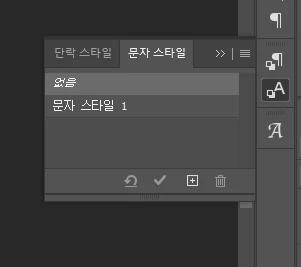
 To solve this, you can create a new character style by clicking Character Style > Create New Character Style > Click Character Style.


but It raises the question of why such a cumbersome update was made.
 

This topic has been closed for replies.

2 replies

c.pfaffenbichler
Community Expert
Community Expert
April 26, 2023

I cannot reproduce the issue, please post screenshots including all pertinent Panels to illustrate what exactly you are doing. 

Participant
April 26, 2023

great. Let me explain my situation again.


That screenshot is my default text settings in Photoshop.


I changed this because I wanted to use a different text font and size.


Now, the text should be entered according to the changed text settings.


However, the changed text settings are not applied and return to the default text settings.


Do you understand my situation now?

c.pfaffenbichler
Community Expert
Community Expert
April 26, 2023

Is there already a Type Layer? 


It works as expected here, what have you done for all-purpose trouble-shooting so far?

Bojan Živković11378569
Community Expert
Community Expert
April 25, 2023

I can not understand what is going on on your Character Style panel, by default it should be set to None or no character style will be applied to text.