
Known Participant
April 5, 2023
Question

Incorrect file size showing in photoshop

  • April 5, 2023
  • 1 reply
  • 1530 views

Hi,
When previewing file size in photoshop (Image > Image Size), I see a different size from what shows when the JPG is then saved on my machine. Please see example below. Does anyone know why this is happening please?

Photoshop - 3MB
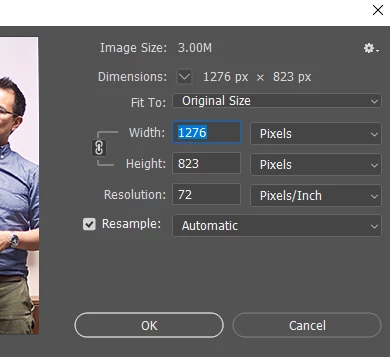
This very images saved on laptop - 596 KB

???

This topic has been closed for replies.

1 reply

davescm
Community Expert
Community Expert
April 5, 2023

Image size shows file size in RAM so 1276 x 823 x 3 = 315044 = 3.0MB ( There are 1048576 bytes in a MB)


That is different to the saved file size on disk, after lossy jpeg compression which compresses the file to 596KB.


Dave

MargoM.Author
Known Participant
April 17, 2023

Hello Dave,
Thanks for the answer. Sorry if I'm asking silly questions, but what does the 3 in '1276 x 823 x 3' stand for? The 1276 and 823 are height and width in pixels, but I'd need help wrapping my head around that last componenet of the equasion 😄

MargoM.Author
Known Participant
May 4, 2023

As Dave says.


When you open a jpeg, it is decompressed back to its full native size as above. When open, it doesn't have a file format at all. File formats are storage containers.


The jpeg compression - packaging for storage - is incredibly effective. It can shrink a file down to 1 - 5% of native size (!). This massive size reduction comes at a steep price, however. Jpeg compression is destructive and cumulative. When you open it, it is not exactly the same as when you saved it. Some data are lost, some artifacts introduced. Don't resave a jpeg if you can avoid it.


Thank you for further explanation @D Fosse and @davescm!
I definitely didn't realise RGB was represented by its own separate bytes - so definitely learnt something new here 🙂
One last thing I'd like to ask is - there's no way to check/ preview the file's size other than saving and looking at the saved image's size it appears?