I'm pretty sure I understand what you want because I successfully did this myself. The open/save Finder window has the icon size fixed at 80 pixels. You can however adjust this in your home Finder plist file:
~/Library/Preferences/com.apple.finder.plist is where this particular plist is located in your home directory.
First you will need a Plist Editor. This is my favorite: "Plist Editor" in the MacOS App Store.
Navigate to and open: com.apple.finder.plist
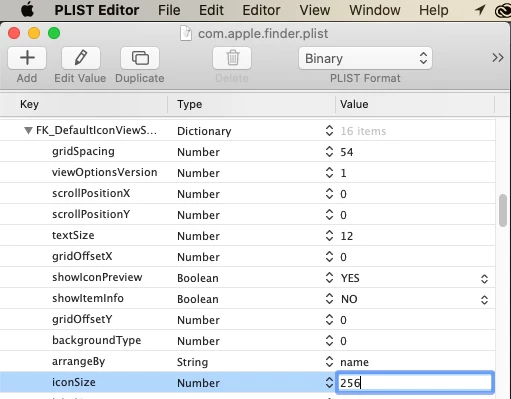
Go to the "FKDefaulticonviewsettings" and click on the triangle to expand to the settings.
Enter 256 in "iconsize" as shown. Then press Enter to confirm, File > Save to keep the changes.
Next Relaunch the Finder by pressing and holding Option/Control on your keyboard and pressing the Finder icon in the dock. You should see "Relaunch" as a menu option.
Open Photoshop and see what the icons in the open window look like.
If they are too large, experiment with different iconsizes.


 AdChoices