
Participant
July 5, 2020
Question

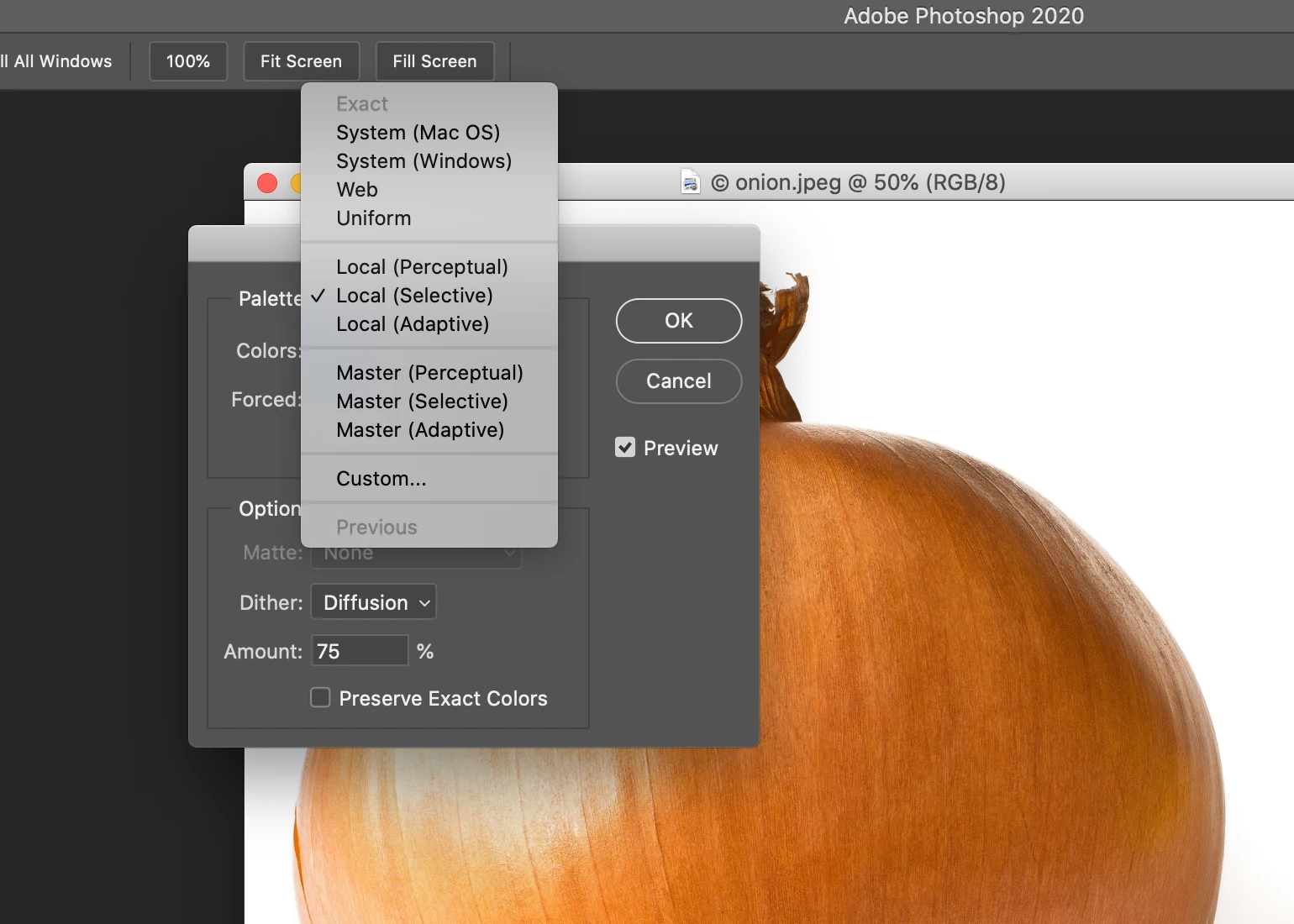
index colour not working even in RBG/8bit

  • July 5, 2020
  • 2 replies
  • 2481 views

Hi,

I am trying to extract the exact colour palette from an RGB/8 bit image using Index Colour but as you can see in the attachment that option is greyed out. Any idea why? Or how can I extract the colour palette? I am in the latest version of Photoshop on the latest version of Catalina.

Thank you
This topic has been closed for replies.

2 replies

Participant
July 5, 2020

I think I figured...so the RGB image in 8 bit needed to be converted to Index, then back to RGB, then back to index and that activated the 'Exact' button. Now I can save my palette :). Problem solved here.

Thanks, JJMack for the inspiration.


JJMack
Community Expert
Community Expert
July 5, 2020

What are you trying to Actually do?  8 bits RGB supports 16,000,000 Colors Index supports 256 Colors. 


You can convert an 8 Bit RGB image to and Index images buy reducing then number of colors the image has.  An Index image can have up 256 color only. If you try to use more photoshop will reset what you tried to 256 and give you a warning popup.

JJMack
Participant
July 5, 2020

Exactly, I am trying to do what I mentioned. Use the 'Exact' option from the Palette drop-down menu which is not active in my example. How can I get that button active? How should my image be? I only want to use that Exact option.

Cheers!

JJMack
Community Expert
Community Expert
July 5, 2020

Have you converted your RGB document to a index document so there is  a color table to extract. A RGB image has 16,000,000 possible colors.  Most like many more than 256 colors will exist in an RGB image.

JJMack