
TinyHouseUK
Participant
May 29, 2022
Answered

Instal error CS6

  • May 29, 2022
  • 5 replies
  • 742 views

Hi Guy's,

Having trouble installing CS6 on my new MacBook Air. Baught CS6 in 2013 (£950) but when trying to instal it on my new MacBook the Red instal file has a white circle with a line through it (a bit like a no entry road sign). When I click on it a message comes up..... .
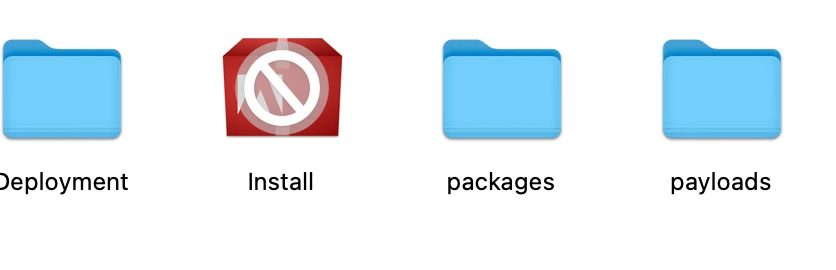
"Instal" needs to be updated. 

The developer of this app needs to update it to work with this version of macOS. Contact the developer for more information.

Does anyone know how to get round this please?

Any hope woukld be greatly appreciated. 

This topic has been closed for replies.
Correct answer D Fosse

MacOS no longer supports 32 bit software. While Photoshop itself is 64 bit, the installer and some other components are 32 bit and won't run. There's no way around that.


A perpetual license is only perpetual as long as the environment doesn't change. Photoshop CS6 hasn't changed, but it is ten years old and in the meantime MacOS has. To run CS6 today you need an older system with an older operating system.

5 replies

TinyHouseUK
Participant
May 29, 2022

Ok, Thank you all for taking the time to reply. On this basis I may as well keep the old laptop purely to use for Photoshop projects until its on its last legs.

Thanks again guys.

gener7
Community Expert
Community Expert
May 29, 2022

Also you can go on Ebay and get an inexpensive older Macbook as well. I've done that.

TheDigitalDog
Inspiring
May 29, 2022

CS6 should run (mostly) as a 64-bit application under Monterey but installing it is the issue; you must boot into an OS that can support the 32-bit installer (the last being Mojave). That's a big problem for M1's because Monterey, Big Sur, Catalina and M1 Macs do not run 32-bit and can't boot into Mojave. 

IF your new MacBook isn't an M1, you are OK but if it is, you're SOL. 

Author “Color Management for Photographers" & "Photoshop CC Color Management/pluralsight"
gener7
Community Expert
Community Expert
May 29, 2022

Both responses are good answers but not good news. You can go with

https://www.adobe.com/creativecloud/photography/compare-plans.html subscription, or Photoshop Elements if you want to own. $69 for now.

https://www.adobe.com/products/photoshop-elements.htmlhttps://www.adobe.com/products/photoshop-elements.html

D Fosse
Community Expert
D FosseCommunity ExpertCorrect answer
Community Expert
May 29, 2022

MacOS no longer supports 32 bit software. While Photoshop itself is 64 bit, the installer and some other components are 32 bit and won't run. There's no way around that.


A perpetual license is only perpetual as long as the environment doesn't change. Photoshop CS6 hasn't changed, but it is ten years old and in the meantime MacOS has. To run CS6 today you need an older system with an older operating system.

Ged_Traynor
Community Expert
Community Expert
May 29, 2022

Hi

Photoshop CS6 is not compatible with MAC Catalina and above, you'll need to subscribe to the Creative Cloud if you want a version that will run on the latest MAC OS.

P.S. don't blame Adobe, it's an Apple issue, no more 32 bit application support.