
INSTALL PREVIOUS VERSION OF PHOTOSHOP
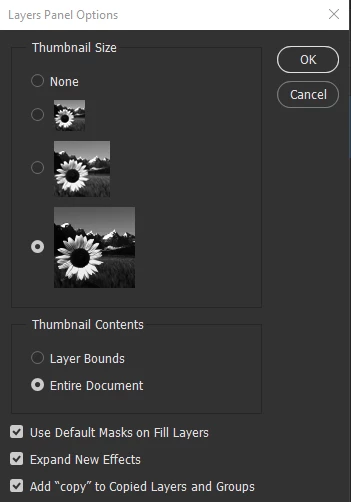
I have noticed that the vast majority of my purchased "actions" don't work with the new version of photoshop. Following the list of steps in the actions, it appears that this is because the actions rely on photoshop renaming copied layers (e.g. layer 1 copy 2 etc). The new version doesn't appear to append copied layers with any additional text preventing the action from finding the relevant layer.
I can't seem to find a way of installing a legacy version where the actions will work. I doubt that the action authors will update the actions (though I have fired a request via GraphicRiver "Envato Market" where they were purchased).
Following the Adobe help guide, I can't find an option to install previous versions from my Creative Cloud app list:
- Scroll down to the app you want to install and select the More actions icon next to it.
- In the drop-down list, select Other Versions (this option isn't available)
Can anyone offer a workaround to install a version where my actions will work so I can continue working on the image in the newest version?
 AdChoices