
jakep8900883
Participant
January 4, 2019
Answered

Insufficient space for Photoshop... when there is space

  • January 4, 2019
  • 2 replies
  • 1167 views

I have a drive that has petty much 223 gb available and i tried to install the new photoshop cc 2019 in a folder and it says this
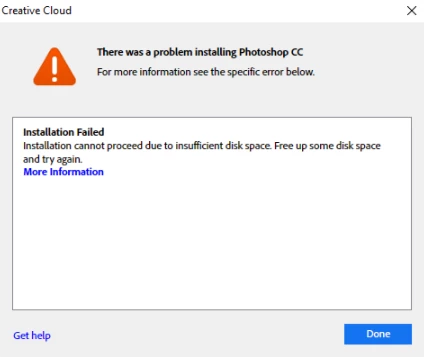
is it that photoshop is bigger than 223 gb or something?

    This topic has been closed for replies.
    Correct answer Ronald Keller

    Eevn if you install it on a different drive much stuff needs to be on the system drive. How many free space has your C drive?

    2 replies

    D Fosse
    Community Expert
    Community Expert
    January 4, 2019

    That's right. A large part of the installation goes to your user account, which has to be on the C drive no matter where the program files are. This is nothing special for Photoshop, just how Windows (and MacOS) organizes things.

    So the message probably means exactly what it says.

    It also means you're so low on space that you will soon have much bigger problems. Consider this an early warning.

    JJMack
    Community Expert
    Community Expert
    January 4, 2019

    On Windows you can move Some User Files off C: or add disk in front of C:  But its a pain in the butt to manage all areas this way.  I have made some modification to some of Windows default libraries locations for my user ID to keep things from being written to C: For example my documents goes to my E:\My File\Documents by default.  C:\Users\myuserid is down the list some I try to keep Libraries files off C: for the most part. I changed Downloads location to e:\

    JJMack
    jakep8900883
    Participant
    January 4, 2019

    not my c drive btw

    JJMack
    Community Expert
    Community Expert
    January 4, 2019

    Even when You install Photoshop on a driver other than c: your boot drive some things are installed on your boot drive and Users Application data and temp files are normalley created on you Boot drive.   So your boot drive need  free space for these files.  You should always have quite a bit of Free space on your boot drive for your OS use for user application data files, and temp files .  If your boot drive fills your OS will have difficulties running.   How much free space is there on you C: drive when this massage is being displayed?  I install Applications in ther default location on my C: Boot Disk however my data files like images are one external USB3 disk drives.  Usera Application data is on C:

    I only adobe Application I install is Photoshop and  I have several version installed.  My user Application Data file for Adobe products is 1.55GB. near 5,000 files in 836 folders

    JJMack