
Participant
March 18, 2023
Respondido

iPad photoshop touch circle missing

  • March 18, 2023
  • 1 resposta
  • 810 Visualizações

Hello. I have been happily using my iPad for drawing with pS for about a year, and this morning, the "touch" circle that I use ALL THE TIME for toggling between eraser/eye dropper disappeared and is no longer on the screen.  Any advice about what setting I may have turned off?  Or a way to get it back?


thank you!!!
Este tópico foi fechado para respostas.
Melhor resposta por jane-e

@defaultx6qvg5bq0790 


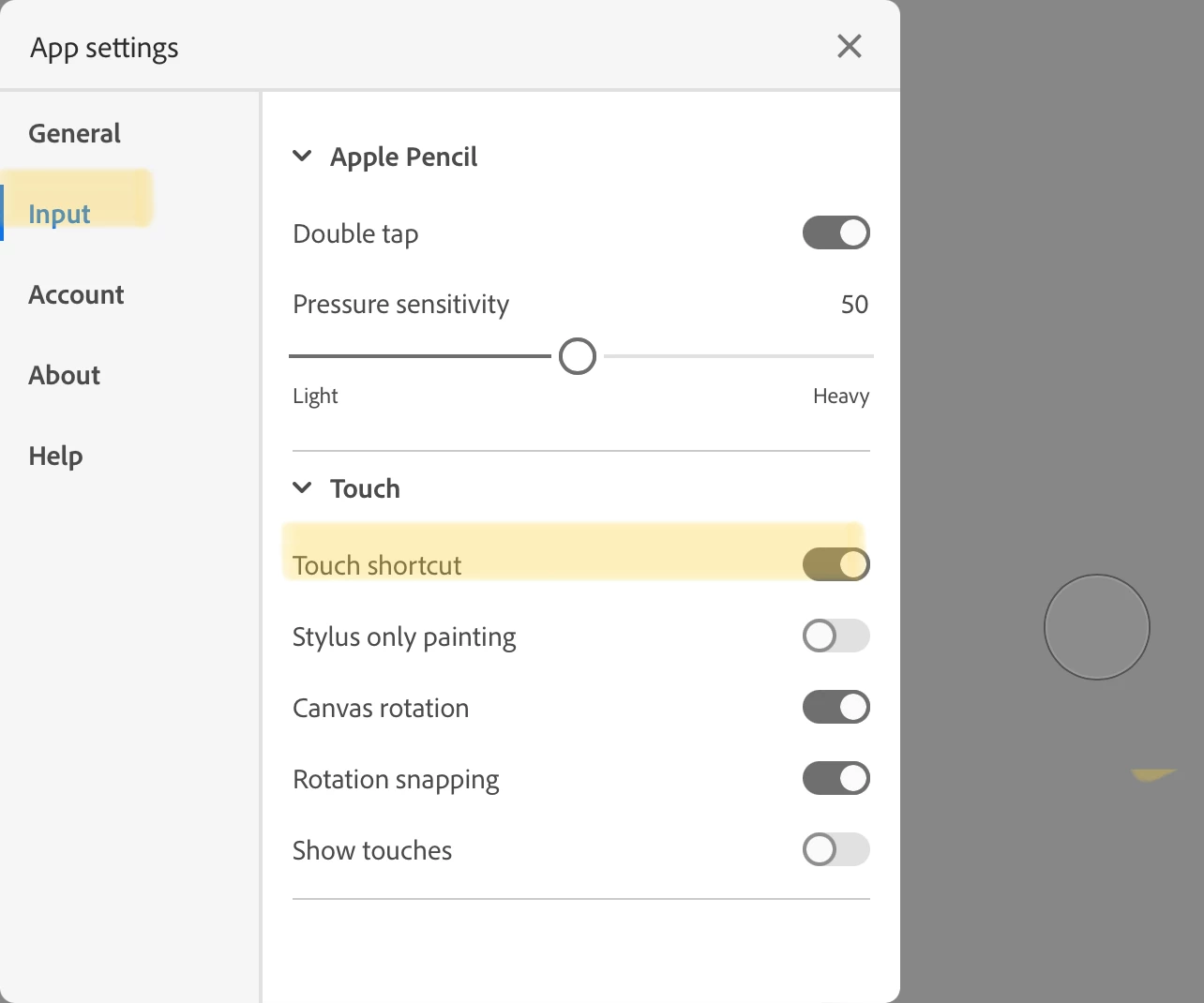
Click your avatar in the upper right to open App Settings, then choose Input from the left hand panel. Under "Touch" enable Touch Shortcut.


Jane


1 Resposta

jane-e
Community Expert
jane-eCommunity ExpertResposta
Community Expert
March 19, 2023

@defaultx6qvg5bq0790 


Click your avatar in the upper right to open App Settings, then choose Input from the left hand panel. Under "Touch" enable Touch Shortcut.


Jane