

Trevor.Dennis
Community Expert
Community Expert
November 15, 2016
Question

Iridescent Sea Shell Texture

  • November 15, 2016
  • 3 replies
  • 3892 views

This is what we call Paua shell in NZ, and is known as Abalone in Oz.  The polished shells are used a lot in jewellery and all sorts of decorative inlays.

Haliotis Iris picture

https://s-media-cache-ak0.pinimg.com/originals/1b/5b/7a/1b5b7aad4853af95afeca9ccb6b25880.jpghttp://amazon.clikpic.com/mschuyl/images/abalone010608_1.jpg

I have used a downloaded Paua texture in a project that is otherwise 100% Photoshop down to the last pixel. and I'd like to keep it that way, but short of building the texture manually layer by layer to give me the laminated effect. I have not got there yet.

I have tried combinations of blend mode and opacity using multiple layers with:

Render clouds and render fibers

Eye Candy 7's Marble and Noise textures

Plastic Wrap, and Glowing Edges

None of these has given me a decent Paua/Abalone shell texture.  My gut tells me that I will have to build it layer by layer, but I thought I'd try the forum for ideas.
    This topic has been closed for replies.

    3 replies

    Trevor.Dennis
    Community Expert
    Community Expert
    November 17, 2016

    That's great Dave. Thanks. I had been thinking along similar lines regards Layer Style Stroke set to Gradient, but I don't know how to make it feather the stroke other than ​Create layer​ > Gaussian Blur​.  I use Layer Styles a LOT, but I still have to think about some of them, like Inner and outer glow, where the interrelationship between all the sliders can be a bit finicky. 

    At the moment, my free time is going into learning the 3D tools (also thanks to you) but I'll get back to this ASAP.

    davescm
    Community Expert
    Community Expert
    November 17, 2016

    The feathering was in the gradient It went from opaque in the mid blues to transparent in the yellows

    This was the inner  glow setting

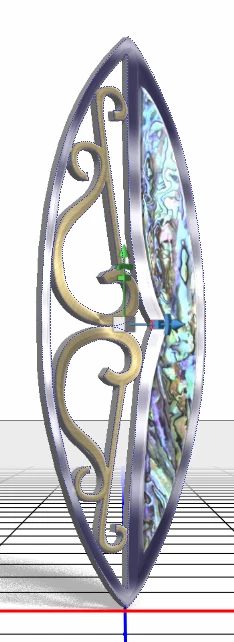
    I tried dropping it in as a texture on a simplified version of your earring model just to see how it looked :

    100% section :

    Dave

    Trevor.Dennis
    Community Expert
    Community Expert
    November 17, 2016

    davescm wrote:

    The feathering was in the gradient

    Dave

    Ahhhh...  I like your thinking.  It's little lateral approaches like that, that make this forum so good.   Workflows that are obvious when pointed out to you, but in this case, had never occurred to me in the 20 odd years I have been doing this stuff. 

    What I really like about this forum is seeing questions that I don't have an answer for, because we have to think how to do it, which gives us new skills, and with some very capable people posting here, it happens all the time.

    Thanks again Dave, and thank you Melissa.  I'm getting back to Deke McClelland's 3D tutorials on Lynda.com   It's also proving to be good therapy towards forgetting the worrying long term affects of our earthquake.

    davescm
    Community Expert
    Community Expert
    November 17, 2016

    Hi Trevor

    Had a bit of a play with this tonight. Something along these lines might get you close

    Several plain black and transparent  layers each with an inner glow style based ona gradient like this

    Then a healthy dose of the smudge tool

    A  layers of noise with motion blur applied to create the surface scratches (blending mode overlay)

    Then a bit of curves and saturation adjustment and a clouds layer set to Overlay
    Finally on top a gray clouds layer set to overlay


    As I said - not there yet but getting closer

    Dave


    Trevor.Dennis
    Community Expert
    Community Expert
    November 17, 2016

    I'll try bumping this just the once.    ???

    melissapiccone
    Community Expert
    Community Expert
    November 17, 2016

    I don't have any ideas for you, just wanted to say I think it looks great and this is quite the challenge you have set for yourself! Ok, maybe one idea. Try playing with the satin layer style, it's pretty weird and might help with the shiny bits.

    Melissa Piccone | Adobe Trainer | Online Courses Author | Fine Artist