DesainFreak2706
Participating Frequently
December 11, 2022
Answered

Is it possible to copy all Width Height, X and Y properties?

  • December 11, 2022
  • 3 replies
  • 5014 views

Hello,


Is there any easy ways to copy Width Height X and Y of a layer so I can apply it to other layer (as a replacement) on the same image


Any help and suggestion will be appreciated, Thank you

This topic has been closed for replies.
Correct answer Stephen Marsh

Update - 19th December 2022:


/* The previous code using the $.setenv() code has been removed due to errors */


Here is a single OPT/ALT version of the updated two-part script:


/*
Resize Target Layer to Source Layer Size - ALT-OPT.jsx
https://community.adobe.com/t5/photoshop-ecosystem-discussions/is-it-possible-to-copy-all-width-height-x-and-y-properties/td-p/13410970
v1.1, 19th December 2022, Stephen Marsh
*/

#target photoshop

if (documents.length) {

    /* Step 2 - Hold down alt/opt to resize the layer */
    if (ScriptUI.environment.keyboardState.altKey) {

        function main() {

            try {
                var prefFileIn = File('~/Desktop/_Resize_Layer_Preference_File.txt');
            } catch (e) {
                alert(e);
            }

            if (File(prefFileIn).exists && File(prefFileIn).length > 0) {

                // Read the preference file from the user's desktop
                prefFileIn.open('r');
                // Read the 1st line from the log file, a means to an end...
                var logInfo = prefFileIn.readln(1);
                // Read the 2nd line from the log file & convert the string to a number/integer
                var prefFileWidthValue = Math.floor(prefFileIn.readln(2));
                // Read the 3rd line from the log file & convert the string to a number/integer
                var prefFileHeightValue = Math.floor(prefFileIn.readln(3));
                var prefFileSourceLayer = prefFileIn.readln(4);
                prefFileIn.close();

                processSelectedLayers();

                prefFileIn.remove();

                // End of script notification
                //app.refresh();
                alert("Script completed!" + "\r" + "Target layer resized to source layer size/position");


                // Functions

                function processSelectedLayers() {
                    var s2t = stringIDToTypeID;
                    (r = new ActionReference).putProperty(s2t('property'), p = s2t('targetLayersIDs'));
                    r.putEnumerated(s2t('document'), s2t('ordinal'), s2t('targetEnum'));
                    var lrs = executeActionGet(r).getList(p),
                        sel = new ActionReference();

                    for (var i = 0; i < lrs.count; i++) {
                        sel.putIdentifier(s2t('layer'), p = lrs.getReference(i).getIdentifier(s2t('layerID')));
                        (r = new ActionReference).putIdentifier(s2t('layer'), p);
                        (d = new ActionDescriptor()).putReference(s2t("target"), r);
                        executeAction(s2t('select'), d, DialogModes.NO);

                        // Call the resize layer function
                        resizeLayerFromPrefFile();

                        // Apply any layer styles from source layer to target layer
                        try {
                            var idpasteEffects = stringIDToTypeID("pasteEffects");
                            executeAction(idpasteEffects, undefined, DialogModes.NO);
                        } catch (error) {
                            //alert(error);
                        }
                    }
                }

                function resizeLayerFromPrefFile() {
                    // Store the original ruler units and set to px
                    var savedRuler = app.preferences.rulerUnits;
                    app.preferences.rulerUnits = Units.PIXELS;

                    // Create variables to hold the target layer dimensions
                    var targetLayerWidth = activeDocument.activeLayer.bounds[2] - activeDocument.activeLayer.bounds[0];
                    var targetLayerHeight = activeDocument.activeLayer.bounds[3] - activeDocument.activeLayer.bounds[1];

                    // Calculate the % adjustment value
                    var targetLayerScaleWidth = prefFileWidthValue / targetLayerWidth * 100;
                    var targetLayerScaleHeight = prefFileHeightValue / targetLayerHeight * 100;

                    // Transform from upper left
                    transform(0, 0, targetLayerScaleWidth, targetLayerScaleHeight);

                    // Alignment
                    targetLayer = activeDocument.activeLayer;
                    selectLayerById(prefFileSourceLayer);
                    transparencySelection();
                    activeDocument.activeLayer = targetLayer;
                    align2Selection('AdLf');
                    align2Selection('AdTp');
                    activeDocument.selection.deselect();

                    // Restore the original ruler units
                    app.preferences.rulerUnits = savedRuler;


                    // Functions

                    function transparencySelection() {
                        function s2t(s) {
                            return app.stringIDToTypeID(s);
                        }
                        var descriptor = new ActionDescriptor();
                        var reference = new ActionReference();
                        var reference2 = new ActionReference();
                        reference.putProperty(s2t("channel"), s2t("selection"));
                        descriptor.putReference(s2t("null"), reference);
                        reference2.putEnumerated(s2t("channel"), s2t("channel"), s2t("transparencyEnum"));
                        descriptor.putReference(s2t("to"), reference2);
                        executeAction(s2t("set"), descriptor, DialogModes.NO);
                    }

                    function align2Selection(method) {
                        var desc = new ActionDescriptor();
                        var ref = new ActionReference();
                        ref.putEnumerated(charIDToTypeID("Lyr "), charIDToTypeID("Ordn"), charIDToTypeID("Trgt"));
                        desc.putReference(charIDToTypeID("null"), ref);
                        desc.putEnumerated(charIDToTypeID("Usng"), charIDToTypeID("ADSt"), charIDToTypeID(method));
                        try {
                            executeAction(charIDToTypeID("Algn"), desc, DialogModes.NO);
                        } catch (e) {}
                    }

                    function transform(horizontal, vertical, width, height) {
                        function s2t(s) {
                            return app.stringIDToTypeID(s);
                        }
                        var descriptor = new ActionDescriptor();
                        var descriptor2 = new ActionDescriptor();
                        var reference = new ActionReference();
                        reference.putEnumerated(s2t("layer"), s2t("ordinal"), s2t("targetEnum"));
                        descriptor.putReference(s2t("null"), reference);
                        descriptor.putEnumerated(s2t("freeTransformCenterState"), s2t("quadCenterState"), s2t("QCSCorner0"));
                        descriptor2.putUnitDouble(s2t("horizontal"), s2t("pixelsUnit"), horizontal);
                        descriptor2.putUnitDouble(s2t("vertical"), s2t("pixelsUnit"), vertical);
                        descriptor.putObject(s2t("offset"), s2t("offset"), descriptor2);
                        descriptor.putUnitDouble(s2t("width"), s2t("percentUnit"), width);
                        descriptor.putUnitDouble(s2t("height"), s2t("percentUnit"), height);
                        descriptor.putEnumerated(s2t("interfaceIconFrameDimmed"), s2t("interpolationType"), s2t("bicubicAutomatic"));
                        executeAction(s2t("transform"), descriptor, DialogModes.NO);
                    }

                    function selectLayerById(id)
                    /* https://graphicdesign.stackexchange.com/questions/130739/photoshop-scripting-applying-changes-only-to-selected-artboards */
                    {
                        var desc1 = new ActionDescriptor();
                        var ref1 = new ActionReference();
                        ref1.putIdentifier(charIDToTypeID('Lyr '), id);
                        desc1.putReference(charIDToTypeID('null'), ref1);
                        executeAction(charIDToTypeID('slct'), desc1, DialogModes.NO);
                    }

                }


            } else {
                app.beep();
                alert('There is no valid file named "_Resize_Layer_Preference_File.txt" on the desktop!');
            }
        }

        activeDocument.suspendHistory("Resize selected layers script", "main()");

    /* Step 1 - Set the target group and layer */
    } else {

        // Store the original ruler units and set to px
        var savedRuler = app.preferences.rulerUnits;
        app.preferences.rulerUnits = Units.PIXELS;

        // Set the layer dimension variables
        try {
            var idcopyEffects = stringIDToTypeID("copyEffects");
            executeAction(idcopyEffects, undefined, DialogModes.NO);
            var iddisableLayerStyle = stringIDToTypeID("disableLayerStyle");
            executeAction(iddisableLayerStyle, undefined, DialogModes.NO);
        } catch (error) {
            //alert(error);
        }

        var layerWidth = (activeDocument.activeLayer.bounds[2] - activeDocument.activeLayer.bounds[0]);
        var layerHeight = (activeDocument.activeLayer.bounds[3] - activeDocument.activeLayer.bounds[1]);
        var sourceLayer = activeDocument.activeLayer.id;

        try {
            var idpasteEffects = stringIDToTypeID("pasteEffects");
            executeAction(idpasteEffects, undefined, DialogModes.NO);
        } catch (error) {
            //alert(error);
        }

        // Log text file platform specific LF options
        var os = $.os.toLowerCase().indexOf("mac") >= 0 ? "mac" : "windows";
        if (os === "mac") {
            prefFileOutLF = "Unix"; // Legacy = "Macintosh"
        } else {
            prefFileOutLF = "Windows";
        }
        // Create the preference file
        var prefFileOut = new File('~/Desktop/_Resize_Layer_Preference_File.txt');
        var dateTime = new Date().toLocaleString();
        if (prefFileOut.exists)
            prefFileOut.remove();
        prefFileOut.open("w");
        prefFileOut.encoding = "UTF-8";
        prefFileOut.lineFeed = prefFileOutLF;
        prefFileOut.writeln(dateTime + ", " + "Source Doc: " + activeDocument.name + ", " + "Source Layer: " + activeDocument.activeLayer.name);
        prefFileOut.writeln(layerWidth.value);
        prefFileOut.writeln(layerHeight.value);
        prefFileOut.writeln(sourceLayer);
        prefFileOut.close();

        // Restore the original ruler units
        app.preferences.rulerUnits = savedRuler;

        // End of script notification
        alert("Select the target layer/s and run the script again while holding down the ALT/OPT key to transform.");

    }

} else {
    alert("A document must be open to run this script!");
}




3 replies

Stephen Marsh
Community Expert
Stephen MarshCommunity ExpertCorrect answer
Community Expert
December 11, 2022

Update - 19th December 2022:


/* The previous code using the $.setenv() code has been removed due to errors */


Here is a single OPT/ALT version of the updated two-part script:


/*
Resize Target Layer to Source Layer Size - ALT-OPT.jsx
https://community.adobe.com/t5/photoshop-ecosystem-discussions/is-it-possible-to-copy-all-width-height-x-and-y-properties/td-p/13410970
v1.1, 19th December 2022, Stephen Marsh
*/

#target photoshop

if (documents.length) {

    /* Step 2 - Hold down alt/opt to resize the layer */
    if (ScriptUI.environment.keyboardState.altKey) {

        function main() {

            try {
                var prefFileIn = File('~/Desktop/_Resize_Layer_Preference_File.txt');
            } catch (e) {
                alert(e);
            }

            if (File(prefFileIn).exists && File(prefFileIn).length > 0) {

                // Read the preference file from the user's desktop
                prefFileIn.open('r');
                // Read the 1st line from the log file, a means to an end...
                var logInfo = prefFileIn.readln(1);
                // Read the 2nd line from the log file & convert the string to a number/integer
                var prefFileWidthValue = Math.floor(prefFileIn.readln(2));
                // Read the 3rd line from the log file & convert the string to a number/integer
                var prefFileHeightValue = Math.floor(prefFileIn.readln(3));
                var prefFileSourceLayer = prefFileIn.readln(4);
                prefFileIn.close();

                processSelectedLayers();

                prefFileIn.remove();

                // End of script notification
                //app.refresh();
                alert("Script completed!" + "\r" + "Target layer resized to source layer size/position");


                // Functions

                function processSelectedLayers() {
                    var s2t = stringIDToTypeID;
                    (r = new ActionReference).putProperty(s2t('property'), p = s2t('targetLayersIDs'));
                    r.putEnumerated(s2t('document'), s2t('ordinal'), s2t('targetEnum'));
                    var lrs = executeActionGet(r).getList(p),
                        sel = new ActionReference();

                    for (var i = 0; i < lrs.count; i++) {
                        sel.putIdentifier(s2t('layer'), p = lrs.getReference(i).getIdentifier(s2t('layerID')));
                        (r = new ActionReference).putIdentifier(s2t('layer'), p);
                        (d = new ActionDescriptor()).putReference(s2t("target"), r);
                        executeAction(s2t('select'), d, DialogModes.NO);

                        // Call the resize layer function
                        resizeLayerFromPrefFile();

                        // Apply any layer styles from source layer to target layer
                        try {
                            var idpasteEffects = stringIDToTypeID("pasteEffects");
                            executeAction(idpasteEffects, undefined, DialogModes.NO);
                        } catch (error) {
                            //alert(error);
                        }
                    }
                }

                function resizeLayerFromPrefFile() {
                    // Store the original ruler units and set to px
                    var savedRuler = app.preferences.rulerUnits;
                    app.preferences.rulerUnits = Units.PIXELS;

                    // Create variables to hold the target layer dimensions
                    var targetLayerWidth = activeDocument.activeLayer.bounds[2] - activeDocument.activeLayer.bounds[0];
                    var targetLayerHeight = activeDocument.activeLayer.bounds[3] - activeDocument.activeLayer.bounds[1];

                    // Calculate the % adjustment value
                    var targetLayerScaleWidth = prefFileWidthValue / targetLayerWidth * 100;
                    var targetLayerScaleHeight = prefFileHeightValue / targetLayerHeight * 100;

                    // Transform from upper left
                    transform(0, 0, targetLayerScaleWidth, targetLayerScaleHeight);

                    // Alignment
                    targetLayer = activeDocument.activeLayer;
                    selectLayerById(prefFileSourceLayer);
                    transparencySelection();
                    activeDocument.activeLayer = targetLayer;
                    align2Selection('AdLf');
                    align2Selection('AdTp');
                    activeDocument.selection.deselect();

                    // Restore the original ruler units
                    app.preferences.rulerUnits = savedRuler;


                    // Functions

                    function transparencySelection() {
                        function s2t(s) {
                            return app.stringIDToTypeID(s);
                        }
                        var descriptor = new ActionDescriptor();
                        var reference = new ActionReference();
                        var reference2 = new ActionReference();
                        reference.putProperty(s2t("channel"), s2t("selection"));
                        descriptor.putReference(s2t("null"), reference);
                        reference2.putEnumerated(s2t("channel"), s2t("channel"), s2t("transparencyEnum"));
                        descriptor.putReference(s2t("to"), reference2);
                        executeAction(s2t("set"), descriptor, DialogModes.NO);
                    }

                    function align2Selection(method) {
                        var desc = new ActionDescriptor();
                        var ref = new ActionReference();
                        ref.putEnumerated(charIDToTypeID("Lyr "), charIDToTypeID("Ordn"), charIDToTypeID("Trgt"));
                        desc.putReference(charIDToTypeID("null"), ref);
                        desc.putEnumerated(charIDToTypeID("Usng"), charIDToTypeID("ADSt"), charIDToTypeID(method));
                        try {
                            executeAction(charIDToTypeID("Algn"), desc, DialogModes.NO);
                        } catch (e) {}
                    }

                    function transform(horizontal, vertical, width, height) {
                        function s2t(s) {
                            return app.stringIDToTypeID(s);
                        }
                        var descriptor = new ActionDescriptor();
                        var descriptor2 = new ActionDescriptor();
                        var reference = new ActionReference();
                        reference.putEnumerated(s2t("layer"), s2t("ordinal"), s2t("targetEnum"));
                        descriptor.putReference(s2t("null"), reference);
                        descriptor.putEnumerated(s2t("freeTransformCenterState"), s2t("quadCenterState"), s2t("QCSCorner0"));
                        descriptor2.putUnitDouble(s2t("horizontal"), s2t("pixelsUnit"), horizontal);
                        descriptor2.putUnitDouble(s2t("vertical"), s2t("pixelsUnit"), vertical);
                        descriptor.putObject(s2t("offset"), s2t("offset"), descriptor2);
                        descriptor.putUnitDouble(s2t("width"), s2t("percentUnit"), width);
                        descriptor.putUnitDouble(s2t("height"), s2t("percentUnit"), height);
                        descriptor.putEnumerated(s2t("interfaceIconFrameDimmed"), s2t("interpolationType"), s2t("bicubicAutomatic"));
                        executeAction(s2t("transform"), descriptor, DialogModes.NO);
                    }

                    function selectLayerById(id)
                    /* https://graphicdesign.stackexchange.com/questions/130739/photoshop-scripting-applying-changes-only-to-selected-artboards */
                    {
                        var desc1 = new ActionDescriptor();
                        var ref1 = new ActionReference();
                        ref1.putIdentifier(charIDToTypeID('Lyr '), id);
                        desc1.putReference(charIDToTypeID('null'), ref1);
                        executeAction(charIDToTypeID('slct'), desc1, DialogModes.NO);
                    }

                }


            } else {
                app.beep();
                alert('There is no valid file named "_Resize_Layer_Preference_File.txt" on the desktop!');
            }
        }

        activeDocument.suspendHistory("Resize selected layers script", "main()");

    /* Step 1 - Set the target group and layer */
    } else {

        // Store the original ruler units and set to px
        var savedRuler = app.preferences.rulerUnits;
        app.preferences.rulerUnits = Units.PIXELS;

        // Set the layer dimension variables
        try {
            var idcopyEffects = stringIDToTypeID("copyEffects");
            executeAction(idcopyEffects, undefined, DialogModes.NO);
            var iddisableLayerStyle = stringIDToTypeID("disableLayerStyle");
            executeAction(iddisableLayerStyle, undefined, DialogModes.NO);
        } catch (error) {
            //alert(error);
        }

        var layerWidth = (activeDocument.activeLayer.bounds[2] - activeDocument.activeLayer.bounds[0]);
        var layerHeight = (activeDocument.activeLayer.bounds[3] - activeDocument.activeLayer.bounds[1]);
        var sourceLayer = activeDocument.activeLayer.id;

        try {
            var idpasteEffects = stringIDToTypeID("pasteEffects");
            executeAction(idpasteEffects, undefined, DialogModes.NO);
        } catch (error) {
            //alert(error);
        }

        // Log text file platform specific LF options
        var os = $.os.toLowerCase().indexOf("mac") >= 0 ? "mac" : "windows";
        if (os === "mac") {
            prefFileOutLF = "Unix"; // Legacy = "Macintosh"
        } else {
            prefFileOutLF = "Windows";
        }
        // Create the preference file
        var prefFileOut = new File('~/Desktop/_Resize_Layer_Preference_File.txt');
        var dateTime = new Date().toLocaleString();
        if (prefFileOut.exists)
            prefFileOut.remove();
        prefFileOut.open("w");
        prefFileOut.encoding = "UTF-8";
        prefFileOut.lineFeed = prefFileOutLF;
        prefFileOut.writeln(dateTime + ", " + "Source Doc: " + activeDocument.name + ", " + "Source Layer: " + activeDocument.activeLayer.name);
        prefFileOut.writeln(layerWidth.value);
        prefFileOut.writeln(layerHeight.value);
        prefFileOut.writeln(sourceLayer);
        prefFileOut.close();

        // Restore the original ruler units
        app.preferences.rulerUnits = savedRuler;

        // End of script notification
        alert("Select the target layer/s and run the script again while holding down the ALT/OPT key to transform.");

    }

} else {
    alert("A document must be open to run this script!");
}


DesainFreak2706
Participating Frequently
December 17, 2022

THIS IS WORKING SCRIPT!! THANK YOU!


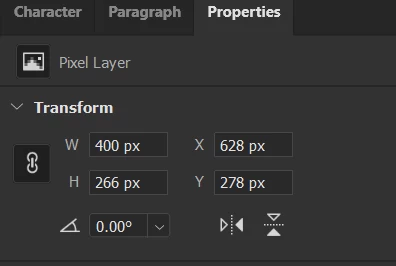
the coordinate is correct; but with one exception, the script is not correct while grabbing the width and height of source layer size, hence the results size also not the same as the source


like you see, the source should be 400x266, but it read 419x285

if this solve then it will be the perfect one! Thank you for your effort until now, really appreciate it!

Stephen Marsh
Community Expert
Community Expert
December 19, 2022

YOU ARE AWESOME! A LIFE SAVER!!... THANKS A LOT FOR THE CORRECT RUNNING SCRIPT, IT DOES HELP ME FOR DAILY WORK... REALLY SIR, YOU ARE AWESOME!!


*sorry for the ALL CAPS text, I do really mean that, consider its a shoutout of my gratitude, Thanks! 😀


@DesainFreak2706 – You're welcome, thank you!


I have now updated the single script using the ALT/OPT key.

Stephen Marsh
Community Expert
Community Expert
December 11, 2022

Update - 17th December 2022:


Here is a simplified 2 part script, replacing all previously posted code in this topic.


Select the source layer and run script 1 of 2:


/*
Resize Target Layer to Source Layer Size - 1 of 2.jsx
https://community.adobe.com/t5/photoshop-ecosystem-discussions/is-it-possible-to-copy-all-width-height-x-and-y-properties/td-p/13410970
v1.1, 17th December 2022, Stephen Marsh
*/

#target photoshop

if (documents.length) {

    // Store the original ruler units and set to px
    var savedRuler = app.preferences.rulerUnits;
    app.preferences.rulerUnits = Units.PIXELS;

    // Set the layer dimension variables
    try {
        var idcopyEffects = stringIDToTypeID("copyEffects");
        executeAction(idcopyEffects, undefined, DialogModes.NO);
        var iddisableLayerStyle = stringIDToTypeID("disableLayerStyle");
        executeAction(iddisableLayerStyle, undefined, DialogModes.NO);
    } catch (error) {
        //alert(error);
    }

    var layerWidth = (activeDocument.activeLayer.bounds[2] - activeDocument.activeLayer.bounds[0]);
    var layerHeight = (activeDocument.activeLayer.bounds[3] - activeDocument.activeLayer.bounds[1]);
    var sourceLayer = activeDocument.activeLayer.id;

    try {
        var idpasteEffects = stringIDToTypeID("pasteEffects");
        executeAction(idpasteEffects, undefined, DialogModes.NO);
    } catch (error) {
        //alert(error);
    }

    // Log text file platform specific LF options
    var os = $.os.toLowerCase().indexOf("mac") >= 0 ? "mac" : "windows";
    if (os === "mac") {
        prefFileOutLF = "Unix"; // Legacy = "Macintosh"
    } else {
        prefFileOutLF = "Windows";
    }
    // Create the preference file
    var prefFileOut = new File('~/Desktop/_Resize_Layer_Preference_File.txt');
    var dateTime = new Date().toLocaleString();
    if (prefFileOut.exists)
        prefFileOut.remove();
    prefFileOut.open("w");
    prefFileOut.encoding = "UTF-8";
    prefFileOut.lineFeed = prefFileOutLF;
    prefFileOut.writeln(dateTime + ", " + "Source Doc: " + activeDocument.name + ", " + "Source Layer: " + activeDocument.activeLayer.name);
    prefFileOut.writeln(layerWidth.value);
    prefFileOut.writeln(layerHeight.value);
    prefFileOut.writeln(sourceLayer);
    prefFileOut.close();

    // Restore the original ruler units
    app.preferences.rulerUnits = savedRuler;

    // End of script notification
    alert("Select the target layer/s and run the script again while holding down the ALT/OPT key to transform.");

} else {
    alert("A document must be open to run this script!");
}


Select one or more target layers and run the 2 of 2 script (a single history step undo is included):


/*
Resize Target Layer to Source Layer Size - 2 of 2.jsx
https://community.adobe.com/t5/photoshop-ecosystem-discussions/is-it-possible-to-copy-all-width-height-x-and-y-properties/td-p/13410970
v1.1, 17th December 2022, Stephen Marsh
*/

#target photoshop

if (documents.length) {

    function main() {

        try {
            var prefFileIn = File('~/Desktop/_Resize_Layer_Preference_File.txt');
        } catch (e) {
            alert(e);
        }

        if (File(prefFileIn).exists && File(prefFileIn).length > 0) {

            // Read the preference file from the user's desktop
            prefFileIn.open('r');
            // Read the 1st line from the log file, a means to an end...
            var logInfo = prefFileIn.readln(1);
            // Read the 2nd line from the log file & convert the string to a number/integer
            var prefFileWidthValue = Math.floor(prefFileIn.readln(2));
            // Read the 3rd line from the log file & convert the string to a number/integer
            var prefFileHeightValue = Math.floor(prefFileIn.readln(3));
            var prefFileSourceLayer = prefFileIn.readln(4);
            prefFileIn.close();

            processSelectedLayers();

            prefFileIn.remove();

            // End of script notification
            //app.refresh();
            alert("Script completed!" + "\r" + "Target layer resized to source layer size/position");


            // Functions

            function processSelectedLayers() {
                var s2t = stringIDToTypeID;
                (r = new ActionReference).putProperty(s2t('property'), p = s2t('targetLayersIDs'));
                r.putEnumerated(s2t('document'), s2t('ordinal'), s2t('targetEnum'));
                var lrs = executeActionGet(r).getList(p),
                    sel = new ActionReference();

                for (var i = 0; i < lrs.count; i++) {
                    sel.putIdentifier(s2t('layer'), p = lrs.getReference(i).getIdentifier(s2t('layerID')));
                    (r = new ActionReference).putIdentifier(s2t('layer'), p);
                    (d = new ActionDescriptor()).putReference(s2t("target"), r);
                    executeAction(s2t('select'), d, DialogModes.NO);

                    // Call the resize layer function
                    resizeLayerFromPrefFile();

                    // Apply any layer styles from source layer to target layer
                    try {
                        var idpasteEffects = stringIDToTypeID("pasteEffects");
                        executeAction(idpasteEffects, undefined, DialogModes.NO);
                    } catch (error) {
                        //alert(error);
                    }
                }
            }

            function resizeLayerFromPrefFile() {
                // Store the original ruler units and set to px
                var savedRuler = app.preferences.rulerUnits;
                app.preferences.rulerUnits = Units.PIXELS;

                // Create variables to hold the target layer dimensions
                var targetLayerWidth = activeDocument.activeLayer.bounds[2] - activeDocument.activeLayer.bounds[0];
                var targetLayerHeight = activeDocument.activeLayer.bounds[3] - activeDocument.activeLayer.bounds[1];

                // Calculate the % adjustment value
                var targetLayerScaleWidth = prefFileWidthValue / targetLayerWidth * 100;
                var targetLayerScaleHeight = prefFileHeightValue / targetLayerHeight * 100;

                // Transform from upper left
                transform(0, 0, targetLayerScaleWidth, targetLayerScaleHeight);

                // Alignment
                targetLayer = activeDocument.activeLayer;
                selectLayerById(prefFileSourceLayer);
                transparencySelection();
                activeDocument.activeLayer = targetLayer;
                align2Selection('AdLf');
                align2Selection('AdTp');
                activeDocument.selection.deselect();

                // Restore the original ruler units
                app.preferences.rulerUnits = savedRuler;


                // Functions

                function transparencySelection() {
                    function s2t(s) {
                        return app.stringIDToTypeID(s);
                    }
                    var descriptor = new ActionDescriptor();
                    var reference = new ActionReference();
                    var reference2 = new ActionReference();
                    reference.putProperty(s2t("channel"), s2t("selection"));
                    descriptor.putReference(s2t("null"), reference);
                    reference2.putEnumerated(s2t("channel"), s2t("channel"), s2t("transparencyEnum"));
                    descriptor.putReference(s2t("to"), reference2);
                    executeAction(s2t("set"), descriptor, DialogModes.NO);
                }

                function align2Selection(method) {
                    var desc = new ActionDescriptor();
                    var ref = new ActionReference();
                    ref.putEnumerated(charIDToTypeID("Lyr "), charIDToTypeID("Ordn"), charIDToTypeID("Trgt"));
                    desc.putReference(charIDToTypeID("null"), ref);
                    desc.putEnumerated(charIDToTypeID("Usng"), charIDToTypeID("ADSt"), charIDToTypeID(method));
                    try {
                        executeAction(charIDToTypeID("Algn"), desc, DialogModes.NO);
                    } catch (e) {}
                }

                function transform(horizontal, vertical, width, height) {
                    function s2t(s) {
                        return app.stringIDToTypeID(s);
                    }
                    var descriptor = new ActionDescriptor();
                    var descriptor2 = new ActionDescriptor();
                    var reference = new ActionReference();
                    reference.putEnumerated(s2t("layer"), s2t("ordinal"), s2t("targetEnum"));
                    descriptor.putReference(s2t("null"), reference);
                    descriptor.putEnumerated(s2t("freeTransformCenterState"), s2t("quadCenterState"), s2t("QCSCorner0"));
                    descriptor2.putUnitDouble(s2t("horizontal"), s2t("pixelsUnit"), horizontal);
                    descriptor2.putUnitDouble(s2t("vertical"), s2t("pixelsUnit"), vertical);
                    descriptor.putObject(s2t("offset"), s2t("offset"), descriptor2);
                    descriptor.putUnitDouble(s2t("width"), s2t("percentUnit"), width);
                    descriptor.putUnitDouble(s2t("height"), s2t("percentUnit"), height);
                    descriptor.putEnumerated(s2t("interfaceIconFrameDimmed"), s2t("interpolationType"), s2t("bicubicAutomatic"));
                    executeAction(s2t("transform"), descriptor, DialogModes.NO);
                }

                function selectLayerById(id)
                /* https://graphicdesign.stackexchange.com/questions/130739/photoshop-scripting-applying-changes-only-to-selected-artboards */
                {
                    var desc1 = new ActionDescriptor();
                    var ref1 = new ActionReference();
                    ref1.putIdentifier(charIDToTypeID('Lyr '), id);
                    desc1.putReference(charIDToTypeID('null'), ref1);
                    executeAction(charIDToTypeID('slct'), desc1, DialogModes.NO);
                }

            }


        } else {
            app.beep();
            alert('There is no valid file named "_Resize_Layer_Preference_File.txt" on the desktop!');
        }
    }

    activeDocument.suspendHistory("Resize selected layers script", "main()");

} else {
    alert("A document must be open to run this script!");
}


Stephen Marsh
Community Expert
Community Expert
December 11, 2022

@DesainFreak2706 – I'm not sure about the properties panel, it seems to leverage the standard transform command in the background, just slightly differently than when using the transform command. Also keep in mind that as soon as one enters a value and tabs to the next field, the value is automatically applied before the next field is entered. The transform command allows both fields to be adjusted before the transform is committed/applied.


The standard transform toolbar command works in %, so you either work out the % or use other tricks to work in px values.


The following topic contains scripts to automatically resize layer "B" using the size of layer "A":


DesainFreak2706
Participating Frequently
December 11, 2022

Thank you for the reply


your latest script that I have tried does generate files with coordinate,

this is the results when I run the "Resize Layer from Source - Script 1 of 2.jsx" while select the layer that i want to copy.


But when I run the "Resize Layer from Source - Script 2 of 2.jsx", it delete the target layer.


-------

And then I find the other script you've made from the topic that you gave to me and it does success resize layer B based on layer A size, but the layer B coordinate does not same as layer A coordinate


am I doing something wrong? please advise

Stephen Marsh
Community Expert
Community Expert
December 11, 2022

I'll post a  new, simplified version (a lot was probably going on that may or may not have any relevance to your situation). The properties panel resizes from a fixed upper left reference point, while transform allows nine reference points.