
Is it possible to print a grayscale image with a Gamma closer to 1.0?
I print digital negatives from Photoshop. A digital negative is a grayscale image printed on clear film that is used for contact printing in the darkroom. The document profile is Adobe RGB, but the components R, G, and B are all equal.
I allow the printer (an Epson P700) to manage color. When I choose a Media Type in the print dialog, I choose one of the photo papers, since there is no such media type as "clear film." Since Photoshop thinks it is printing on paper, it lays down ink in such a way that the print, will match the image on my screen when viewed by a human observer in reflected light, which is to say it applies some kind of gamma correction. As a result, print density increase rapidly as tone approach RGB=0 (K-100%). In the following plot, the X axis is digital grayscale tone and the Y axis is log density.
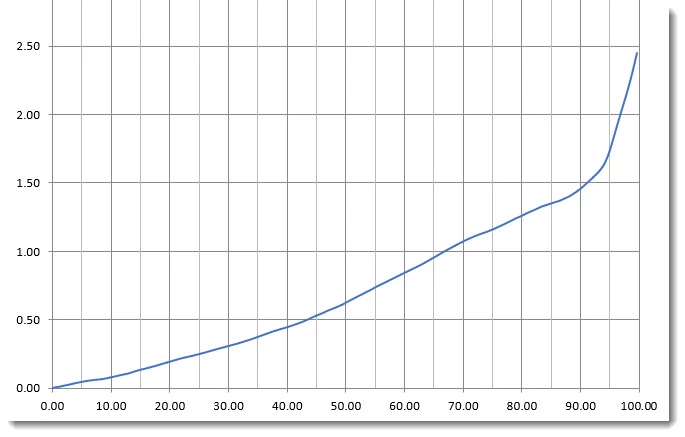
For digital negatives, these rapidly increasing densities near RGB=0 are a problem. A more linear curve would be desirable. Is there is anything I can do to make the curve more linear? A gamma correction of 1.0 would be ideal, since it would produce a negative with linear tones. Or perhaps the solution is to let Photosop manage color and use some kind of output ICC profile that would straighten the curve. If so, can you suggest how to either find or make such a profile?
 AdChoices