
Inspiring
October 16, 2022
Question

Is there a brush that will add either a wet look or some shine to a still life image?
  • October 16, 2022
  • 6 replies
  • 2392 views

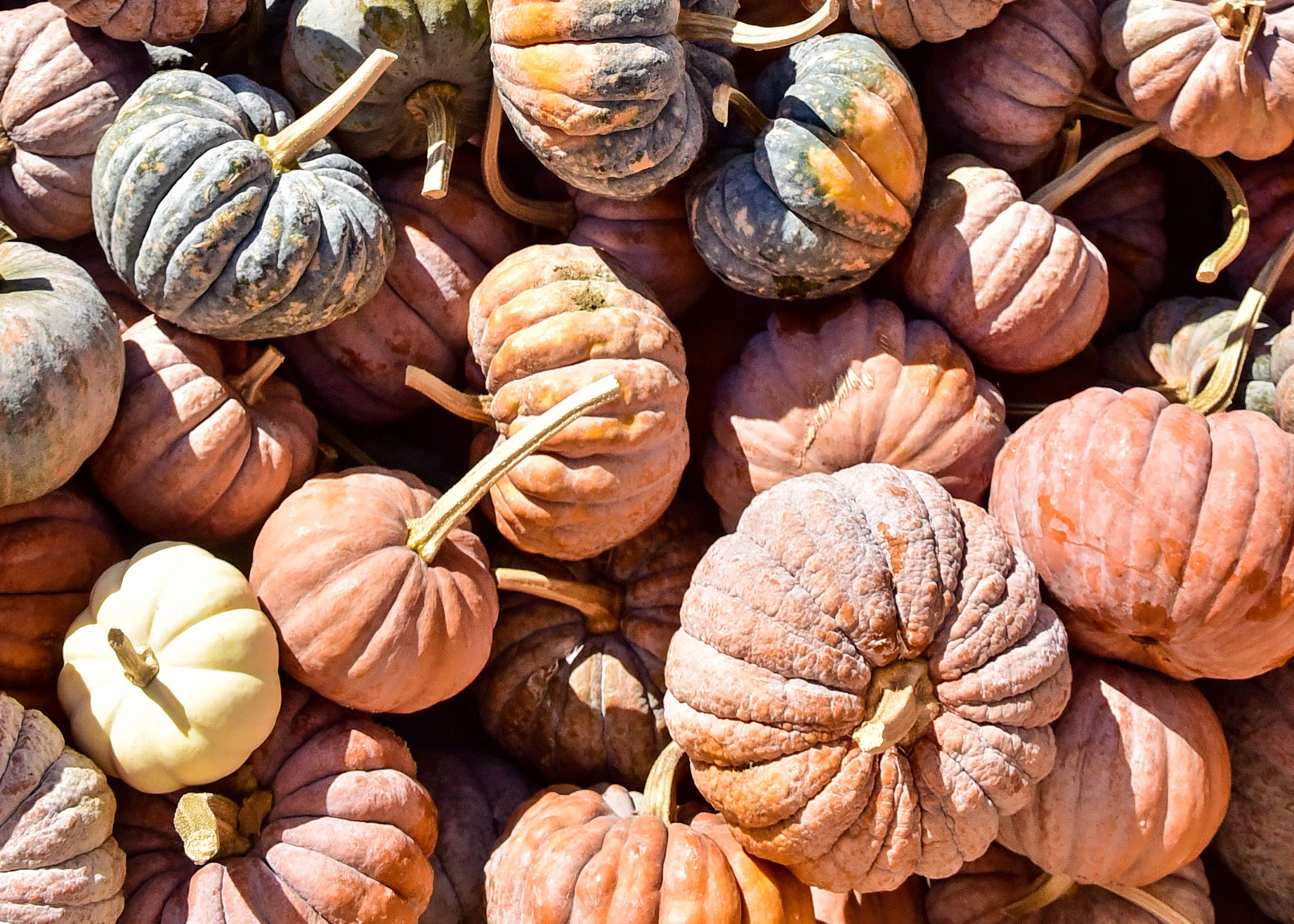
I have some photos of pumpkins/gourds that appear very dry.  I would like to add a bit of either a wet look or some shine to some of the pumpkins.  Is there a brush or some other means to achieve this? Thank you.

This topic has been closed for replies.

6 replies

PECourtejoie
Community Expert
Community Expert
October 17, 2022

Hello, With the correct blending modes, the plastic wrap filter can give some glossiness.

Likewise, an emboss layer style with some texture, and shadow set to a light color, set to screen or a lightening blending mode.

Inspiring
October 17, 2022

I appreciate your time and help.  I am definitely a novice with regard to Photoshop and I am currently enrolled in a Photoshop class and am seeing how powerful Photoshop is.  I am intrigued by the suggestion with the suggestion to 'set to screen' ?  I will have to see how that works.  Again, many thanks for your time, CP


PECourtejoie
Community Expert
Community Expert
October 17, 2022

select the portion that you want to glossify with any selection tool.

Jump it to its own layer: CTRL+J (CMD+J on a Mac)

Click the FX button in the bottom of the layers panel, and select bevel and emboss. For the shadow mode, select screen of Soft Light, and the color to white.

I suggest also to play with the texture setting, and try different textures.

You can then lower the opacity of the effect.

As an alternative, you can also paint on a new layer with any color, add the FX, change the settings, and, in the Layers panel, Lower the FILL% to 0: that way , the color disappears, but not the effect, and you can paint with it.


For the plastic wrap filter, same thing selection, run the effect, then go to Edit>Fade and change the blending mode to scren, or one of the lighting modes.

Mylenium
Legend
October 17, 2022

Wettness is defined by increased reflectivity and colors getting darker due to how the light gets absorbed rather than reflected. Also this perception is driven by the surroundings. A pumpkin on "light" soil will always look more dry than on "heavy", dark soil. So you may have to apply some sort of high-pass process to sharpen the highlights and/ or darken and desaturate the colors somewhere, though without at least a part of the image or a small version to have a look it will be near impossible to advise on the specifics.


Mylenium

Inspiring
October 17, 2022

Many thanks for your input!  I did post a small section of one of the photos that I am working with---in case that might show better what I am dealing with.  I will try your suggestions----again, appreciate your help, CP

c.pfaffenbichler
Community Expert
Community Expert
October 17, 2022

Please post (a lores or a part of) the image. 

Inspiring
October 17, 2022

Thank you----I will add a photo of part of one of the images.


Leslie Moak Murray
Community Expert
Community Expert
October 17, 2022

Without seeing the image, I'd say maybe the Dodge Tool can help.

Inspiring
October 17, 2022

I just posted an image of a section of the file I am trying to work with.  I appreciate your time and advice---and will attempt some adjustments using the Dodge Tool.  Thank you again, CP

c.pfaffenbichler
Community Expert
Community Expert
October 17, 2022

I can’t find the image. 

Did you post in on the Forum in a browser? Email-replies don’t work … 

Chuck Uebele
Community Expert
Community Expert
October 17, 2022

On top of what Bojan said, you need to attempt to change the quality of light on the pumpkin. Wet surfaces have a lot of contrast in the specular highlights that act as virtual mirrors. Dry pumpkins will pretty much show just diffused highlights. You could try adding a light gray layer above the pumpkin, set the blend mode to screen, add a layer mask, filled with black, and then take a low opacity  brush and paint in harsher specular highlights. 

Inspiring
October 17, 2022

Thank you very much for these hints.  As I am definitely still learning the power of Photoshop, I will try to work with a mask or two!  Many thanks, CP


Bojan Živković11378569
Community Expert
Community Expert
October 17, 2022

"I would like to add a bit of either a wet look or some shine to some of the pumpkins. "


If that means to change some colors only then use Hue/Saturation adjustments layer. Pick which colors you want to change from the second drop down list from the top then drag Hue slider and optionaly Saturation and Lightness, At the bottom of the dialogue you can refine which colors to be affected.

You can also control visibility of color changes using Layer Mask attached to Hue/Saturation adjustments layer.

Inspiring
October 17, 2022

Thank you so much for your help!  I am definitely on the beginner side of Photoshop.  I will try to use your tips for working with an adjustment layer.  I appreciate your time and help, CP