blank308
Participant
March 24, 2023
Answered

Is there a way to alert when there's modified content like in InDesign?

  • March 24, 2023
  • 2 replies
  • 473 views

I'm using Photoshop 2021 and perhaps this was added into a newer version of Photoshop so I apologize, in advance, if that's the case but I do not believe that to be the case.


Photoshop gives you an alert when it "cannot locate linked assets" but doesn't alert you when there are modified linked assets. I know that it adds a warning icon on the layer but it would be far more helpful to warn after opening a document and give a list of all the layers that were modified as well. InDesign warns you when there are modified files, so it doesn't make sense that Photoshop wouldn't. Am I missing something? Is it a preference that I'm unaware of? Is there a script I can use? Is it in a newer version?

This topic has been closed for replies.
Correct answer jazz-y

In InDesing and Illustrator, linked files are embedded at the document level. In Photoshop, the nesting system is much more complicated - we can create a smart object inside which there will be a linked file, inside this linked file there will be another smart object with linked files inside, and so on. That is, linked objects in Photoshop are rather not part of the document, but part of the layer.

Try this script. It checks for files that need to be updated at the first level (without going deep into the linked files and smart objects themselves):
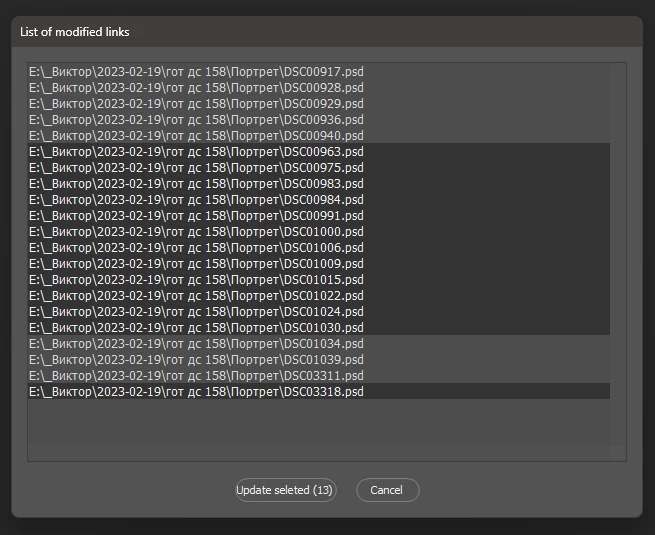
 

/**
 * Is there a way to alert when there's modified content like in InDesign? 
 * https://community.adobe.com/t5/photoshop-ecosystem-discussions/is-there-a-way-to-alert-when-there-s-modified-content-like-in-indesign/td-p/13678234
 */
#target photoshop
var apl = new AM('application'),
    doc = new AM('document'),
    lr = new AM('layer');
if (apl.getProperty('numberOfDocuments')) {
    if (doc.hasProperty('numberOfLayers')) {
        var len = doc.getProperty('numberOfLayers');
        linkedObjects = [];
        for (var i = 1; i <= len; i++) {
            if (lr.getProperty('layerSection', i, true).value == 'layerSectionEnd') continue;
            if (lr.getProperty('layerKind', i, true) == 5) {
                var smartObject = doc.descToObject(lr.getProperty('smartObject', i, true).value)
                if (smartObject.linked) {
                    if (smartObject.linkChanged) {
                        var cur =
                        {
                            layerID: lr.getProperty('layerID', i, true),
                            link: !(smartObject.link instanceof File) ? smartObject.fileReference : File(smartObject.link)
                        }
                        var copyOfLayer = false;
                        for (var x = 0; x < linkedObjects.length; x++) {
                            if (decodeURI(cur.link).toUpperCase() == decodeURI(linkedObjects[x].link).toUpperCase()) {
                                copyOfLayer = true
                                break;
                            }
                        }
                        if (!copyOfLayer) linkedObjects.push(cur)
                    }
                }
            }
        }
        if (linkedObjects.length) showDialog(linkedObjects)
    }
}
function showDialog(fileList) {
    var w = new Window("dialog {text: 'List of modified links'}"),
        l = w.add("listbox", [0, 0, 600, 400], undefined, { multiselect: true }),
        gButtons = w.add("group"),
        bnOk = gButtons.add("button {text:'Update all files'}", [0, 0, 150, -1], undefined, { name: "ok" }),
        bnCancel = gButtons.add("button {text:'Cancel'}", undefined, undefined, { name: "cancel" });
    l.graphics.font = "dialog:12";
    bnOk.onClick = function () {
        w.close();
        var ids = [];
        if (l.selection != null) {
            for (var i = 0; i < l.items.length; i++)
                if (l.items[i].selected) ids.push(fileList[i].layerID)
        }
        doc.updateLinks(ids)
    }
    l.onClick = function () {
        bnOk.text = 'Update ' + (l.selection == null ? 'all' : 'seleted (' + l.selection.length + ')')
    }
    w.onShow = function () {
        for (var i = 0; i < fileList.length; i++) l.add('item', fileList[i].link instanceof File ? fileList[i].link.fsName : fileList[i].link)
    }
    w.show()
}
function AM(target) {
    var s2t = stringIDToTypeID,
        t2s = typeIDToStringID;
    target = target ? s2t(target) : null;
    this.getProperty = function (property, id, idxMode) {
        property = s2t(property);
        (r = new ActionReference()).putProperty(s2t('property'), property);
        id != undefined ? (idxMode ? r.putIndex(target, id) : r.putIdentifier(target, id)) :
            r.putEnumerated(target, s2t('ordinal'), s2t('targetEnum'));
        return getDescValue(executeActionGet(r), property)
    }
    this.hasProperty = function (property, id, idxMode) {
        property = s2t(property);
        (r = new ActionReference()).putProperty(s2t('property'), property);
        id ? (idxMode ? r.putIndex(target, id) : r.putIdentifier(target, id))
            : r.putEnumerated(target, s2t('ordinal'), s2t('targetEnum'));
        try { return executeActionGet(r).hasKey(property) } catch (e) { return false }
    }
    this.descToObject = function (d, o) {
        o = o ? o : {}
        for (var i = 0; i < d.count; i++) {
            var k = d.getKey(i)
            o[t2s(k)] = getDescValue(d, k)
        }
        return o
    }
    this.selectLayerByIDList = function (IDList) {
        var ref = new ActionReference()
        for (var i = 0; i < IDList.length; i++) {
            ref.putIdentifier(s2t("layer"), IDList[i])
        }
        var desc = new ActionDescriptor()
        desc.putReference(s2t("target"), ref)
        desc.putBoolean(s2t("makeVisible"), false)
        executeAction(s2t("select"), desc, DialogModes.NO)
    }
    this.updateLinks = function (ids) {
        if (ids.length) {
            for (var i = 0; i < ids.length; i++) {
                var r = new ActionReference();
                r.putIdentifier(s2t('layer'), ids[i]);
                (d = new ActionDescriptor()).putReference(s2t('null'), r);
                executeAction(s2t('select'), d, DialogModes.NO);
                executeAction(s2t("placedLayerUpdateModified"), d, DialogModes.NO);
            }
        } else {
            executeAction(s2t("placedLayerUpdateAllModified"), new ActionDescriptor(), DialogModes.NO);
        }
    }
    function getDescValue(d, p) {
        switch (d.getType(p)) {
            case DescValueType.OBJECTTYPE: return { type: t2s(d.getObjectType(p)), value: d.getObjectValue(p) };
            case DescValueType.LISTTYPE: return d.getList(p);
            case DescValueType.REFERENCETYPE: return d.getReference(p);
            case DescValueType.BOOLEANTYPE: return d.getBoolean(p);
            case DescValueType.STRINGTYPE: return d.getString(p);
            case DescValueType.INTEGERTYPE: return d.getInteger(p);
            case DescValueType.LARGEINTEGERTYPE: return d.getLargeInteger(p);
            case DescValueType.DOUBLETYPE: return d.getDouble(p);
            case DescValueType.ALIASTYPE: return d.getPath(p);
            case DescValueType.CLASSTYPE: return d.getClass(p);
            case DescValueType.UNITDOUBLE: return (d.getUnitDoubleValue(p));
            case DescValueType.ENUMERATEDTYPE: return { type: t2s(d.getEnumerationType(p)), value: t2s(d.getEnumerationValue(p)) };
            default: break;
        };
    }
}


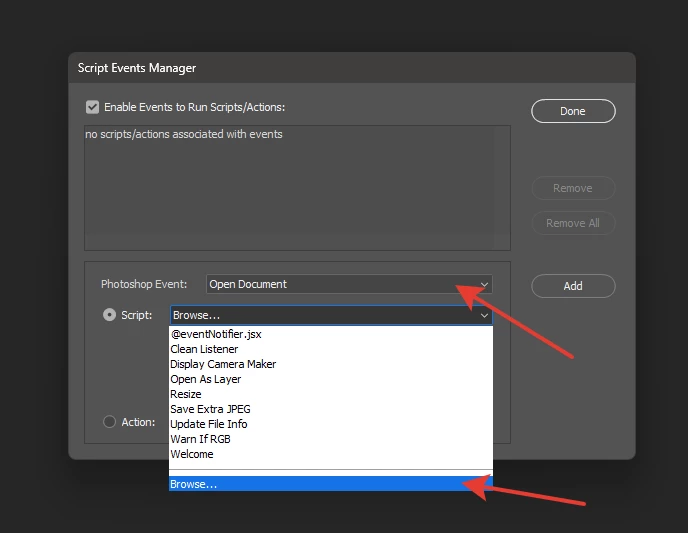
* using the File -> Scripts -> Script event manager you can add this script to the "open document" event (and it will check the content every time any document is opened)

2 replies

jazz-yCorrect answer
Legend
March 25, 2023

In InDesing and Illustrator, linked files are embedded at the document level. In Photoshop, the nesting system is much more complicated - we can create a smart object inside which there will be a linked file, inside this linked file there will be another smart object with linked files inside, and so on. That is, linked objects in Photoshop are rather not part of the document, but part of the layer.

Try this script. It checks for files that need to be updated at the first level (without going deep into the linked files and smart objects themselves):


/**
 * Is there a way to alert when there's modified content like in InDesign? 
 * https://community.adobe.com/t5/photoshop-ecosystem-discussions/is-there-a-way-to-alert-when-there-s-modified-content-like-in-indesign/td-p/13678234
 */
#target photoshop
var apl = new AM('application'),
    doc = new AM('document'),
    lr = new AM('layer');
if (apl.getProperty('numberOfDocuments')) {
    if (doc.hasProperty('numberOfLayers')) {
        var len = doc.getProperty('numberOfLayers');
        linkedObjects = [];
        for (var i = 1; i <= len; i++) {
            if (lr.getProperty('layerSection', i, true).value == 'layerSectionEnd') continue;
            if (lr.getProperty('layerKind', i, true) == 5) {
                var smartObject = doc.descToObject(lr.getProperty('smartObject', i, true).value)
                if (smartObject.linked) {
                    if (smartObject.linkChanged) {
                        var cur =
                        {
                            layerID: lr.getProperty('layerID', i, true),
                            link: !(smartObject.link instanceof File) ? smartObject.fileReference : File(smartObject.link)
                        }
                        var copyOfLayer = false;
                        for (var x = 0; x < linkedObjects.length; x++) {
                            if (decodeURI(cur.link).toUpperCase() == decodeURI(linkedObjects[x].link).toUpperCase()) {
                                copyOfLayer = true
                                break;
                            }
                        }
                        if (!copyOfLayer) linkedObjects.push(cur)
                    }
                }
            }
        }
        if (linkedObjects.length) showDialog(linkedObjects)
    }
}
function showDialog(fileList) {
    var w = new Window("dialog {text: 'List of modified links'}"),
        l = w.add("listbox", [0, 0, 600, 400], undefined, { multiselect: true }),
        gButtons = w.add("group"),
        bnOk = gButtons.add("button {text:'Update all files'}", [0, 0, 150, -1], undefined, { name: "ok" }),
        bnCancel = gButtons.add("button {text:'Cancel'}", undefined, undefined, { name: "cancel" });
    l.graphics.font = "dialog:12";
    bnOk.onClick = function () {
        w.close();
        var ids = [];
        if (l.selection != null) {
            for (var i = 0; i < l.items.length; i++)
                if (l.items[i].selected) ids.push(fileList[i].layerID)
        }
        doc.updateLinks(ids)
    }
    l.onClick = function () {
        bnOk.text = 'Update ' + (l.selection == null ? 'all' : 'seleted (' + l.selection.length + ')')
    }
    w.onShow = function () {
        for (var i = 0; i < fileList.length; i++) l.add('item', fileList[i].link instanceof File ? fileList[i].link.fsName : fileList[i].link)
    }
    w.show()
}
function AM(target) {
    var s2t = stringIDToTypeID,
        t2s = typeIDToStringID;
    target = target ? s2t(target) : null;
    this.getProperty = function (property, id, idxMode) {
        property = s2t(property);
        (r = new ActionReference()).putProperty(s2t('property'), property);
        id != undefined ? (idxMode ? r.putIndex(target, id) : r.putIdentifier(target, id)) :
            r.putEnumerated(target, s2t('ordinal'), s2t('targetEnum'));
        return getDescValue(executeActionGet(r), property)
    }
    this.hasProperty = function (property, id, idxMode) {
        property = s2t(property);
        (r = new ActionReference()).putProperty(s2t('property'), property);
        id ? (idxMode ? r.putIndex(target, id) : r.putIdentifier(target, id))
            : r.putEnumerated(target, s2t('ordinal'), s2t('targetEnum'));
        try { return executeActionGet(r).hasKey(property) } catch (e) { return false }
    }
    this.descToObject = function (d, o) {
        o = o ? o : {}
        for (var i = 0; i < d.count; i++) {
            var k = d.getKey(i)
            o[t2s(k)] = getDescValue(d, k)
        }
        return o
    }
    this.selectLayerByIDList = function (IDList) {
        var ref = new ActionReference()
        for (var i = 0; i < IDList.length; i++) {
            ref.putIdentifier(s2t("layer"), IDList[i])
        }
        var desc = new ActionDescriptor()
        desc.putReference(s2t("target"), ref)
        desc.putBoolean(s2t("makeVisible"), false)
        executeAction(s2t("select"), desc, DialogModes.NO)
    }
    this.updateLinks = function (ids) {
        if (ids.length) {
            for (var i = 0; i < ids.length; i++) {
                var r = new ActionReference();
                r.putIdentifier(s2t('layer'), ids[i]);
                (d = new ActionDescriptor()).putReference(s2t('null'), r);
                executeAction(s2t('select'), d, DialogModes.NO);
                executeAction(s2t("placedLayerUpdateModified"), d, DialogModes.NO);
            }
        } else {
            executeAction(s2t("placedLayerUpdateAllModified"), new ActionDescriptor(), DialogModes.NO);
        }
    }
    function getDescValue(d, p) {
        switch (d.getType(p)) {
            case DescValueType.OBJECTTYPE: return { type: t2s(d.getObjectType(p)), value: d.getObjectValue(p) };
            case DescValueType.LISTTYPE: return d.getList(p);
            case DescValueType.REFERENCETYPE: return d.getReference(p);
            case DescValueType.BOOLEANTYPE: return d.getBoolean(p);
            case DescValueType.STRINGTYPE: return d.getString(p);
            case DescValueType.INTEGERTYPE: return d.getInteger(p);
            case DescValueType.LARGEINTEGERTYPE: return d.getLargeInteger(p);
            case DescValueType.DOUBLETYPE: return d.getDouble(p);
            case DescValueType.ALIASTYPE: return d.getPath(p);
            case DescValueType.CLASSTYPE: return d.getClass(p);
            case DescValueType.UNITDOUBLE: return (d.getUnitDoubleValue(p));
            case DescValueType.ENUMERATEDTYPE: return { type: t2s(d.getEnumerationType(p)), value: t2s(d.getEnumerationValue(p)) };
            default: break;
        };
    }
}


* using the File -> Scripts -> Script event manager you can add this script to the "open document" event (and it will check the content every time any document is opened)

blank308
blank308Author
Participant
March 25, 2023

@jazz-y This is exactly what I was looking for. Thank you so much. I've implemented it and it works perfectly.

I really only wanted it to warn about the first level modified linked layers anyway, while it would be nice for it to warn about the nested ones, it's not at all necessary for my purposes and your explanation makes a lot of sense, thanks again!

jane-e
Community Expert
Community Expert
March 24, 2023

@blank308


Both InDesign and Illustrator have a Links panel. Photoshop does not and has nothing equivalent.


Jane