Participant
January 8, 2017
Answered

Is there a way to make Photoshop show out coordinates of certain pixels?

  • January 8, 2017
  • 3 replies
  • 6364 views

Hey, I need to be able to find the start and end coordinates of a line of pixels. Is there a way to select an entire pixel and find out it's coordinates? I can only seem to find the coordinates of a single point, which selects at the start or end of the pixel, but not the pixel itself. (It gives the correct coordinate, but it'd be easier to set my cursor to lock onto pixels and move in pixels.) Thank you

    This topic has been closed for replies.
    Correct answer Trevor.Dennis

    A pixel is essentially the same thing as a single point in Photoshop.  If you zoom in far enough to see the pixel grid, and select a brush with a square brush preset set to 1 pixel, then although you appear to be able to hover between pixels, that is an illusion.

    As you move the cursor — with the Info panel close to the cursor — the coordinates will snap to the nearest whole pixel.  If you try to stamp down with your 1 pixel brush, it will always be placed exactly on the nearest whole pixel.  What else can it be?

    With lighter tones it can be difficult to see the pixel grid.  You can use the same work around that we use for work paths...  Place a layer filled with black at the top of the stack, and set its opacity to 50% (or there abouts)
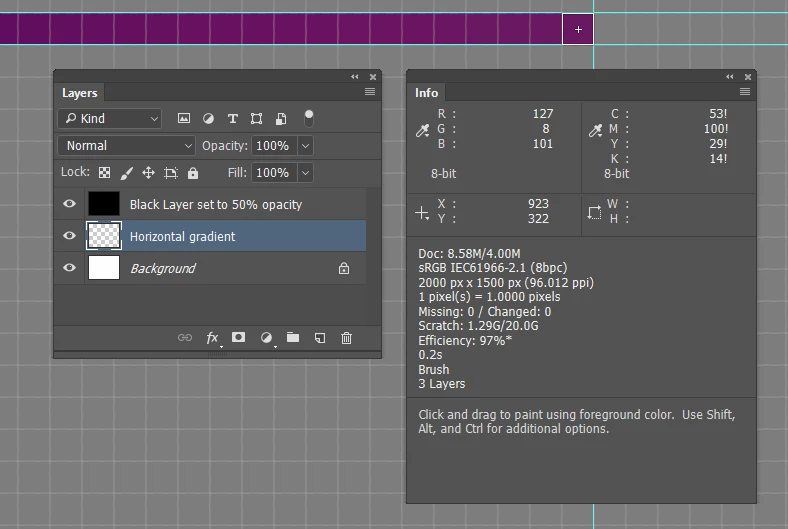
    Incidentally, there is nothing the regular posters to this forum like more than a question they don't know the answer to, because we can then try _very_ hard to work out the answer.  There's kudos to be the first with the answer (unspoken but I am sure we are quietly pleased).  But most importantly, we get to know a little bit more about the program we love.  You'll not find another group of people who will try harder to answer even the most obscure and difficult questions.

    [EDIT]  I meant to say that if you copy your selected line of pixels to a new layer, then guides will snap top the end of that line when dragged out from the rulers.  Make sure your rulers are set to Pixels, and the job becomes super easy.

    3 replies

    JJMack
    Community Expert
    Community Expert
    January 9, 2017

    That answer is not correct! It shows one pixel not the first and last pixel coordinates....  a script is required....

    Line length can also be calculated  Square root of (width squared + height squared).

    Here is a script that will calulate Line length  and show the start and end coordinates.

    // enable double-clicking from Mac Finder or Windows Explorer

    // enable double-clicking from Mac Finder or Windows Explorer

    #target photoshop // this command only works in Photoshop CS2 and higher

    // bring application forward for double-click events

    app.bringToFront();

    // Save the current preferences

    var startRulerUnits = app.preferences.rulerUnits;

    // Set Photoshop to use pixels

    app.preferences.rulerUnits = Units.PIXELS;

    try{

      var LB = activeDocument.activeLayer.bounds;

      var LWidth = (LB[2].value) - (LB[0].value);

      var LHeight = (LB[3].value) - (LB[1].value);

      var LLenght = Math.round(Math.sqrt(LWidth*LWidth+LHeight*LHeight));

      /*

      MarkX((LB[0].value + LWidth/2));

      MarkX(LB[0].value);

      MarkX(LB[2].value);

      MarkY((LB[1].value + LHeight/2));

      MarkY(LB[1].value)

      MarkY(LB[3].value)

      */

      alert("'" + activeDocument.activeLayer.name + "' Layer Bounds\nTop Left " +  LB[0].value + "X," +  LB[1].value + "Y     Bottom Right " 

      +  LB[2].value + "X," +  LB[3].value + "Y"

        + "\nLine Length " + LLenght + "px   Width " +  LWidth + "px   Height " + LHeight +"px"

      /*

      + "\nLayer center relative to canvas " + (LB[0].value + LWidth/2) + "X," +  (LB[1].value + LHeight/2) +"Y"

      */

      );

    }

    catch(e){alert("Requires a layer targered");}

    // Return the app preferences

    app.preferences.rulerUnits = startRulerUnits;

    function MarkX(x) {

    // =======================================================

    var idMk = charIDToTypeID( "Mk  " );

        var desc61 = new ActionDescriptor();

        var idNw = charIDToTypeID( "Nw  " );

            var desc62 = new ActionDescriptor();

            var idPstn = charIDToTypeID( "Pstn" );

            var idPxl = charIDToTypeID( "#Pxl" );

            desc62.putUnitDouble( idPstn, idPxl, x);

            var idOrnt = charIDToTypeID( "Ornt" );

            var idOrnt = charIDToTypeID( "Ornt" );

            var idVrtc = charIDToTypeID( "Vrtc" );

            desc62.putEnumerated( idOrnt, idOrnt, idVrtc );

        var idGd = charIDToTypeID( "Gd  " );

        desc61.putObject( idNw, idGd, desc62 );

    executeAction( idMk, desc61, DialogModes.NO );

    }

    function MarkY(y) {

    // =======================================================

    var idMk = charIDToTypeID( "Mk  " );

        var desc63 = new ActionDescriptor();

        var idNw = charIDToTypeID( "Nw  " );

            var desc64 = new ActionDescriptor();

            var idPstn = charIDToTypeID( "Pstn" );

            var idPxl = charIDToTypeID( "#Pxl" );

            desc64.putUnitDouble( idPstn, idPxl, y );

            var idOrnt = charIDToTypeID( "Ornt" );

            var idOrnt = charIDToTypeID( "Ornt" );

            var idHrzn = charIDToTypeID( "Hrzn" );

            desc64.putEnumerated( idOrnt, idOrnt, idHrzn );

        var idGd = charIDToTypeID( "Gd  " );

        desc63.putObject( idNw, idGd, desc64 );

    executeAction( idMk, desc63, DialogModes.NO );

    }

    JJMack
    Participant
    April 20, 2020

    CAN I USE THIS SCRIPT ON PHOTOSHOP 20019/2020?

    JJMack
    Community Expert
    Community Expert
    April 20, 2020

    It should work in all version of Photoshop if that Photoshop version scriptingsupport plug-in is in good working order.

    JJMack
    Trevor.Dennis
    Community Expert
    Trevor.DennisCommunity ExpertCorrect answer
    Community Expert
    January 9, 2017

    A pixel is essentially the same thing as a single point in Photoshop.  If you zoom in far enough to see the pixel grid, and select a brush with a square brush preset set to 1 pixel, then although you appear to be able to hover between pixels, that is an illusion.

    As you move the cursor — with the Info panel close to the cursor — the coordinates will snap to the nearest whole pixel.  If you try to stamp down with your 1 pixel brush, it will always be placed exactly on the nearest whole pixel.  What else can it be?

    With lighter tones it can be difficult to see the pixel grid.  You can use the same work around that we use for work paths...  Place a layer filled with black at the top of the stack, and set its opacity to 50% (or there abouts)

    Incidentally, there is nothing the regular posters to this forum like more than a question they don't know the answer to, because we can then try _very_ hard to work out the answer.  There's kudos to be the first with the answer (unspoken but I am sure we are quietly pleased).  But most importantly, we get to know a little bit more about the program we love.  You'll not find another group of people who will try harder to answer even the most obscure and difficult questions.

    [EDIT]  I meant to say that if you copy your selected line of pixels to a new layer, then guides will snap top the end of that line when dragged out from the rulers.  Make sure your rulers are set to Pixels, and the job becomes super easy.

    JJMack
    Community Expert
    Community Expert
    January 8, 2017

    You lost me with the first sentence. "If I'm folding an equilateral triangle that's 100px wide, that means I simply fold 100 pages in 2 spots per page."

    I know an equilateral triangle has three equal length sides and three equal angles each 120 degrees. I assume you mean the base of the triangle is 100px as the width.  You gave no information about aspect ration of a page or it dimensions.  So I have no ideal if sad page could be folder into a 100Px  equilateral triangle with two folds.  I assume your books have 100 pages.

    JJMack
    postrophe
    Inspiring
    January 9, 2017

    Hi

    Seem the Op changed it's text/explanation. But, I still dont understand the goal. If you draw a 1px line, you can get the X/Y coordinates.

    [Edit] The OP posted a new "text/explanation".

    Pierre

    postrophe
    Inspiring
    January 10, 2017

    If you select 5 pixels in a line going down, I'm trying to figure out if there's a way in one single place to view both the x and y coordinates of the first pixel and the last one in the selection. For example, if the 5 vertical pixels selected are in the top left of the canvas, the Window->Info toolbox simply says  X:0, y:4, and it says the selection is 5 pixels long. But I'm trying to figure out if there's a way to see that the selection is X:0, y:0 - X:0, y:4, all in one screenshottable spot, rather than mousing over the first pixel for that coordinate and having to mouse over the 5th pixel for the second one. It seems like a tiny thing but when you need to convert specific measurements to paper hundreds of times, it's a lot more efficient

    And the original post was edited because it's difficult to fully explain a craft that I'm certain nobody on these forums does or cares about enough to learn about to simply answer a question Basically, even if I could somehow have photoshop spit out x and y axis's for each page folded, once there's overlappings in letters that require you to stagger page folds, the numbers would be irrelevant. That's why I've settled on my new dilemma.


    Hi

    Cant't the "Ruler Tool" help with this ?

    Pierre