


- Home
- Photoshop ecosystem
- Discussions
- Re: Is there a way to return to a previously activ...
- Re: Is there a way to return to a previously activ...

Copy link to clipboard
Copied
Hi,
I encournter this problem quite a bit in my work flow. I'm working on say layer 126 in a large Photoshop file and I use an action to switch an overlay layer off (for example layer 1) then I go back to wanting to work on layer 126 but Photoshop has skiped to the layer 1 (the overlay) to run the action. I then have to scroll down back to layer 126 to continue working. Obviously this is no real hardship, but it would be great if there was a keyboard command or similar to return to the previously active layer.
I hope I've explained my self clearly enough. If anyone can off any advice that would be fantastic.
Kind Regards
Ian


 1 Correct answer


@mrmurray wrote:
Thanks again for your help with this. Look forward to having a tinker with the helper script to see what I can do.
Much appricated.
Kind Regards
Ian
Hi Ian, there should be no need to tinker... you can just use it as is and enjoy it! You can record each script as a separate step into your action, or you could set a custom keyboard shortcut against each script for manual use.
To save and install or run:
- Copy the code text to the clipboard
- Open a new blank fil


Explore related tutorials & articles
 10
Replies
10
10
Replies
10

Copy link to clipboard
Copied
This could be scripted. The first "helper script" to store the current layer and a second one to read and select the stored layer could be recorded into the action steps or have keyboard shortcuts applied.
Copy link to clipboard
Copied
Thanks for your reply Stephen, I'm a complete novice when it comes to scrpiting so I'll have to look into it. Can I ask what the "helper script" is? Cheers Ian
Copy link to clipboard
Copied
I'll post the code tomorrow Ian, I'm off to bed now.
A "helper script" is just a script, however, the term is loosely applied to a script that is intended to be used in an action as a discrete "step" to provide functionality beyond what actions can offer. This is opposed to a full script that would be used instead of an action. Scripting is beyond many Photoshop users, however, actions are quite accessible, so little "helper scripts" can make a big difference. A perfect example is Automate > Fit Image (which goes further than standard scripting as it is a "plug-in" script allowing the parameters to be recorded into an action just like a standard action step).
Copy link to clipboard
Copied
Thanks again for your help with this. Look forward to having a tinker with the helper script to see what I can do.
Much appricated.
Kind Regards
Ian
Copy link to clipboard
Copied
@mrmurray wrote:
Thanks again for your help with this. Look forward to having a tinker with the helper script to see what I can do.
Much appricated.
Kind Regards
Ian
Hi Ian, there should be no need to tinker... you can just use it as is and enjoy it! You can record each script as a separate step into your action, or you could set a custom keyboard shortcut against each script for manual use.
To save and install or run:
- Copy the code text to the clipboard
- Open a new blank file in a plain-text editor (not word-processor)
- Paste the code in
- Save the text file extension as .txt
- Rename the file extension from .txt to .jsx (ensure that there is no double extension)
- Install or browse to the .jsx file to run
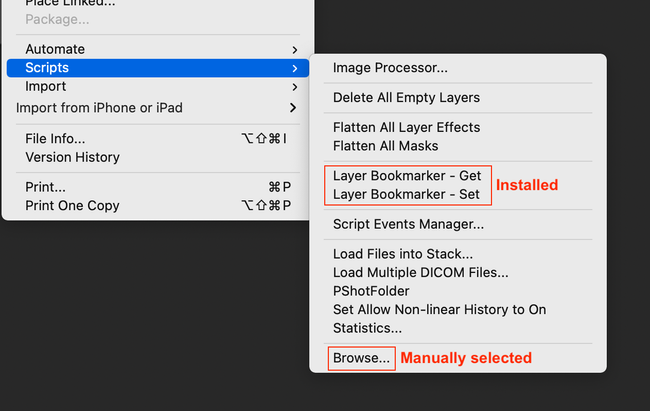
Step 1: Bookmark the active layer
/*
Layer Bookmarker - Set.jsx
Info: Script 1 of 2, sets the layer bookmark (step 1)
Stephen Marsh: Version 1.1, 6th March 2022
https://community.adobe.com/t5/photoshop-ecosystem-discussions/is-there-a-way-to-return-to-a-previously-active-layer-in-photoshop/td-p/12791534
*/

/*
<javascriptresource>
<name>$$$/JavaScripts/LayerBookmarker-Set/Menu=Layer Bookmarker - Set</name>
<category>LayerBookmarker</category>
<enableinfo>true</enableinfo>
<eventid>9ba2209c-793c-4bdf-9202-bdcdcb7bebf4</eventid>
<terminology><![CDATA[<< /Version 1
/Events <<
/9ba2209c-793c-4bdf-9202-bdcdcb7bebf4 [($$$/JavaScripts/LayerBookmarker-Set/Menu=Layer Bookmarker - Set) /noDirectParam <<
>>]
>>
>> ]]></terminology>
</javascriptresource>
*/

#target photoshop

try {
    var os = $.os.toLowerCase().indexOf("mac") >= 0 ? "mac" : "windows";
    if (os === "mac") {
        prefFileOutLF = "Unix"; // Legacy = "Macintosh"
    } else {
        prefFileOutLF = "Windows";
    }

    var prefFileOut = new File('~/_Ps-Layer-Bookmark.pref');
    var dateTime = new Date().toLocaleString();
    if (prefFileOut.exists)
        prefFileOut.remove();

    //var layerBookmark = app.activeDocument.activeLayer;
    var layerBookmark = app.activeDocument.activeLayer.id;
    // r = read mode | w = write mode | a = append | e = edit
    prefFileOut.open("w");
    prefFileOut.encoding = "UTF-8";
    prefFileOut.lineFeed = prefFileOutLF;
    prefFileOut.writeln(dateTime + ", " + "Source Doc: " + app.activeDocument.name + ", " + "Source Layer Name: " + app.activeDocument.activeLayer.name + ", " + "Source Layer ID: ");
    prefFileOut.writeln(layerBookmark);
    prefFileOut.close();
} catch (e) {
    alert("There was an error writing the _Ps-Layer-Bookmark.pref file!");
}
Step 2: Return to the bookmarked layer
/*
Layer Bookmarker - Get.jsx
Info: Script 2 of 2, gets the layer bookmark (step 2)
Stephen Marsh: Version 1.1, 6th March 2022
https://community.adobe.com/t5/photoshop-ecosystem-discussions/is-there-a-way-to-return-to-a-previously-active-layer-in-photoshop/td-p/12791534
*/

/*
<javascriptresource>
<name>$$$/JavaScripts/LayerBookmarker-Get/Menu=Layer Bookmarker - Get</name>
<category>LayerBookmarker</category>
<enableinfo>true</enableinfo>
<eventid>8522d05d-f674-413b-8df4-5c3995e773e7</eventid>
<terminology><![CDATA[<< /Version 1
/Events <<
/8522d05d-f674-413b-8df4-5c3995e773e7 [($$$/JavaScripts/LayerBookmarker-Get/Menu=Layer Bookmarker - Get) /noDirectParam <<
>>]
>>
>> ]]></terminology>
</javascriptresource>
*/

#target photoshop

if (File('~/_Ps-Layer-Bookmark.pref').exists && File('~/_Ps-Layer-Bookmark.pref').length > 0) {
    var prefFileIn = File('~/_Ps-Layer-Bookmark.pref');
    prefFileIn.open('r');
    // Read the 1st line from the log file, a means to an end...
    prefFileIn.readln(1);
    // Read the 2nd line from the log file for the actual layer ID
    var bookmarkedLayer = prefFileIn.readln(2);
    prefFileIn.close();
    if (prefFileIn.exists)
        prefFileIn.remove();

    //app.activeDocument.activeLayer = bookmarkedLayer;
    selectLayerById(bookmarkedLayer);
} else {
    alert("There was an unexpected issue reading the _Ps-Layer-Bookmark.pref file!");
}


function selectLayerById(id) {
    var desc1 = new ActionDescriptor();
    var ref1 = new ActionReference();
    ref1.putIdentifier(charIDToTypeID('Lyr '), id);
    desc1.putReference(charIDToTypeID('null'), ref1);
    executeAction(charIDToTypeID('slct'), desc1, DialogModes.NO);
}
Copy link to clipboard
Copied
Thanks so much Stephen, will try this out over the weekend. The advice and support is much appricate. 😉
Copy link to clipboard
Copied
Just wanted to say THANKS again, finally got round to setting this up and it works like a dream. Cheers.

Copy link to clipboard
Copied
Topic How to change the order of open documents for an action? has a similar script, only it works with documents.
To make it work with layers, save the code to a jsx file and simply replace all "document" with "layer"
Copy link to clipboard
Copied
Thanks Jazz-y Will have a look at this later. Much appriciated - cheers. Ian
Copy link to clipboard
Copied
A related script to mark 2 "key" windows/tabs from among many open documents and cycle between them here:


Find more inspiration, events, and resources on the new Adobe Community
Explore Now
 AdChoices