artistic_Glimmer5E1B
Inspiring
July 26, 2019
Answered

Is there a way to save multiple layers while preserving canvas size in Photoshop?

  • July 26, 2019
  • 2 replies
  • 763 views

I have a canvas of 128x128px. Inside that canvas, I have around 50 layers. I want to save these layers as separate png pictures but want to preserve the canvas size. Is there a way to quickly do this?

Message was edited by: Sahil Chawla
This topic has been closed for replies.
Correct answer JJMack

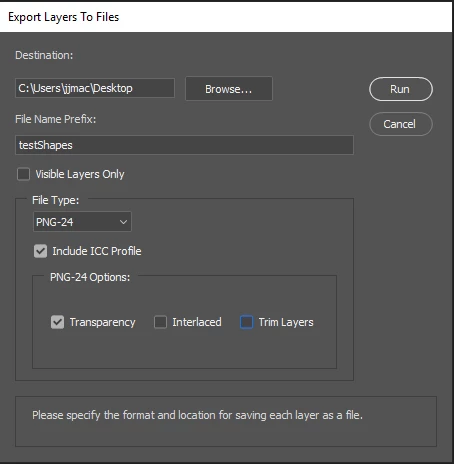
Have you tried Export Layers to Files? Png 24 with Trim not checked? I would think that should] work. Layers content will be clipped by Canvas bounds though.

2 replies

Norman Sanders
Legend
July 26, 2019
  1. Go to the the Layers panel.
  2. Select the layers you want to save as separate files
  3. Right-click your selection and select Quick Export As PNG from the context menu.
  4. Choose a destination folder and export the layers as files
artistic_Glimmer5E1B
Inspiring
July 26, 2019

That does NOT preserve canvas size, unfortunately.

JJMack
Community Expert
JJMackCommunity ExpertCorrect answer
Community Expert
July 26, 2019

Have you tried Export Layers to Files? Png 24 with Trim not checked? I would think that should] work. Layers content will be clipped by Canvas bounds though.

JJMack
Sahil.Chawla
Adobe Employee
Adobe Employee
July 26, 2019

Hi there,

You may check this article to see if it helps:

Export layers and artboards in Photoshop

However, I believe you might need to run a script to export multiple layers and preserve the canvas size.
JJMack​ Do you have any suggestions for achieving this?

Regards,
Sahil