
Is there way to revert to previous default Text Tool behavior?
In previous versions of Photoshop (I believe around 2022 and before?), when you would make a new file or switch to a different document, your previously used Text/Character settings and size were retained and used for that newly opened document.
For example, if my settings looked like this for File #1,
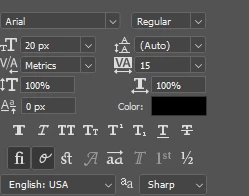
It would stay that way for File #2 and so on. But it seems that in more recent versions of photoshop, that's no longer the case and instead what happens is that the size seems to arbitarily change:
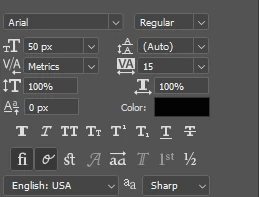
From what I can gather, Photoshop now automatically scales the text tool's default font size to height, width, and resolution of the new document. If File #2 was at 258x187px and 72ppi, this is the size that Photoshop defaults to for for 258x1000px and 72ppi for File #3:
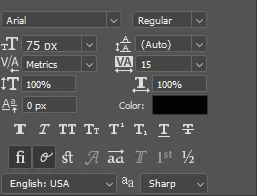
There is one additional very interesting caveat, however. This all only happens assuming the new document I open does not already have a pre-existing text layer. For example, if I switched to say, a File #0, something I've already worked on and had a text layer on, it would retain whatever settings my text tool was already on. Going off of that, I can make a very temporary workaround for my very specific workflow, but I'd just rather that to not be the case.
So yeah. Anyway to make it so that photoshop doesn't change my font size every time I open a new or different file that lacks a text layer? I'd also rather it not be dependent on presets either, since I would likely have to make a new preset every time I work on a new project.
 AdChoices