
alistairn87767224
Known Participant
November 26, 2019
Answered

Issue with the clone stamp tool

  • November 26, 2019
  • 3 replies
  • 6106 views

Hi there


I have noticed that with Photoshop 2020 my clone stamp tool is not behaving properly.  If I try to clone something, it will clone for a second or so and then stop.  To continue cloning I need to first release the left button of the mouse and re-click it.  To clone something large might take several clicking of the mouse.  Is anyone else having this issue with the clone stamp tool?  Is it bug that I need to wait for an update? Thanks in advance


Al
This topic has been closed for replies.
Correct answer

Hi

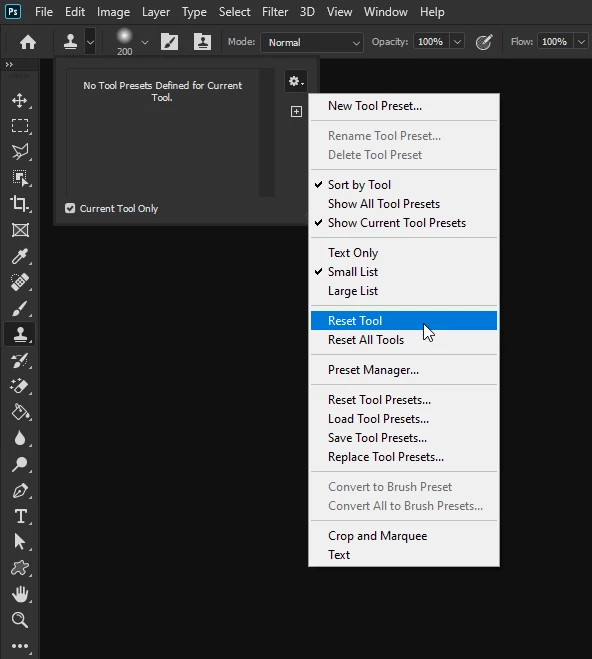
Have you tried resetting the Clone Tool

3 replies

Participant
November 20, 2023

I am also having issue with pdf Stamp on my adobe DC PDF pro, not behaving properly, cant drug text callout where I need it, also cant set size 

c.pfaffenbichler
Community Expert
Community Expert
November 21, 2023

What exactly are you talking about? 

Please post meaningful screenshots to illustrate. 

Correct answer
November 26, 2019

Hi

Have you tried resetting the Clone Tool

alistairn87767224
Known Participant
November 26, 2019

My mistake, it looks like it has solved my problem.  Thank you.


Al

Participant
December 12, 2019

I'm working on a mac, and using Ps 2020 version 21.0.1using wacom version 6.3.37-3 and I have used all of the suggestions on fixing the clone tool but non of them work. This is very frustating when you are woking on live jobs and your clone tool dose not work the way it should.

I have Highlighted the stamp tool problem so that you can see it. When you Alt Click and stamp the tool has a mind of its own drawing a line from one point to the other. Please see attached.


Cheers,

Bruce Long


Model Name: Mac Pro

  Model Identifier: MacPro6,1

  Processor Name: 12-Core Intel Xeon E5

  Processor Speed: 2.7 GHz

  Number of Processors: 1

  Total Number of Cores: 12

  L2 Cache (per Core): 256 KB

  L3 Cache: 30 MB

  Hyper-Threading Technology: Enabled

  Memory: 64 GB

  Boot ROM Version: 133.0.0.0.0

  SMC Version (system): 2.20f18

  Illumination Version: 1.4a6

  Serial Number (system): F5KP709CF9VN

  Hardware UUID: 5D77BC2A-46F2-52B1-B23B-AA9A1C65A34C


I have the same problem. When I use the stamp tool, I get a straight line. I can not trace the causes of this problem. it can appear when it is pleasing at any stage of working with photography. This is terribly annoying when retouching photos.

i have imac pro and wacom

The problem disappears when I go into the settings and reset the dialog error.

I don’t understand what to do next.


c.pfaffenbichler
Community Expert
Community Expert
November 26, 2019

What are the Tool’s settings? 

Please post a screenshot including the pertinent Panels (Options Bar, Brush Settings, …). 

alistairn87767224
Known Participant
November 26, 2019

Thanks for assisting with my issue.  Is this screen grab sufficient information?


c.pfaffenbichler
Community Expert
Community Expert
November 26, 2019

Is any of the Transfer or Size features of the Brush set to Fade in the Brush Settings Panel?