
alistairn87767224
Known Participant
November 26, 2019
Answered

Issue with the clone stamp tool

  • November 26, 2019
  • 3 replies
  • 6106 views

Hi there


I have noticed that with Photoshop 2020 my clone stamp tool is not behaving properly.  If I try to clone something, it will clone for a second or so and then stop.  To continue cloning I need to first release the left button of the mouse and re-click it.  To clone something large might take several clicking of the mouse.  Is anyone else having this issue with the clone stamp tool?  Is it bug that I need to wait for an update? Thanks in advance


Al
This topic has been closed for replies.
Correct answer

Hi

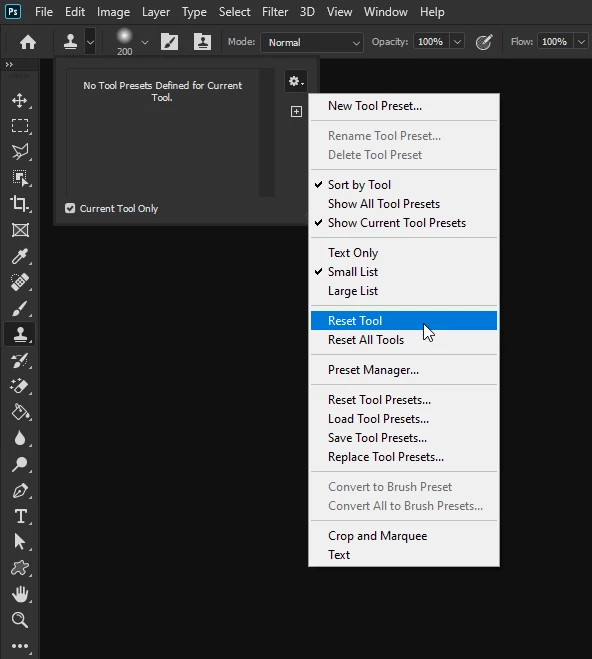
Have you tried resetting the Clone Tool

3 replies

Participant
November 20, 2023

I am also having issue with pdf Stamp on my adobe DC PDF pro, not behaving properly, cant drug text callout where I need it, also cant set size 

c.pfaffenbichler
Community Expert
Community Expert
November 21, 2023

What exactly are you talking about? 

Please post meaningful screenshots to illustrate. 

Correct answer
November 26, 2019

Hi

Have you tried resetting the Clone Tool

alistairn87767224
Known Participant
November 26, 2019

My mistake, it looks like it has solved my problem.  Thank you.


Al

March 9, 2020

With a lot of back and forth between asking Adobe, Wacom, and Apple, (with no responce by the way). I figured out how to fix this issue. So far it seems to be working for my problem, and no it has nothing to do with reseting the brushes. What you want to do is move your Adobe Photoshop 2020 Prefs.psp out of your user Library to you desktop. This will reset you PS setting some, so if you are used to having your preference behave a certant way, I suggest that you first command K and take snapshots of those preferences. Close Photoshop. Then go to your Preferences folder, see attached for location, (path at the bottom of window), and drag it to your desktop. Restart Photoshop, Photoshop will rebuild this pref. then you should be good. Let me know if this works for you.


Cheers, Bruce Long


Good afternoon!

I hope the topic is not closed yet and you will see my message. We faced the same problem: additional stripes are formed when using the cloning tool.

When using the "cloning" tool, I take the source, start drawing and the moment I release the mouse, an additional strip appears with a bias in the upper left part of the monitor, but I did not draw it.

The same thing happens with the losso tool.

The problem appeared just a day ago, and before that, everything was fine. Photoshop is licensed, updated without problems. Tried reinstallation - did not help. Did a reset, brushes - did not help. Tried and your method specified above - also did not help.

Please tell me, did you manage to solve the problem or maybe there is another way?

c.pfaffenbichler
Community Expert
Community Expert
November 26, 2019

What are the Tool’s settings? 

Please post a screenshot including the pertinent Panels (Options Bar, Brush Settings, …). 

alistairn87767224
Known Participant
November 26, 2019

Thanks for assisting with my issue.  Is this screen grab sufficient information?


c.pfaffenbichler
Community Expert
Community Expert
November 26, 2019

Is any of the Transfer or Size features of the Brush set to Fade in the Brush Settings Panel?