
alistairn87767224
Known Participant
November 26, 2019
Answered

Issue with the clone stamp tool

  • November 26, 2019
  • 3 replies
  • 6106 views

Hi there


I have noticed that with Photoshop 2020 my clone stamp tool is not behaving properly.  If I try to clone something, it will clone for a second or so and then stop.  To continue cloning I need to first release the left button of the mouse and re-click it.  To clone something large might take several clicking of the mouse.  Is anyone else having this issue with the clone stamp tool?  Is it bug that I need to wait for an update? Thanks in advance


Al
This topic has been closed for replies.
Correct answer

Hi

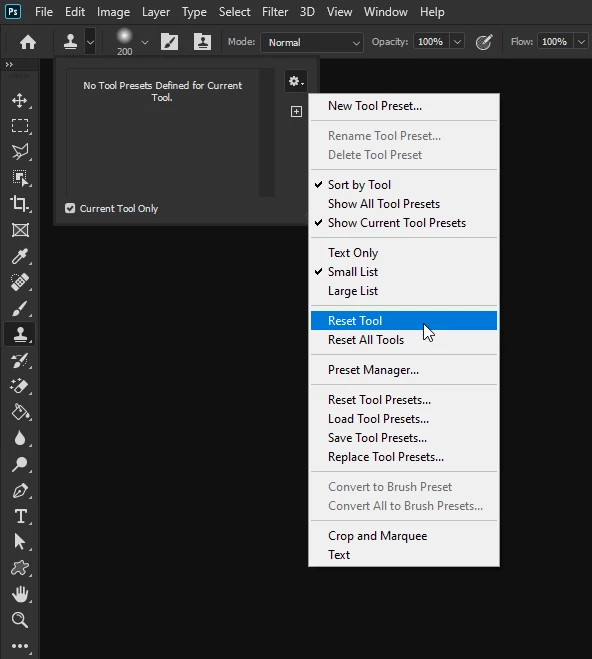
Have you tried resetting the Clone Tool

3 replies

Participant
November 20, 2023

I am also having issue with pdf Stamp on my adobe DC PDF pro, not behaving properly, cant drug text callout where I need it, also cant set size 

Participant
December 28, 2023

Sorry for late answer

while selecting any custom stamps first of not selecting properly, if by chance selected than while stamping its shows that stamped, however, after dropping it on place its disappearing, so looks like you placed stamp but as soon as move your cursor its disappearing,

2, editing, while using arrow mark not allowing to modify after placed it, (resize or move to correct position on drawing) same for call out  cant edit ones you placed, (even not locked) 

After using custom stamp pdf document stop scrolling by mouse wheel and start to zoom the document, closing and reopen only option to go back position.

Taking longer time to save each documents (30 to 40 sec) , some time crash and re open,

Kevin Stohlmeyer
Community Expert
Community Expert
December 28, 2023

@Anilesh32955452zt7m this is an unrelated topic to this thread, please start a new post in the Acrobat community.

Correct answer
November 26, 2019

Hi

Have you tried resetting the Clone Tool

alistairn87767224
Known Participant
November 26, 2019

Hi there


I have reset the tool brush but that has stopped it from working altogether.


Al

c.pfaffenbichler
Community Expert
Community Expert
November 26, 2019

What are the Tool’s settings? 

Please post a screenshot including the pertinent Panels (Options Bar, Brush Settings, …). 

alistairn87767224
Known Participant
November 26, 2019

Thanks for assisting with my issue.  Is this screen grab sufficient information?


c.pfaffenbichler
Community Expert
Community Expert
November 26, 2019

Is any of the Transfer or Size features of the Brush set to Fade in the Brush Settings Panel?