
Inspiring
June 29, 2012
Answered

Issues with Javascript on Mac but not PC

  • June 29, 2012
  • 1 reply
  • 3302 views

I'm running into some strange issues with some script in which another user's Mac will halt on a line that does nothing more than store a history state to the variable "actHist" while PCs run the entire script fine.  We'll be testing the script an another Mac later today, but I was wondering if there are known issues with running Java based scripts on Macs vs PCs?  Below is a screenshot of the problem:
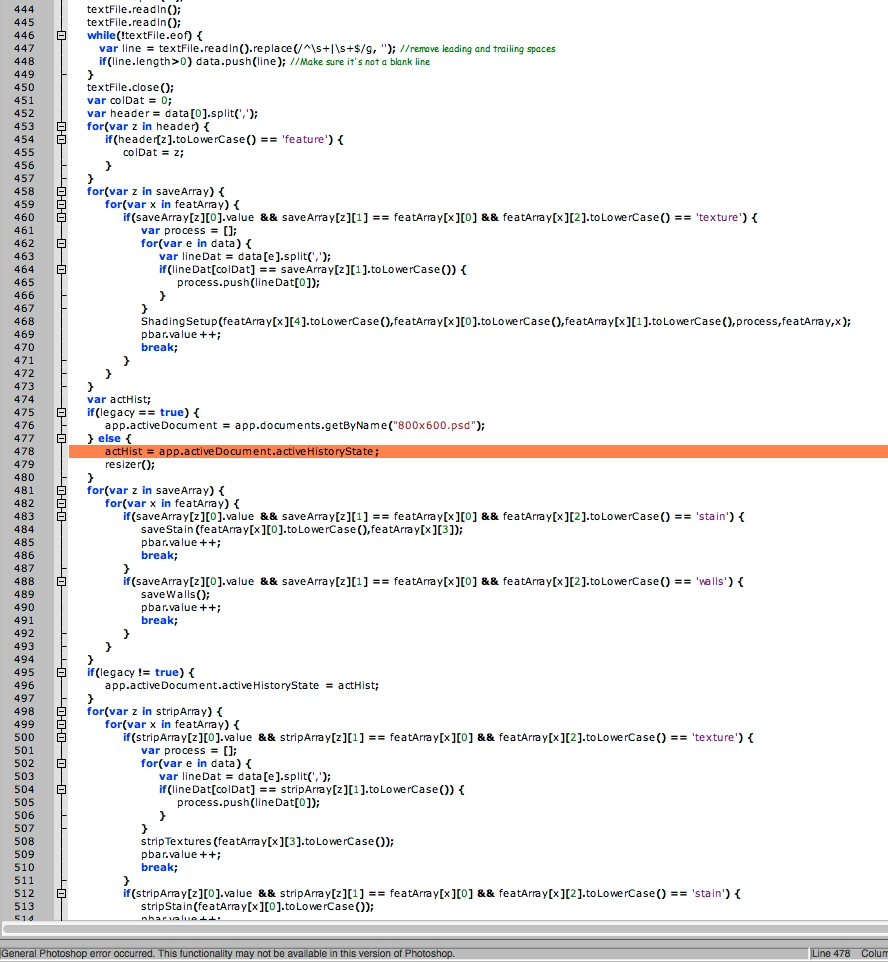
I can't figure out WHY it stops on that area.  I tried asigning the variable outside the else statement cause I was out of ideas, but it does the same thing regardless where I declare it.  The odd part is, that same line is used elsewhere in the script without issues, it just does not seem to work in this one spot on a Mac (PC has no issues with it).  Any idea why this is only a problem for the Mac and not any PCs?

This topic has been closed for replies.
Correct answer xbytor2

Tom is right. This is a known problem and Adobe has been alerted about it. This error can also occur when trying to access a document's activeLayer.

I've used this code for troublesome lines like this and it has worked for me:

try {

   doc = app.activeDocument;

} catch  (e) {

   $.sleep(500);

   var desc = new ActionDescriptor();

   desc.putEnumerated(cTID("Stte"), cTID("Stte"), cTID("RdCm"));

   executeAction(cTID("Wait"), desc, DialogModes.NO);

   doc = app.activeDocument;

}

This has not worked for others. Someone has suggested using:

   try {

      doc =  app.activeDocument;

   } catch (e) { 

      app.refresh();

      doc =  app.activeDocument;

   }

I haven't tried this because I don't have a reproducible test case.

1 reply

Tom Ruark
Inspiring
June 29, 2012

Are your documents in tabbed mode? Preferences->Interface->Open Documents as Tabs on vs off. I think we have issues with scripting when *not* in tabbed mode.

xbytor2Correct answer
Inspiring
June 29, 2012

Tom is right. This is a known problem and Adobe has been alerted about it. This error can also occur when trying to access a document's activeLayer.

I've used this code for troublesome lines like this and it has worked for me:

try {

   doc = app.activeDocument;

} catch  (e) {

   $.sleep(500);

   var desc = new ActionDescriptor();

   desc.putEnumerated(cTID("Stte"), cTID("Stte"), cTID("RdCm"));

   executeAction(cTID("Wait"), desc, DialogModes.NO);

   doc = app.activeDocument;

}

This has not worked for others. Someone has suggested using:

   try {

      doc =  app.activeDocument;

   } catch (e) { 

      app.refresh();

      doc =  app.activeDocument;

   }

I haven't tried this because I don't have a reproducible test case.

Paul Riggott
Inspiring
June 29, 2012

The above workarounds don't work for me on Windows, the only thing that has worked for me is to set the prefs to tabbed whilst the script is running.

function tabInterface(onOff) {

if(onOff == undefined) onOff=true;

    var desc19 = new ActionDescriptor();

        var ref8 = new ActionReference();

        ref8.putProperty( charIDToTypeID('Prpr'), stringIDToTypeID('interfacePrefs') );

        ref8.putEnumerated( charIDToTypeID('capp'), charIDToTypeID('Ordn'), charIDToTypeID('Trgt') );

    desc19.putReference( charIDToTypeID('null'), ref8 );

        var desc20 = new ActionDescriptor();

        desc20.putBoolean( charIDToTypeID('EGst'), true );

        desc20.putBoolean( stringIDToTypeID('openNewDocsAsTabs'), onOff );

    desc19.putObject( charIDToTypeID('T   '), stringIDToTypeID('interfacePrefs'), desc20 );

    executeAction( charIDToTypeID('setd'), desc19, DialogModes.NO );

};

function isTabInterface(){

var ref = new ActionReference();

ref.putEnumerated( charIDToTypeID("capp"), charIDToTypeID("Ordn"), charIDToTypeID("Trgt") );

return executeActionGet(ref).getObjectValue(stringIDToTypeID('interfacePrefs')).getBoolean(stringIDToTypeID( 'openNewDocsAsTabs'));

};