Inspiring
March 28, 2023
Answered

Javascript or ScriptListener - which one is better?

  • March 28, 2023
  • 2 replies
  • 3059 views

Hi experts

I am wring a photoshop script and wondering whether javascript will be better or scriptlistener ?

I read that javascript will be faster, but all the APIs are not compatible with all the versions of photoshop.

On the otherhand, scriptlistener may be slower, but it's compatible with all the photoshop versions.

Is it true? Can you please confirm?

I know that many commands can't be executed by javascript; scriptlistener is the only option. But when both are working which one to choose?

For example I am duplicating two layerSets to a different document and aligning it to right side.

In Javascript -

var openDocs = app.documents;
app.displayDialogs = DialogModes.NO;

var curDoc = openDocs[1];

var topLayerSet1 = curDoc.layerSets.getByName("TOP");
var bottomLayerSet1 = curDoc.layerSets.getByName("BOTTOM");
topLayerSet1.duplicate(openDocs[0], ElementPlacement.PLACEATBEGINNING);
bottomLayerSet1.duplicate(openDocs[0], ElementPlacement.PLACEATEND);
curDoc.close(SaveOptions.DONOTSAVECHANGES);

var doc = app.activeDocument;
var topLayerSet2 = doc.layerSets.getByName("TOP");
var bottomLayerSet2 = doc.layerSets.getByName("BOTTOM");
topLayerSet2.translate(5400, 0);
bottomLayerSet2.translate(5400, 0);


In scriptlistener -

//Right Align
var idAlgn = charIDToTypeID( "Algn" );
    var desc317 = new ActionDescriptor();
    var idnull = charIDToTypeID( "null" );
        var ref27 = new ActionReference();
        var idLyr = charIDToTypeID( "Lyr " );
        var idOrdn = charIDToTypeID( "Ordn" );
        var idTrgt = charIDToTypeID( "Trgt" );
        ref27.putEnumerated( idLyr, idOrdn, idTrgt );
    desc317.putReference( idnull, ref27 );
    var idUsng = charIDToTypeID( "Usng" );
    var idADSt = charIDToTypeID( "ADSt" );
    var idAdRg = charIDToTypeID( "AdRg" );
    desc317.putEnumerated( idUsng, idADSt, idAdRg );
    var idalignToCanvas = stringIDToTypeID( "alignToCanvas" );
    desc317.putBoolean( idalignToCanvas, false );
executeAction( idAlgn, desc317, DialogModes.NO );


Which one shoud I choose?
Will eagerly wait for your valuable comments.
This topic has been closed for replies.
Correct answer jazz-y

I would say this - if you study the ActionManager (or its upgraded version of batchPlay (UXP)) sufficiently, then there will be no desire to return to DOM objects. I usually only use the DOM for basic functionality related to interacting with the application.


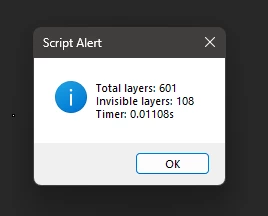
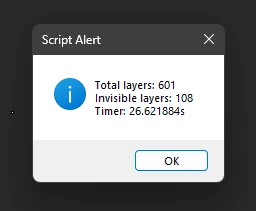
A simple example: a 1x1px file with 601 layers (including background) is attached to a post. Let's say we need to count how many invisible layers are in this document:


DOM code: 


$.hiresTimer
var doc = activeDocument,
invisible = 0;
for (var i=0; i<doc.layers.length;i++) if (!doc.layers[i].visible) invisible++

alert ('Total layers: ' + i +'\nInvisible layers: ' + invisible +'\nTimer: ' + Number($.hiresTimer)/1000000+ 's')


Result:

ActionManager code:


$.hiresTimer
var s2t = stringIDToTypeID;
invisible = 0;
(r = new ActionReference()).putProperty(s2t('property'), p = s2t('hasBackgroundLayer'));
r.putEnumerated(s2t('document'), s2t('ordinal'), s2t('targetEnum'));
var from = executeActionGet(r).getBoolean(p) ? 0 : 1;
(r = new ActionReference()).putProperty(s2t('property'), p = s2t('numberOfLayers'));
r.putEnumerated(s2t('document'), s2t('ordinal'), s2t('targetEnum'));
var to= executeActionGet(r).getInteger(p);

for (var i = from; i <= to; i++) {
    (r = new ActionReference()).putProperty(s2t('property'), p = s2t('visible'));
    r.putIndex(s2t('layer'), i);
    if (!executeActionGet(r).getBoolean(p)) invisible++

}

alert ('Total layers: ' + (to + !from) + '\nInvisible layers: ' + invisible +'\nTimer: ' + Number($.hiresTimer)/1000000+ 's')


Result:


2 replies

Inspiring
March 28, 2023

To the question "which should I choose?" the best answer is: yes.

What you should do, if you are unsure and have not found what is important to you, is to work with "javascript" as much as possible. When you need to use scriptlistener, think about why you need it now, and why you could need it in the future.

With that in mind, make a function using the scriptlistener code and put it in a separate file.

This file will grow and grow and grow, and will contain all your "i cannot fix this with javascript" code.


Example:


You go from this scriptlistener code:

var idAddT = charIDToTypeID( "AddT" );
    var desc1667 = new ActionDescriptor();
    var idnull = charIDToTypeID( "null" );
        var ref82 = new ActionReference();
        var idChnl = charIDToTypeID( "Chnl" );
        var idfsel = charIDToTypeID( "fsel" );
        ref82.putProperty( idChnl, idfsel );
    desc1667.putReference( idnull, ref82 );
    var idT = charIDToTypeID( "T   " );
        var desc1668 = new ActionDescriptor();
        var idHrzn = charIDToTypeID( "Hrzn" );
        var idPxl = charIDToTypeID( "#Pxl" );
        desc1668.putUnitDouble( idHrzn, idPxl, 471.000000 );
        var idVrtc = charIDToTypeID( "Vrtc" );
        var idPxl = charIDToTypeID( "#Pxl" );
        desc1668.putUnitDouble( idVrtc, idPxl, 200.000000 );
    var idPnt = charIDToTypeID( "Pnt " );
    desc1667.putObject( idT, idPnt, desc1668 );
    var idTlrn = charIDToTypeID( "Tlrn" );
    desc1667.putInteger( idTlrn, 20 );
    var idMrgd = charIDToTypeID( "Mrgd" );
    desc1667.putBoolean( idMrgd, true );
    var idAntA = charIDToTypeID( "AntA" );
    desc1667.putBoolean( idAntA, true );
executeAction( idAddT, desc1667, DialogModes.NO );


To this:

function magicWand(x, y, tolerance, selectMergedLayers, AntiAlias) {

    var idAddT = charIDToTypeID("AddT");
    var idnull = charIDToTypeID("null");
    var idChnl = charIDToTypeID("Chnl");
    var idfsel = charIDToTypeID("fsel");
    var idT = charIDToTypeID("T   ");
    var idPxl = charIDToTypeID("#Pxl");
    var idHrzn = charIDToTypeID("Hrzn");
    var idVrtc = charIDToTypeID("Vrtc");
    var idPnt = charIDToTypeID("Pnt ");
    var idTlrn = charIDToTypeID("Tlrn");
    var idMrgd = charIDToTypeID("Mrgd");
    var idAntA = charIDToTypeID("AntA");

    var adMagicWand = new ActionDescriptor();
    var arSelect = new ActionReference();
    arSelect.putProperty(idChnl, idfsel);
    adMagicWand.putReference(idnull, arSelect);
    var adMWPoint = new ActionDescriptor();
    adMWPoint.putUnitDouble(idHrzn, idPxl, x);
    adMWPoint.putUnitDouble(idVrtc, idPxl, y);
    adMagicWand.putObject(idT, idPnt, adMWPoint);
    adMagicWand.putInteger(idTlrn, tolerance);
    adMagicWand.putBoolean(idMrgd, selectMergedLayers);
    adMagicWand.putBoolean(idAntA, AntiAlias);
    executeAction(idAddT, adMagicWand, DialogModes.NO);
};

You put this in a separate file called "mystuff.jsx" or something similar and keep it around.


When you have a script you want to make, at the top of the file you put:

//@include "./mystuff.jsx";

This will load the magicWand function so your script "knows it exists".


I will use your code to show how to use it:


//@include "./mystuff.jsx";            // <-------- I ADDED THIS LINE

var openDocs = app.documents;
app.displayDialogs = DialogModes.NO;

var curDoc = openDocs[1];

var topLayerSet1 = curDoc.layerSets.getByName("TOP");
var bottomLayerSet1 = curDoc.layerSets.getByName("BOTTOM");
topLayerSet1.duplicate(openDocs[0], ElementPlacement.PLACEATBEGINNING);
bottomLayerSet1.duplicate(openDocs[0], ElementPlacement.PLACEATEND);
curDoc.close(SaveOptions.DONOTSAVECHANGES);

var doc = app.activeDocument;
var topLayerSet2 = doc.layerSets.getByName("TOP");
var bottomLayerSet2 = doc.layerSets.getByName("BOTTOM");
topLayerSet2.translate(5400, 0);
bottomLayerSet2.translate(5400, 0);

magicWand(100,200,15,true,false);      // <-------- AND THIS LINE TOO


The one line on top loads the file with your scriptlistener functions in

The one line on the bottom is using a part of that file, namely the magicWand function I made.


- - - don't read beyond this point, it is extra information in case you want to think ahead - - -


Once you have this, and after you know what is important to you, and you are motivated, you can for example time how long it takes for a piece of code to run...

Try the same code in javascript and in scriptlistener, see which is fastest, and then choose which one you need/prefer.

If it's scriptlistener, add it to the file.

After a while, you will have more and more functions, it will be messy. You can learn about prototyping.

This will let you do all the work again (refactoring it) and you can put the functions not in one huge list, but in a nice structure.


Before (as in the example) you would call magicWand by writing "magicWand(1,2,3,true,true);"

After you have learned prototyping, and you have structured your functions you would call magicWand by for example writing "nirmalya.scriptlistenerFunctions.selections.magicWand(1,2,3,true,true);"


If you have read beyond the point that said don't read beyond this point, start simple.

Just do it the easy way first, achieve what you want to achieve without extras or "best practices".

You will learn from it more than you will from trying to be perfect the first time.

After you have something that works, stop. This is good. Now, you can do it again to make it better.

Or move to the next task. Both are how you grow.


Namasté 😄


jazz-yCorrect answer
Legend
March 28, 2023

I would say this - if you study the ActionManager (or its upgraded version of batchPlay (UXP)) sufficiently, then there will be no desire to return to DOM objects. I usually only use the DOM for basic functionality related to interacting with the application.


A simple example: a 1x1px file with 601 layers (including background) is attached to a post. Let's say we need to count how many invisible layers are in this document:


DOM code: 


$.hiresTimer
var doc = activeDocument,
invisible = 0;
for (var i=0; i<doc.layers.length;i++) if (!doc.layers[i].visible) invisible++

alert ('Total layers: ' + i +'\nInvisible layers: ' + invisible +'\nTimer: ' + Number($.hiresTimer)/1000000+ 's')


Result:

ActionManager code:


$.hiresTimer
var s2t = stringIDToTypeID;
invisible = 0;
(r = new ActionReference()).putProperty(s2t('property'), p = s2t('hasBackgroundLayer'));
r.putEnumerated(s2t('document'), s2t('ordinal'), s2t('targetEnum'));
var from = executeActionGet(r).getBoolean(p) ? 0 : 1;
(r = new ActionReference()).putProperty(s2t('property'), p = s2t('numberOfLayers'));
r.putEnumerated(s2t('document'), s2t('ordinal'), s2t('targetEnum'));
var to= executeActionGet(r).getInteger(p);

for (var i = from; i <= to; i++) {
    (r = new ActionReference()).putProperty(s2t('property'), p = s2t('visible'));
    r.putIndex(s2t('layer'), i);
    if (!executeActionGet(r).getBoolean(p)) invisible++

}

alert ('Total layers: ' + (to + !from) + '\nInvisible layers: ' + invisible +'\nTimer: ' + Number($.hiresTimer)/1000000+ 's')


Result:


c.pfaffenbichler
Community Expert
Community Expert
March 29, 2023

I wanted to lead you to the idea that mixing DOM and AM code is not a good idea. DOM objects often have attributes that are similar to AM, but carry a completely different meaning. In your code, you use indexes from the activeDocument.layers collection, hoping that it will coincide with the indexing order in AM, however, in AM, indexing of layers is end-to-end within the document (counting from bottom to top) plus it contains indexes of hidden elements (closing sections of groups), in the DOM, layer indexing goes at the level of the current parent element, starts from top to bottom and does not contain indexes of hidden elements.


Basically I write the code by hand. It took me a couple of years to learn and memorize frequently used objects and functions. When it comes to something unfamiliar, I use either scriptListener or app.notifiers (in the latter case, I can immediately get a ready-made descriptor and study it in a way that suits me)


I often reuse code. I have an object template with basic functions for getting and setting parameters, in which I usually put the functions necessary for the operation of a particular script, something like in this topic: .jsx script extremely slow   If necessary, I combine some functions and make them dependent on the properties of the parent object (for example, you can activate, delete a layer, document, channel, path with the same function, simply by changing the name of the object class and the name of the action).


I don't like compiling code into one big library because I try to make every script clean of dependencies. In general, I am an ordinary photographer and writing scripts is nothing more than a hobby. You can learn a lot from @xbytor2  xtools, he did a great job putting together a lot of features. Many of the things he did are still beyond my comprehension.


quote

You can learn a lot from @xbytor2  xtools, he did a great job putting together a lot of features. Many of the things he did are still beyond my comprehension.


Does anybody happen to know what xbytor is up to nowadays? 

I think I haven’t noticed them on the Forum in a long time. 

Legend
March 28, 2023

In both cases, you are dealing with javascript (more precisely, with its variant extendScript).


The first example is the Photoshop Object Model (DOM), the second example is ActionManger code.

The DOM is well documented, however it doesn't fully cover all of Photoshop's automation capabilities. ActionManger has no documentation, it's essentially an internal action language. But with it, you can perform a significantly larger number of operations than with the help of DOM.


ActionManger code typically runs faster or at the same speed as DOM.

Both options have compatibility issues with past versions of Photoshop.

ActionManger is of interest when you need to do something that can't be done with regular DOM functions.