Gotta Dance
Inspiring
December 30, 2021
Answered

JSX - Referencing Layer(s) Syntax Question

  • December 30, 2021
  • 3 replies
  • 1321 views

Hi everybody,


So I'm breaking to learning how to use the script "generator" (ScriptListener/CleanSL) and learning why errors keep coming up with common code. I'm used to working in Flash/Animate and CSS/JS errors in web pages. Sourcing errors in this environment is a little less intuitive for me so pardon the persistent questions...


I pulled a script from an expert, I've dumbed it down. It looks simple enough, but not knowing this environment well I'm not sure why it doesn't run.


var aDoc = documents.add();

var aLay1 = aDoc.layers.add();
var subLay2 = aLay1.layers.add();


The second line creates an error: Error 1302: No such element


Now, I pulled another code from the scripting guide and it works fine:


var aDoc2 = documents.add();

var aLay1 = aDoc2.artLayers.add()
textLayerRef.name = "my text"
textLayerRef.kind = LayerKind.TEXT


I don't imagine the first is a deprecated version of layer referencing as I also found this in the guide as well:


layers["Layer 3"].name
//using the collection name and square brackets for the collection


Layers looks pre-defined and is treated like an array object as far as I can tell, but these layers log out as 'undefined' and typeOf tells me it's not a function. So...I'm trying to figure out what's wrong form for the first set of layer building. 


Both try to add(), but only the latter works. Is 'artLayers' just a new school thing for 'layers'?


Thanks for reading. 


This topic has been closed for replies.
Correct answer JJMack

It all about Adobe's Photoshop  Object Model

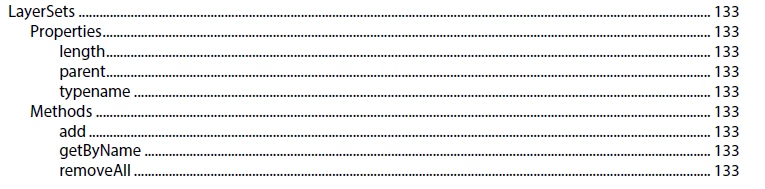
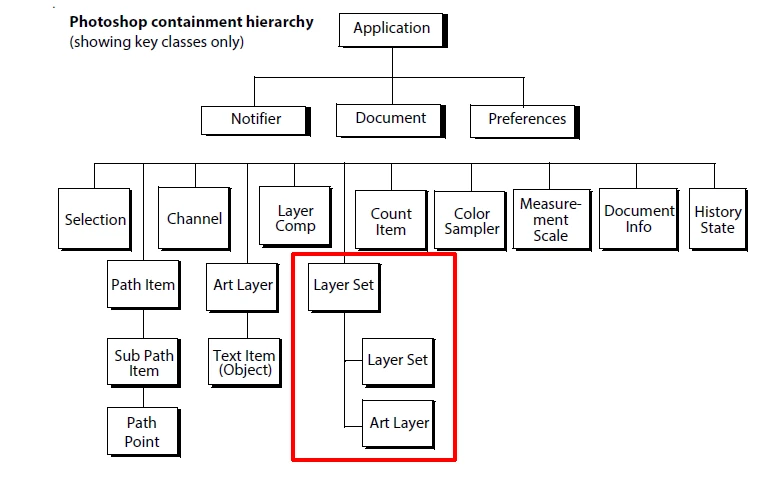
A Photoshop Document has a Layer Set.  In the Layer Set you can have other Layer Sets and Art Layers.  To Process the whole document you need to Process the Document's Layer Set recursively for there can be nested Layer Sets. Its About Adobe Photoshop Objects and Object's Properties and Methods  


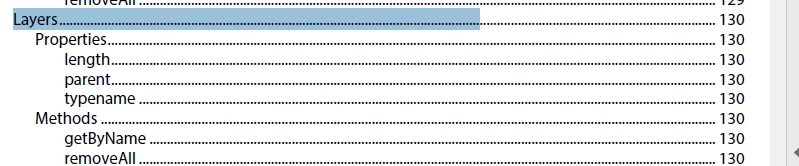
Doc.layers.add() is invalid there is no Method .add() for the Photoshop DOM Layers collection  the Array contains objects that are Layers and LayerSets.

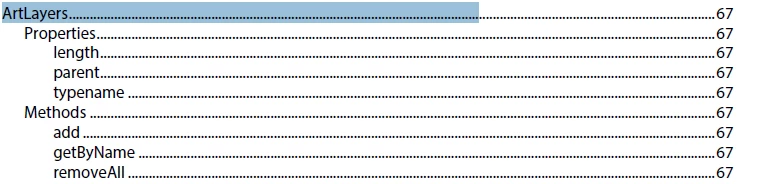
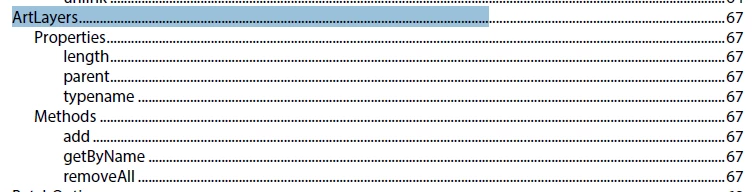
 Layers objects are artLayers and Doc.artLayers.add() is a valid method


3 replies

JJMack
Community Expert
JJMackCommunity ExpertCorrect answer
Community Expert
December 30, 2021

It all about Adobe's Photoshop  Object Model

A Photoshop Document has a Layer Set.  In the Layer Set you can have other Layer Sets and Art Layers.  To Process the whole document you need to Process the Document's Layer Set recursively for there can be nested Layer Sets. Its About Adobe Photoshop Objects and Object's Properties and Methods  


Doc.layers.add() is invalid there is no Method .add() for the Photoshop DOM Layers collection  the Array contains objects that are Layers and LayerSets.

 Layers objects are artLayers and Doc.artLayers.add() is a valid method


JJMack
Gotta Dance
Inspiring
December 31, 2021

Ahhhh, I see. Okay, I get it. Layers encompasses artLayers which are generally used for imagery purposes. But Layers (Layer Sets) themselves references the total gamut of 'layers' within a composition.


That, and their method set is a parent up from artLayers and don't reflect the attributes of artLayers.


Excellent, thank you so much guys!

Kukurykus
Legend
December 31, 2021

Mark correct solution(s) if you see any 😉

Kukurykus
Legend
December 30, 2021
documents.add().layerSets.add().artLayers.add()

activeDocument.layers['Group 1'].name
JJMack
Community Expert
Community Expert
December 30, 2021
.layers.add();

vs

.artLayers.add()


JJMack