
danielp70022946
Participant
July 13, 2017
Answered

justifying text paragraph in photoshop CC 2017

  • July 13, 2017
  • 2 replies
  • 16745 views

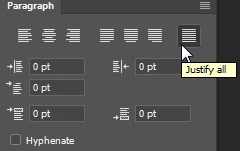
I am having trouble justifying text in a paragraph. not all the options are available. I am looking to justify all so the text is in a block with no indents either side of the paragraph. I can see the option in the paragraph formatting window but am unable to select it. the only options I can select are with ragged edges on on or both sides of the paragraph.

what can I do to allow access the the "justify all" option.

regards,

Daniel
This topic has been closed for replies.
Correct answer barbara_a7746676

Not all justification settings will show in the Options bar. Click inside the paragraph with the Type tool and open the Window > Paragraphs panel. All of the justification options will be shown across the top of the panel.

2 replies

barbara_a7746676
Community Expert
barbara_a7746676Community ExpertCorrect answer
Community Expert
July 14, 2017

Not all justification settings will show in the Options bar. Click inside the paragraph with the Type tool and open the Window > Paragraphs panel. All of the justification options will be shown across the top of the panel.

Participant
November 6, 2020

Thank you for your answers, but it still doesn't work.  I am in Photoshop CC 2020, and having the excawt same problem.  All the "Justify" options SHOW, but only the 3 on the left WORK.

Can you help?

Participant
May 19, 2021

Daniel / William,

When you're in the text feature, go to the top of the program menu and click on "Layer", then in the drop-down menu click "Type", then select "Convert to Paragraph Text" from the drop-down menu (since it is currently in 'Point Text' mode), and those other "Justify" options should now be available.

Colin Holgate
Inspiring
July 14, 2017

If you open the Paragraph Styles palette and double-click on the Basic Paragraph line you can change the paragraph style options. Select Indents and Spacing, then from the Alignment drop down menu you can choose various justify types. Most likely you will want Left Justify, so that the few words on the last line go to the left. If you want even the last line to fill the width you would choose Full Justify, but the last line may look very stretched out!