
chrism77498712
Participant
February 20, 2018
解決済み

Keep getting current document msg

  • February 20, 2018
  • 返信数 1.
  • 302 ビュー

Hello fellow Adobe users.

     Every time i open or close a photo I keep getting a message that reads, 'The object "current document" is currently not available.' It also reappears 3-5 times before or after every photo i open or close.

     I have tried deleting and reinstalling the program, updates haven't fixed the issue either. it doesn't hinder the performance of the program or editing photo. just a nuisance.

     Has anyone ever come across this and how do you fix it?

thanks
    このトピックへの返信は締め切られました。
    解決に役立った回答 JJMack

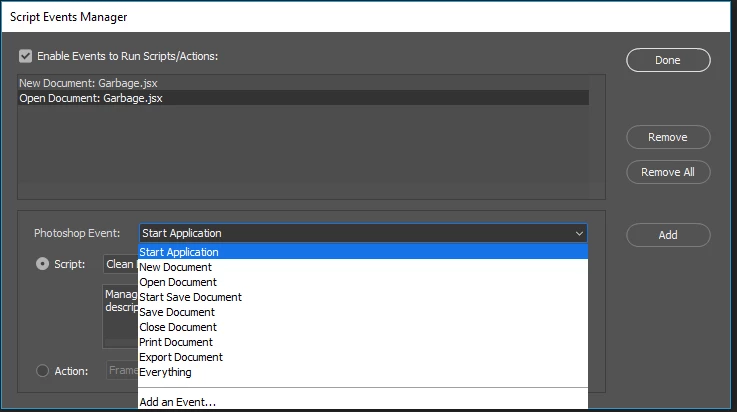
    There may be a start application event set up.  Check your Script Event manager....

    返信数 1

    JJMack
    Community Expert
    Community Expert
    February 20, 2018

    It may be that something is being run after some event has occurred and the process  is running when Photoshop is switching between document and there is currently no active document.  CS6 before any update had problems interlocking problems  so some actions and  script that process multiple document often failed because a step required there to be an active document but the document switch had not completed. What version of Photoshop are you running and what level is it at? If there is a close even handler there may not be a current document the event handler is run. You need to find out what is failing when Photoshop displaye the message. The may be a start application event set up

    JJMack
    chrism77498712
    Participant
    February 20, 2018

    I am running Photoshop CC 2018, version 19.1.1

    JJMack
    Community Expert
    Community Expert
    February 20, 2018

    Did you check to see if there are any Script event handlers set up.  I there is a Start Application event handler, If the handler tries to use a Photoshop feature that requires an open document it will fail like that unless it first added a document into Photoshop.

    JJMack