

Keyboard Shortcut for "Save a Copy > PNG"
I'm going nuts here trying to solve what should be an easy problem and I'm stuck. I want to have a keyboard shortcut (ideally Ctrl+Shift+P) that could automatically run File > Save a Copy > PNG.
I've tried two methods that each get me about 90% of the way there, but ultimately don't work:
1) Create a shortcut for Quick Export as PNG. This creates a PNG image, but it increases the bit depth from 24 to 32, which makes a larger file size (but same quality since the original is 24).
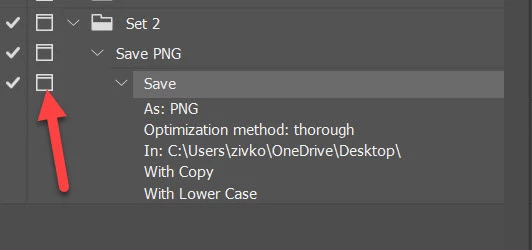
2) Make an Action with a function key shortcut for File > Save a Copy > PNG. This creates a PNG image with the correct bit depth, but does not prompt for a file name and overwrites any existing image with the same name, so that won't work either.
Is there a way to do this, or do I just have to enlessly punch through files names to get a PNG every time I save?
 AdChoices