Roger Breton
Legend
September 21, 2023
Answered

Keyboard shortcuts location on MacOSX?

  • September 21, 2023
  • 3 replies
  • 3411 views

Looking for the equivalent path on MacOSX where custom keyboard shortcuts are located?
On Windows, it is C:\Users\username\AppData\Roaming\Adobe\Adobe Photoshop 2023\Presets\Keyboard Shortcuts.
What is it on the Mac?
I'm teaching a Photoshop class next week and I know many of my students use Macintosh computers.

I want to supply them with a custom keyboard shortcut file but I don't know what it is on the Mac.


Thanks in advance!
This topic has been closed for replies.
Correct answer Jeff Arola

On the Mac side it's

Macintosh HD/Users/UserName/Library/Application Support/Adobe/Adobe Photoshop 2023/Presets/Keyboard Shortcuts


Also in case you don't know the User Library is hidden by default just like on Windows.


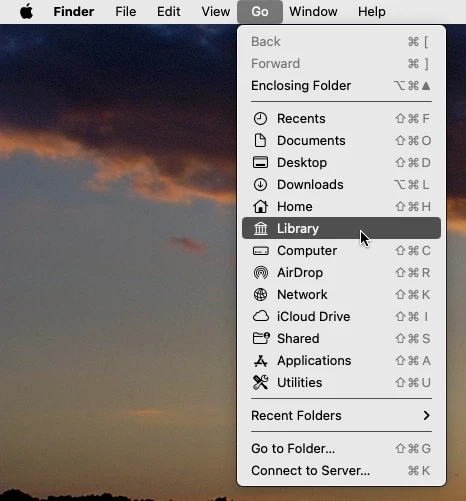
So one easy way to get to ones User Library is click on the desktop, click Go and while holding the Option key you'll see Library which is the User's Library.


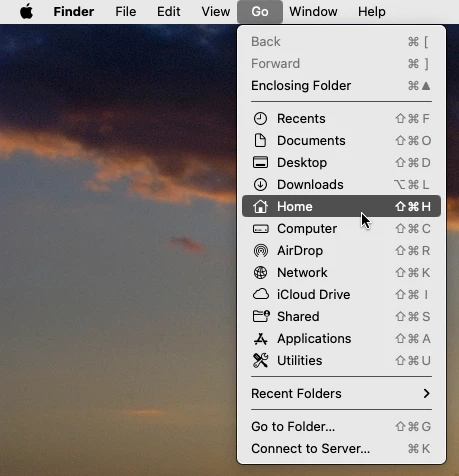
To make the User Library show on a permanent basis click on the desktop, click Go then Home.

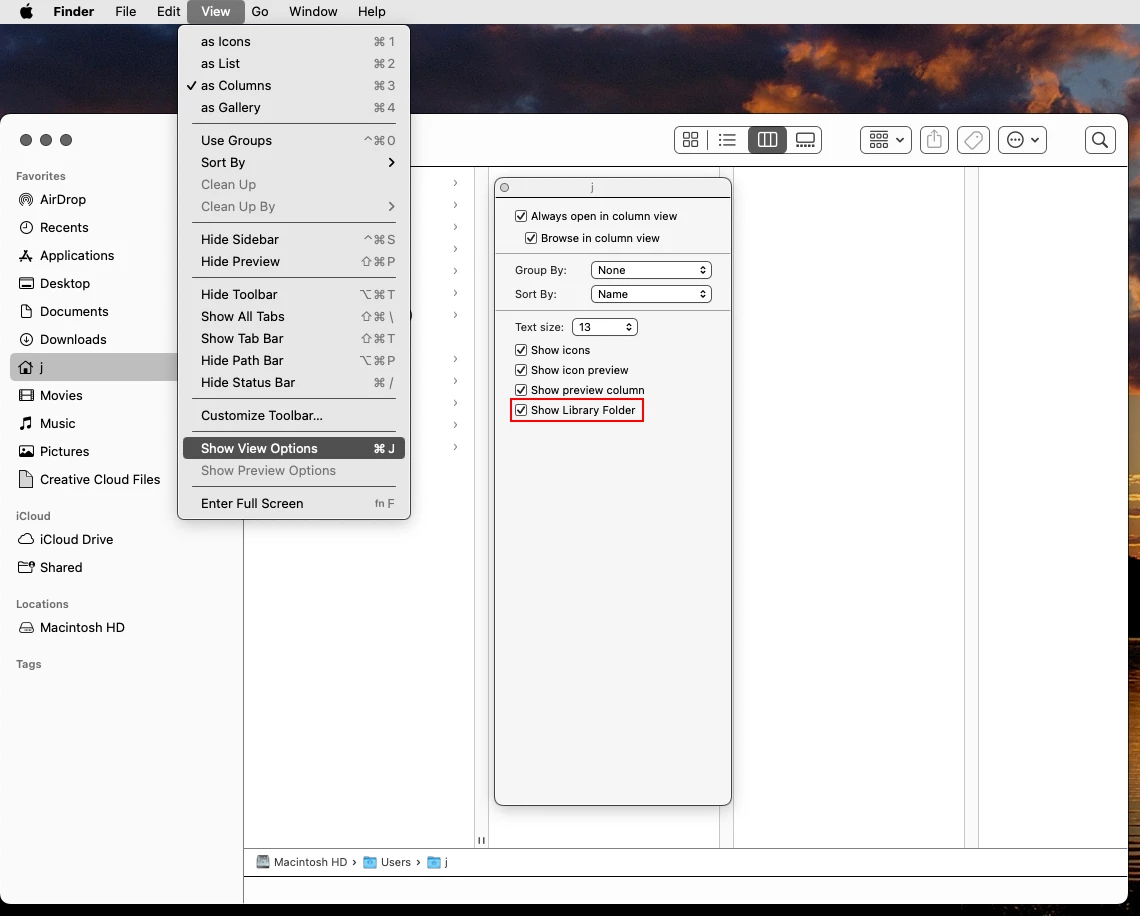
Then click View>Show View Options and check Show Library Folder.


3 replies

jane-e
Community Expert
Community Expert
September 22, 2023
quote

I'm teaching a Photoshop class next week and I know many of my students use Macintosh computers.

By @Roger Breton


There are several possible answers to your question:

If you want Photoshop keyboard shortcuts, they are in Edit menu > Keyboard Shortcuts on both macOS and Windows.


Here are some other things that might be helpful:


Preferences is in the Edit menu on Windows and the Application menu on macOS. (Photoshop is the Application when you are using Photoshop.)

But in the newest version of macOS it is no longer called Preferences; it is now System Settings.

https://support.apple.com/guide/mac-help/change-system-settings-mh15217/mac

Cmd+K will work for all versions of macOS.


Windows always uses the Application frame and it cannot be turned off. Mac users can turn it on or off from the Window menu. When on, it's like Windows; when off it's like Mac. It's on by default (which I prefer.)

https://creativepro.com/learn-love-application-frame/


"Keyboard shortcuts location on MacOSX?"

None of your students will be using macOSX, as the last iteration was 10.15 (Yosemite) and current versions of Photoshop won't run on it. Since then, there has been macOS11, macOS12, and macOS13. Very soon macOS14 will be released.

https://en.wikipedia.org/wiki/MacOS_version_history


Jane


Roger Breton
Legend
September 22, 2023

Ah! Thank you for your kind help! 

jane-e
Community Expert
Community Expert
September 22, 2023

You're welcome, @Roger Breton 😊 I know it's not what you asked for, but it will be useful information in your mixed class!


Jane

Jeff Arola
Community Expert
Jeff ArolaCommunity ExpertCorrect answer
Community Expert
September 22, 2023

On the Mac side it's

Macintosh HD/Users/UserName/Library/Application Support/Adobe/Adobe Photoshop 2023/Presets/Keyboard Shortcuts


Also in case you don't know the User Library is hidden by default just like on Windows.


So one easy way to get to ones User Library is click on the desktop, click Go and while holding the Option key you'll see Library which is the User's Library.


To make the User Library show on a permanent basis click on the desktop, click Go then Home.

Then click View>Show View Options and check Show Library Folder.


Roger Breton
Legend
September 22, 2023

Thank you so very much! That's exactly the information I was looking for 🙂

Trevor.Dennis
Community Expert
Community Expert
September 21, 2023