Participant
April 21, 2018
Answered

Keyframes option greyed out in timeline menu

  • April 21, 2018
  • 3 replies
  • 11943 views

I'm trying to create a basic animated gif and followed the tutorial online without a problem yesterday. Now when I try to "make frames from layers" I can't because half of the Timeline menu is greyed out including keyframes. I've created new files, restarted Photoshop and nothing makes a difference. Any ideas?

Thanks!
    This topic has been closed for replies.
    Correct answer davescm

    The timeline in Photoshop can be started in two different formats :

    1 A Video Timeline

    2. A frame Animation timeline

    Keyframes are seen the video timeline, Make frames from Layers is in a Frame animation timeline

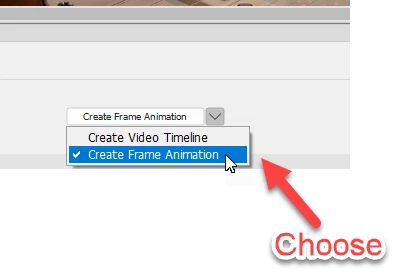
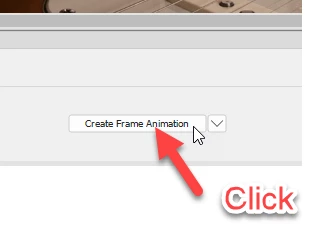
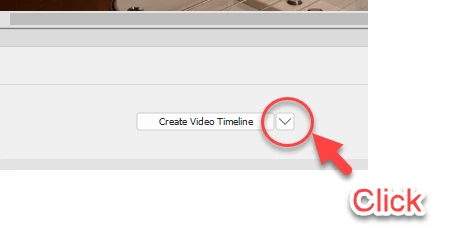
    Go back to the point where you create the timeline and choose which you want before starting the timeline

    Step 1:

    Step 2:

    Step 3:

    Note after choosing the "Create Frame Animation" box becomes a button which you then need to click

    Dave

    3 replies

    Participant
    November 17, 2020

    Dave, 

    Doesn't speak well of my intelligence, but I have spent all day trying to figure out why part of the menu was greyed out. Read a dozen articles, tried a half dozen work-arounds. Then, then, I came upon your answer "box becomes a button" and hey, you are absolutely right. Thank you.


    davescm
    Community Expert
    davescmCommunity ExpertCorrect answer
    Community Expert
    April 22, 2018

    The timeline in Photoshop can be started in two different formats :

    1 A Video Timeline

    2. A frame Animation timeline

    Keyframes are seen the video timeline, Make frames from Layers is in a Frame animation timeline

    Go back to the point where you create the timeline and choose which you want before starting the timeline

    Step 1:

    Step 2:

    Step 3:

    Note after choosing the "Create Frame Animation" box becomes a button which you then need to click

    Dave

    Participant
    October 5, 2018

    Oh wow. I was having the same issue/question. I would have NEVER known that "Create Frame Animation" was a button, and I've been using adobe products for 17 years! Thanks for your answer.

    Mylenium
    Legend
    April 22, 2018

    Without more precise info nobody can really answer that. You have to be more specific about what you actually do in the document, the layer structure, your version of PS, other things.

    Mylenium