
Traw2011
Participant
June 11, 2018
Question

Knockout shape in sphere

  • June 11, 2018
  • 2 replies
  • 223 views

Hello all,

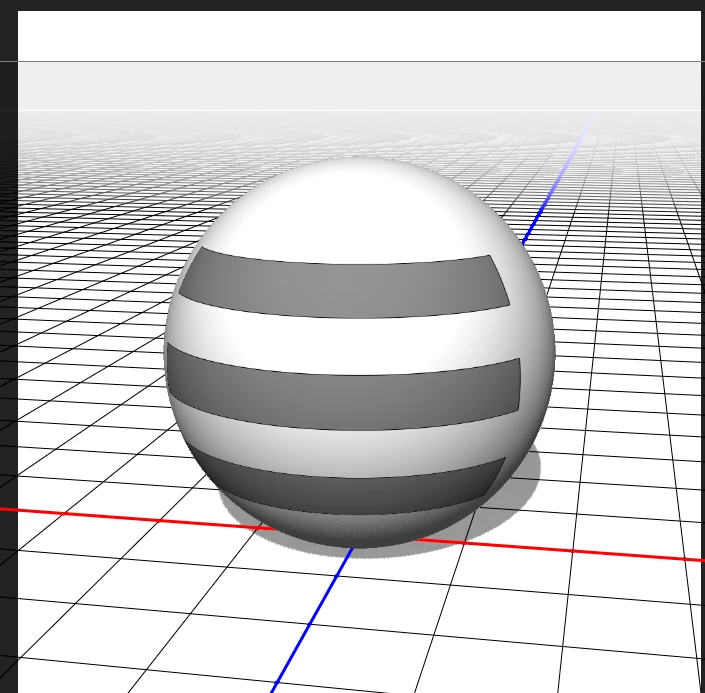
I trying to figure out how I can cut a shape into a sphere. kind of like a hollow sphere with an extra step.

I want to make it so the viewer can see straight through my sphere where the grey rectangles are.

I want ot make it so where you see grey, you can see all the way throught the sphere and where you see white the sphere is solid.

Thanks.
    This topic has been closed for replies.

    2 replies

    davescm
    Community Expert
    Community Expert
    June 11, 2018

    Hi

    If you just want to have a skin with holes so the sphere is transparent in the dark grey areas you marked then JJMack's method using an opacity map will work well.

    However, If you want to knock a shape out of a solid sphere so the interior follows the knocked out shape, as below, then you will need to go to a 3D application which allows you to manipulate the mesh.

    The example below, in Blender 3D, used the Boolean modifier, set to difference, to subtract one shape from another

    Staring with :

    Subtract this object:

    Result :

    Dave

    JJMack
    Community Expert
    Community Expert
    June 11, 2018

    Opacity map.

    JJMack