
philippb29054734
Inspiring
October 27, 2021
Answered

Kyle's Brushes Aren't Working

  • October 27, 2021
  • 2 replies
  • 2583 views

I use Windows 10, and Photoshop Version 23.0.0

Today, I downloaded the newest Photoshop Update.


Afterwards, not a single brush worked anymore, so I followed Adobe's instructions and reset the tool preferences


That worked fine on some of the brushes, returning them to my original preferences, but it completely destroyed all of the ones with specific settings, like Kyle's Grid Foil (I am translating from the German name, sorry if it's not called that in English.) Instead of drawing a fixed grid of dots, this brush now is a single, large solid mass of colour, exactly like the standard circular brush.


So I downloaded a new set of gridded brushes (Kyle's Manga Pack), thinking those would come with their own presets, and override the previously erased presets - but they didn't. They apparently lost all presets as soon as I downloaded them. They are all the same now. No grid, no pattern, just big blobs of colour.


I would really like to get those brushes back, but I have no clue how to.
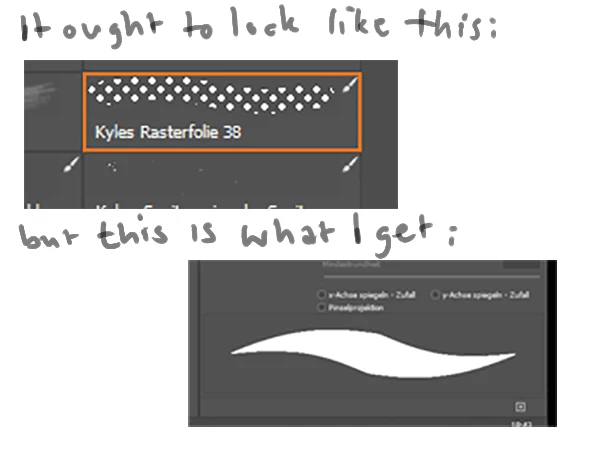
 

Thanks in advance for y'all's help.

Correct answer philippb29054734

Well, I solved it myself.


During the "incident" described above, I (or the error starting this whole ordeal, cannot say) apparently "locked" form and structure in the brush settings menue, and that stopped all other brushes from doing what they were supposed to do. So, everyone else who's as clueless as me: leave those little locks alone.


Apparently it was that easy.

Still don't know how Kyle made that Grid Brush do what it does, but... yay.

2 replies

philippb29054734
philippb29054734AuthorCorrect answer
Inspiring
December 23, 2021

Well, I solved it myself.


During the "incident" described above, I (or the error starting this whole ordeal, cannot say) apparently "locked" form and structure in the brush settings menue, and that stopped all other brushes from doing what they were supposed to do. So, everyone else who's as clueless as me: leave those little locks alone.


Apparently it was that easy.

Still don't know how Kyle made that Grid Brush do what it does, but... yay.

Participant
January 30, 2025

I don't understand how you solved it. Mines doesn't work too 😞

Earth Oliver
Legend
October 27, 2021

everything works as expected here. What happens when you paint with it? Are you sure you have the right Brush tool selected?

philippb29054734
Inspiring
November 2, 2021

Yes, I *am* sure I selected the right brush tool. In fact, I spent two hours that day selecting all kinds of brush tools, and as I said, I even downloaded another batch of them and tried them out. And most of them have lost their distinctive presets.


As to what happens when I paint with it - I described that, and even attached an image to SHOW that. As opposed to painting dots in a fixed grid, Photoshop treats the brush like any pressure sensitive round brush.


This is an image of me using the selected brush once - it should be grid shown in the selection menue, instead it is a round brushhead with no distinct pattern:


Participant
November 2, 2021

View that brush stroke at 100%.