
Inspiring
May 24, 2021
Answered

Language options in Photoshop 2021

  • May 24, 2021
  • 2 replies
  • 3823 views

While choosing a language in Lightroom Classic is as simple as can be, doing so in Photoshop is plainly horrible.

Please, someone, how can I choose the language of my choice in Photoshop WITHOUT having to change the install language in Adobe Creative Cloud and then removing Photoshop and re-installing it again?


This topic has been closed for replies.
Correct answer gener7

Hi Gener7,

My copy of Photoshop CC 2021 only shows one UI Language at a time, depending on what I chose as an install language in Adobe Creative Cloud. How did you get Photoshop CC 2021 to show several UI Languages to choose from?


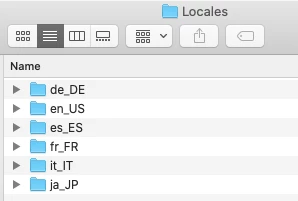
I simply change the install language and install for each language I want, but I do not uninstall Photoshop itself. What this does is to drop a language folder into the Locales folder in the Photoshop folder like so:

From there I choose the language and restart Photoshop.

I have not seen any problems doing it this way, but it may not work for all Creative Cloud Programs.


2 replies

gener7
Community Expert
Community Expert
May 24, 2021

See this: https://helpx.adobe.com/creative-cloud/help/change-install-language.html


Personally I never uninstall one language so I can have another language installed. I install the other language and from then on I can switch between them in Preferences.

I think it's easier in Photoshop because only language-pack folders are involved. I wouldn't do that with InDesign because of the different Type and Layout engines.


VillebonAuthor
Inspiring
May 24, 2021

Jeez, did you read my post? It described the horrible procedure in that link!

gener7
Community Expert
gener7Community ExpertCorrect answer
Community Expert
May 24, 2021

Hi Gener7,

My copy of Photoshop CC 2021 only shows one UI Language at a time, depending on what I chose as an install language in Adobe Creative Cloud. How did you get Photoshop CC 2021 to show several UI Languages to choose from?


I simply change the install language and install for each language I want, but I do not uninstall Photoshop itself. What this does is to drop a language folder into the Locales folder in the Photoshop folder like so:

From there I choose the language and restart Photoshop.

I have not seen any problems doing it this way, but it may not work for all Creative Cloud Programs.


Kevin Stohlmeyer
Community Expert
Community Expert
May 24, 2021

If you're talking about the UI/Menu Languages then you'll have to use Creative Cloud.