
Participating Frequently
March 3, 2022
Question

large photoshop files

  • March 3, 2022
  • 3 replies
  • 283 views

Hi im just wondering if somebody could help me

So my photoshop has been being EXTREMELEY slow 

I saved a file today and tried to export it as a JPEG it look around 6 minutes to save to my computer and the JPEG file was just empty. 

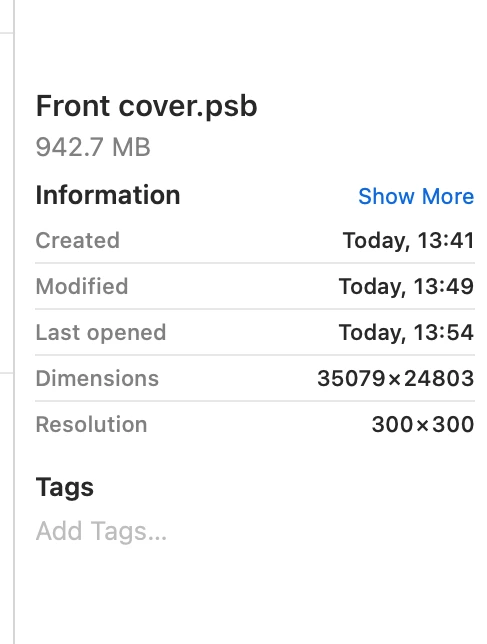
I had a look at the photoshop file and it was HUGE all my files used to save as psd and not the format it is now but i havent done anything other than update my photoshop to the 2022 version. 

How do i fix this im so stressed I have a deadline on the 10th of March and can't achieve anything with my photoshop. 
 

    This topic has been closed for replies.

    3 replies

    Participant
    March 3, 2022

    I am experiencing this same issue!!! Updated a few nights ago and now every file I open takes FOREVER!!! What do we do?!

    Legend
    March 3, 2022

    Sonia, please start by telling us your image size in pixels, your version of Photoshop, and your operating system. Please answer all three. 

    D Fosse
    Community Expert
    Community Expert
    March 3, 2022

    First of all, to get it out of the way: do you really need 35000 x 25000 pixels?


    It's a very common misunderstanding that print files always need to be 300 ppi regardless of size.


    In reality, the bigger the reproduction, the lower the ppi requirement, because it will be seen from farther away. A wall-sized banner can be printed at 20 ppi and still look perfectly sharp. The very same file can be used for any size, from magazine spread to billboard.


    Participating Frequently
    March 3, 2022

    how do I change the pixels?

    D Fosse
    Community Expert
    Community Expert
    March 3, 2022

    It would help to know what kind of image it is, where it originally comes from, and what the intended use is.


    But just to answer the question, Image > Image Size.

    Peru Bob
    Community Expert
    Community Expert
    March 3, 2022

    I've moved this from the Using the Community forum (which is the forum for issues using the forums) to the Photoshop forum so that proper help can be offered.