Answered
Latest PhotoShop CC upgrade causes display driver problem. How can it be solved?
Things were working fine until I committed to the upgrade this morning, and then I got this message when I opened Ps CC: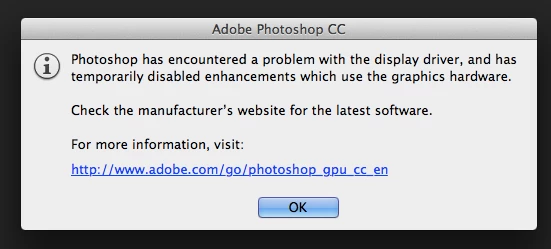
How can this be resolved?
Thanks,
Anna

Things were working fine until I committed to the upgrade this morning, and then I got this message when I opened Ps CC:
How can this be resolved?
Thanks,
Anna
Since 14.1 my photoshop has been crashing consistently also:
Photoshop crashed on 14/09/2013 at 12:16:57 PM (GetImageViewResourceSharingGLContext)
The GPU Sniffer crashed on 14/09/2013 at 1:04:13 PM
I am using the stable 13.4 Catalyst drivers for a HD7970 on Windows 7 64bit.
The update to 14.1.1 which installed this morning hasn't fixed it. I have tried removing the drivers by standard method and reinstalling, I have also tried removing the drivers, then running a full driver clean using the official AMD tool, and reinstalling, neither of which helped.
Is it possible to rollback to version 14.0 somehow? It was all working fine last week. At least today I can make a selection without Photoshop crashing, so that's an improvement over 14.1.
The Sytem Info output is as follows:
Adobe Photoshop Version: 14.1.1 (14.1.1 20130910.r.414 2013/09/10:23:00:00) x64
Operating System: Windows 7 64-bit
Version: 6.1 Service Pack 1
System architecture: Intel CPU Family:6, Model:10, Stepping:9 with MMX, SSE Integer, SSE FP, SSE2, SSE3, SSE4.1, SSE4.2, HyperThreading
Physical processor count: 4
Logical processor count: 8
Processor speed: 3500 MHz
Built-in memory: 16258 MB
Free memory: 8450 MB
Memory available to Photoshop: 14609 MB
Memory used by Photoshop: 59 %
Image tile size: 1024K
Image cache levels: 4
Photoshop crashed on 14/09/2013 at 12:16:57 PM (GetImageViewResourceSharingGLContext)
The GPU Sniffer crashed on 14/09/2013 at 1:04:13 PM
Display: 1
Display Bounds: top=0, left=0, bottom=1200, right=1920
Display: 2
Display Bounds: top=1200, left=0, bottom=2280, right=1920
OpenGL Drawing: Disabled.
OpenGL Allow Old GPUs: Not Detected.
Serial number: 90970366049377642337
Application folder: C:\Program Files\Adobe\Adobe Photoshop CC (64 Bit)\
Temporary file path: G:\temp\
Photoshop scratch has async I/O enabled
Scratch volume(s):
G:\, 238.5G, 23.4G free
C:\, 238.4G, 81.7G free
Required Plug-ins folder: C:\Program Files\Adobe\Adobe Photoshop CC (64 Bit)\Required\Plug-Ins\
Primary Plug-ins folder: C:\Program Files\Adobe\Adobe Photoshop CC (64 Bit)\Plug-ins\
Installed components:
ACE.dll ACE 2013/07/14-12:09:50 79.543790 79.543790
adbeape.dll Adobe APE 2013/02/04-09:52:32 0.1160850 0.1160850
AdobeLinguistic.dll Adobe Linguisitc Library 7.0.0
AdobeOwl.dll Adobe Owl 2013/03/03-12:10:08 5.0.13 79.533484
AdobePDFL.dll PDFL 2013/03/13-12:09:15 79.499517 79.499517
AdobePIP.dll Adobe Product Improvement Program 7.0.0.1786
AdobeXMP.dll Adobe XMP Core 2013/03/13-12:09:15 79.151481 79.151481
AdobeXMPFiles.dll Adobe XMP Files 2013/03/13-12:09:15 79.151481 79.151481
AdobeXMPScript.dll Adobe XMP Script 2013/03/13-12:09:15 79.151481 79.151481
adobe_caps.dll Adobe CAPS 7,0,0,21
AGM.dll AGM 2013/07/14-12:09:50 79.543790 79.543790
ahclient.dll AdobeHelp Dynamic Link Library 1,8,0,31
aif_core.dll AIF 5.0 79.534508
aif_ocl.dll AIF 5.0 79.534508
aif_ogl.dll AIF 5.0 79.534508
amtlib.dll AMTLib (64 Bit) 7.0.0.169 BuildVersion: 7.0; BuildDate: Mon Apr 8 2013 2:31:50) 1.000000
ARE.dll ARE 2013/07/14-12:09:50 79.543790 79.543790
AXE8SharedExpat.dll AXE8SharedExpat 2011/12/16-15:10:49 66.26830 66.26830
AXEDOMCore.dll AXEDOMCore 2011/12/16-15:10:49 66.26830 66.26830
Bib.dll BIB 2013/07/14-12:09:50 79.543790 79.543790
BIBUtils.dll BIBUtils 2013/07/14-12:09:50 79.543790 79.543790
boost_date_time.dll DVA Product 7.0.0
boost_signals.dll DVA Product 7.0.0
boost_system.dll DVA Product 7.0.0
boost_threads.dll DVA Product 7.0.0
cg.dll NVIDIA Cg Runtime 3.0.00007
cgGL.dll NVIDIA Cg Runtime 3.0.00007
CIT.dll Adobe CIT 2.1.6.30929 2.1.6.30929
CITThreading.dll Adobe CITThreading 2.1.6.30929 2.1.6.30929
CoolType.dll CoolType 2013/07/14-12:09:50 79.543790 79.543790
dvaaudiodevice.dll DVA Product 7.0.0
dvacore.dll DVA Product 7.0.0
dvamarshal.dll DVA Product 7.0.0
dvamediatypes.dll DVA Product 7.0.0
dvaplayer.dll DVA Product 7.0.0
dvatransport.dll DVA Product 7.0.0
dvaunittesting.dll DVA Product 7.0.0
dynamiclink.dll DVA Product 7.0.0
ExtendScript.dll ExtendScript 2013/03/21-12:10:31 79.535742 79.535742
FileInfo.dll Adobe XMP FileInfo 2013/03/19-12:09:02 79.151561 79.151561
filter_graph.dll AIF 5.0 79.534508
icucnv40.dll International Components for Unicode 2011/11/15-16:30:22 Build gtlib_3.0.16615
icudt40.dll International Components for Unicode 2011/11/15-16:30:22 Build gtlib_3.0.16615
imslib.dll IMSLib DLL 7.0.0.116
JP2KLib.dll JP2KLib 2013/02/19-12:28:44 79.248139 79.248139
libifcoremd.dll Intel(r) Visual Fortran Compiler 10.0 (Update A)
libiomp5md.dll Intel(R) OMP Runtime Library 5.0
libmmd.dll Intel(r) C Compiler, Intel(r) C++ Compiler, Intel(r) Fortran Compiler 12.0
LogSession.dll LogSession 2.1.2.1785
mediacoreif.dll DVA Product 7.0.0
MPS.dll MPS 2013/03/15-13:25:52 79.535029 79.535029
msvcm80.dll Microsoft® Visual Studio® 2005 8.00.50727.6195
msvcm90.dll Microsoft® Visual Studio® 2008 9.00.30729.1
msvcp100.dll Microsoft® Visual Studio® 2010 10.00.40219.1
msvcp80.dll Microsoft® Visual Studio® 2005 8.00.50727.6195
msvcp90.dll Microsoft® Visual Studio® 2008 9.00.30729.1
msvcr100.dll Microsoft® Visual Studio® 2010 10.00.40219.1
msvcr80.dll Microsoft® Visual Studio® 2005 8.00.50727.6195
msvcr90.dll Microsoft® Visual Studio® 2008 9.00.30729.1
PatchMatch.dll PatchMatch 2013/06/11-12:08:08 79.542390 79.542390
pdfsettings.dll Adobe PDFSettings 1.04
Photoshop.dll Adobe Photoshop CC CC
Plugin.dll Adobe Photoshop CC CC
PlugPlugOwl.dll Adobe(R) CSXS PlugPlugOwl Standard Dll (64 bit) 4.0.1.34
PSArt.dll Adobe Photoshop CC CC
PSViews.dll Adobe Photoshop CC CC
SCCore.dll ScCore 2013/03/21-12:10:31 79.535742 79.535742
ScriptUIFlex.dll ScriptUIFlex 2013/03/21-12:10:31 79.535742 79.535742
svml_dispmd.dll Intel(r) C Compiler, Intel(r) C++ Compiler, Intel(r) Fortran Compiler 12.0
tbb.dll Intel(R) Threading Building Blocks for Windows 4, 1, 2012, 1003
tbbmalloc.dll Intel(R) Threading Building Blocks for Windows 4, 1, 2012, 1003
updaternotifications.dll Adobe Updater Notifications Library 7.0.1.102 (BuildVersion: 1.0; BuildDate: BUILDDATETIME) 7.0.1.102
WRServices.dll WRServices Mon Feb 25 2013 16:09:10 Build 0.19078 0.19078
Required plug-ins:
3D Studio 14.1.1 (14.1.1 x001)
Accented Edges 14.1.1
Adaptive Wide Angle 14.1.1
Angled Strokes 14.1.1
Average 14.1.1 (14.1.1 x001)
Bas Relief 14.1.1
BMP 14.1.1
Camera Raw 8.1
Camera Raw Filter 8.1
Chalk & Charcoal 14.1.1
Charcoal 14.1.1
Chrome 14.1.1
Cineon 14.1.1 (14.1.1 x001)
Clouds 14.1.1 (14.1.1 x001)
Collada 14.1.1 (14.1.1 x001)
Color Halftone 14.1.1
Colored Pencil 14.1.1
CompuServe GIF 14.1.1
Conté Crayon 14.1.1
Craquelure 14.1.1
Crop and Straighten Photos 14.1.1 (14.1.1 x001)
Crop and Straighten Photos Filter 14.1.1
Crosshatch 14.1.1
Crystallize 14.1.1
Cutout 14.1.1
Dark Strokes 14.1.1
De-Interlace 14.1.1
Dicom 14.1.1
Difference Clouds 14.1.1 (14.1.1 x001)
Diffuse Glow 14.1.1
Displace 14.1.1
Dry Brush 14.1.1
Eazel Acquire 14.1.1 (14.1.1 x001)
Embed Watermark 4.0
Entropy 14.1.1 (14.1.1 x001)
Extrude 14.1.1
FastCore Routines 14.1.1 (14.1.1 x001)
Fibers 14.1.1
Film Grain 14.1.1
Filter Gallery 14.1.1
Flash 3D 14.1.1 (14.1.1 x001)
Fresco 14.1.1
Glass 14.1.1
Glowing Edges 14.1.1
Google Earth 4 14.1.1 (14.1.1 x001)
Grain 14.1.1
Graphic Pen 14.1.1
Halftone Pattern 14.1.1
HDRMergeUI 14.1.1
IFF Format 14.1.1
Ink Outlines 14.1.1
JPEG 2000 14.1.1
Kurtosis 14.1.1 (14.1.1 x001)
Lens Blur 14.1.1
Lens Correction 14.1.1
Lens Flare 14.1.1
Liquify 14.1.1
Matlab Operation 14.1.1 (14.1.1 x001)
Maximum 14.1.1 (14.1.1 x001)
Mean 14.1.1 (14.1.1 x001)
Measurement Core 14.1.1 (14.1.1 x001)
Median 14.1.1 (14.1.1 x001)
Mezzotint 14.1.1
Minimum 14.1.1 (14.1.1 x001)
MMXCore Routines 14.1.1 (14.1.1 x001)
Mosaic Tiles 14.1.1
Multiprocessor Support 14.1.1 (14.1.1 x001)
Neon Glow 14.1.1
Note Paper 14.1.1
NTSC Colors 14.1.1 (14.1.1 x001)
Ocean Ripple 14.1.1
Oil Paint 14.1.1
OpenEXR 14.1.1
Paint Daubs 14.1.1
Palette Knife 14.1.1
Patchwork 14.1.1
Paths to Illustrator 14.1.1
PCX 14.1.1 (14.1.1 x001)
Photocopy 14.1.1
Photoshop 3D Engine 14.1.1 (14.1.1 x001)
Photoshop Touch 14.0
Picture Package Filter 14.1.1 (14.1.1 x001)
Pinch 14.1.1
Pixar 14.1.1 (14.1.1 x001)
Plaster 14.1.1
Plastic Wrap 14.1.1
PNG 14.1.1
Pointillize 14.1.1
Polar Coordinates 14.1.1
Portable Bit Map 14.1.1 (14.1.1 x001)
Poster Edges 14.1.1
Radial Blur 14.1.1
Radiance 14.1.1 (14.1.1 x001)
Range 14.1.1 (14.1.1 x001)
Read Watermark 4.0
Reticulation 14.1.1
Ripple 14.1.1
Rough Pastels 14.1.1
Save for Web 14.1.1
ScriptingSupport 14.1.1
Shake Reduction 14.1.1
Shear 14.1.1
Skewness 14.1.1 (14.1.1 x001)
Smart Blur 14.1.1
Smudge Stick 14.1.1
Solarize 14.1.1 (14.1.1 x001)
Spatter 14.1.1
Spherize 14.1.1
Sponge 14.1.1
Sprayed Strokes 14.1.1
Stained Glass 14.1.1
Stamp 14.1.1
Standard Deviation 14.1.1 (14.1.1 x001)
STL 14.1.1 (14.1.1 x001)
Sumi-e 14.1.1
Summation 14.1.1 (14.1.1 x001)
Targa 14.1.1
Texturizer 14.1.1
Tiles 14.1.1
Torn Edges 14.1.1
Twirl 14.1.1
Underpainting 14.1.1
Vanishing Point 14.1.1
Variance 14.1.1 (14.1.1 x001)
Variations 14.1.1 (14.1.1 x001)
Water Paper 14.1.1
Watercolor 14.1.1
Wave 14.1.1
Wavefront|OBJ 14.1.1 (14.1.1 x001)
WIA Support 14.1.1 (14.1.1 x001)
Wind 14.1.1
Wireless Bitmap 14.1.1 (14.1.1 x001)
ZigZag 14.1.1
Optional and third party plug-ins: NONE
Plug-ins that failed to load: NONE
Flash:
Mini Bridge
Kuler
Adobe Exchange
Installed TWAIN devices: NONE
As indicated by the sniffer crashes - something is wrong with your video card or it's drivers. You probably need to contact AMD for more information (to diagnose the problem with the card, or get them information to debug the driver).
Already have an account? Login
Enter your E-mail address. We'll send you an e-mail with instructions to reset your password.
 AdChoices