

Participant
March 2, 2023
Answered
Layer mask - How do I return to default settings
- March 2, 2023
- 1 reply
- 1782 views
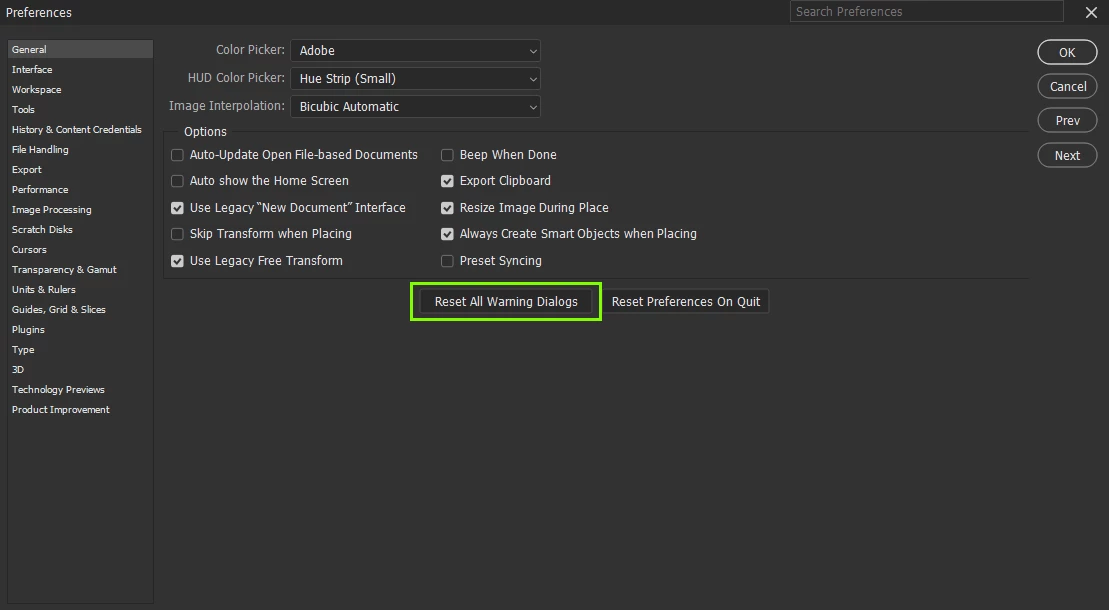
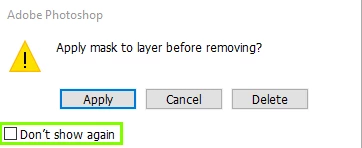
A while ago I changed the automatic settings on layer masks, and I want to revert back and I don't know how.
Here's what I do:
When I am using a layer mask and I want to implement it, I grab the layer mask icon in the layers pallette and drag it on to the bin symbol in layers. This takes the editing features of the mask away, and makes it a normal layer. I changed something a while ago, and when I do this, it reverts to how the layer was before the mask. It doesn't seal the mask into the layer. It's really annoying…
I can't figure out how to reverse this. (see dodgy screengrab)
Anyone have any ideas?
Thanks
 AdChoices