

michaelp37878722
Participating Frequently
August 4, 2020
Question

Layer palette hiding the canvas?

  • August 4, 2020
  • 2 replies
  • 390 views


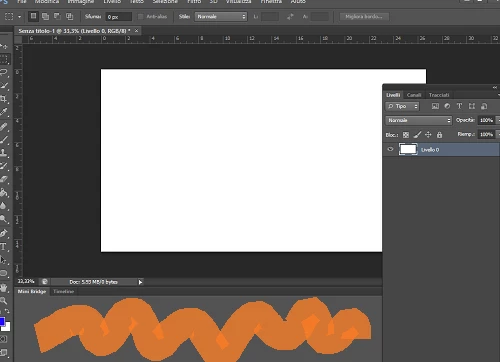
Hello guys, i want the layer palette to stay at the right everytime i open PS, now it's above the canvas, i can move it to the right but it's still big enough to cover part of the canvas. I want to see the entire canvas and the layer palette at the side small enough to not cover it. How can i do it? thank you


Also that orange area under the canvas, how can i make it smaller? there is nothing there but its still too big, thank you!
This topic has been closed for replies.

2 replies

barbara_a7746676
Community Expert
Community Expert
August 4, 2020

Once you get your panels arranged the way you like, you may want to choose Window > Workspace > New Workspace. Give your workspace a name and save it. It will appear at the top of the workspace list. That way if your workspace accidentally changes, you can reset it under the Window menu.

michaelp37878722
Participating Frequently
August 5, 2020


very helpful thank you!

jane-e
Community Expert
Community Expert
August 4, 2020

It will do that when it is a floating panel. To dock it, go to Window > Workspace > Reset to reset the current workspace. You can also drag the title bar into the drop zone to dock it. Details here:

https://helpx.adobe.com/photoshop/using/workspace-basics.html

~ Jane


michaelp37878722
Participating Frequently
August 5, 2020


OK THANKS!

jane-e
Community Expert
Community Expert
August 5, 2020

"Also that orange area under the canvas"


You're welcome, Michael, and I'm glad it's working for you now.


I forgot to answer Part 2 of your question, though. What you have at the bottom are two panels called Mini Bridge and Timeline. When you dock the Layers panel that is currently floating, you may see a close button in the upper right of the panel. The second way to close it is to go to the Window menu where you will see all the panels in alphabetical order and turn them off there.


~ Jane