

csgaraglino
Known Participant
March 10, 2023
Answered

Layer select and drag rescent change bites the big one!

  • March 10, 2023
  • 3 replies
  • 1324 views

Ok, I am SOOOOO done with the recent change to selecting and dragging layers with the move tool.


Previously, if I selected a layer or multiple layers and then used the move tool to click (anywhere) & drag them to a new position, they would ACTUALLY be what "moved."


With the recent changes, if I select a layer or multiple layers and use the move tool to click & drag them to a new position, whatever I clicked on the canvas actually moves instead! This is the way it has been for 20+ years!


Seriously, how do I set this back?


I tried, really tried, but I need to set this process BACK to how it used to be - I am wasting so much time and screwing up too many placements t [removed by moderator], and then I bail on the project.
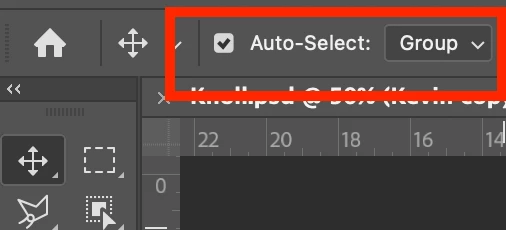
This topic has been closed for replies.
Correct answer Kevin Stohlmeyer

Hi @csgaraglino check your options bar at the top - what do you have set for "Auto Select"?


3 replies

ProtectorOfThe Realm
Participating Frequently
July 30, 2023

It used to not be like this. Why can't they just change it back. The new version provides no advantage whatsoever and is a monumental step backward in intuitive workflow.

Conrad_C
Community Expert
Community Expert
July 30, 2023
quote

The new version provides no advantage whatsoever and is a monumental step backward in intuitive workflow.

By @ProtectorOfThe Realm


There are many users who do like Auto-Select for, ironically, the exact reason you stated: It’s more intuitive…for those used to other applications where if you want to select an object (layer) in the document window, you click it. Before Photoshop had Auto-Select, that was not possible, it was not consistent with other applications, clicking to select did not work as one might intuit from those other applications. With Auto-Select on, if someone clicks to select as they would in other applications like Illustrator, InDesign, After Effects, etc, the selection change intuitively works.


But, the whole reason Auto-Select is optional is because it can also be very annoying if you mostly click the Move tool in the canvas to do something other than change the selection. Like for me personally, what is most productive is to leave Auto-Select disabled to avoid accidental selections, but when I do want to select by clicking, I use the “Auto-Select on demand” shortcut of Command-clicking a layer on the canvas. That combo — Auto-Select off by default, activate only on demand — works best for me.

ProtectorOfThe Realm
Participating Frequently
July 30, 2023

@Kevin Stohlmeyer  @csgaraglino  none of your susggestions work nor doe theuy help. This has nothing to do with auroselect... the software is horrible now. Simple horrible. Feels worse than v. 1.0 in 1995.

Kevin Stohlmeyer
Community Expert
Kevin StohlmeyerCommunity ExpertCorrect answer
Community Expert
March 10, 2023

Hi @csgaraglino check your options bar at the top - what do you have set for "Auto Select"?


csgaraglino
Known Participant
March 10, 2023

I searched EVERYWHERE in the settings and didn't find it - I never thought to look there!


Thank you!