February 9, 2017
Answered

Layer Style Drop Shadow not working

  • February 9, 2017
  • 3 replies
  • 34550 views

Hello, I am doing the classroom in a book (2015 edition) with CC2017 release and i am learning layer styles. I am trying to apply a drop shadow and inner stroke layer style to a layer (single layer, selected, not background) but only the stroke is working. The drop shadow doesn't appear at all.

If anyone has the book i'm on page 306. Following the instructions to the letter. Did something extremely subtle change between 2015 and 2017? Am i missing something really obvious?! It's driving me crazy

The drop shadow shows up on the little preview box and disappears if i uptick drop shadow, reappears if i tick it again. But for love nor money it will not apply it to the layer itself. What am I doing wrong?!

Thank you very much for any help

Sharon
    This topic has been closed for replies.
    Correct answer

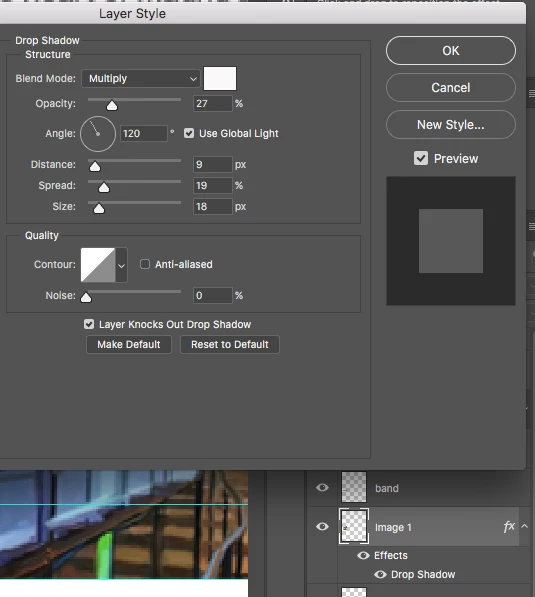
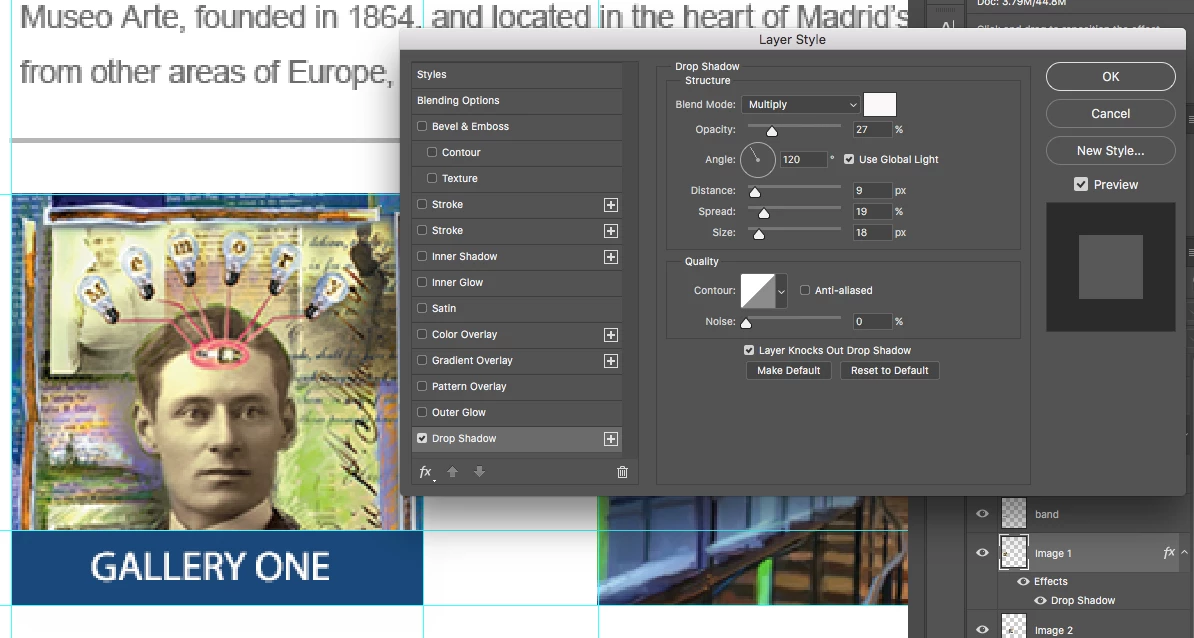
    Hello Dave, thank you very much for replying to me. Here is are a couple of screen shots. I hope they are clear enough. The drop shadow applies to the little preview box if I leave the blend mode as 'screen' but disappears if i change the blend mode to 'multiply'. However, in either of these settings - the drop shadow doesn't apply to the layer at all. The layer i am trying to add the drop shadow to is the image on the left of the first screen shot - as you see there is no drop shadow (and still isn't after i press ok on these settings). I have the transparency on the layer you mentioned. I am extremely grateful for your help with this! Thank you!

    Ahhhhhhh!!!!!!! I have just figured it out - it's the COLOUR OF THE DROP SHADOW!!!! It's still white!!! Ahahahahaha. Hilariously i am used to following the book instructions to the letter, and on this page they miss out 'change the colour' and 'change mode to multiply'. When they miss something - i miss something!!!

    Wow - sometimes it's the really obvious things staring you in the face!!

    Right i'm going to make a cup of tea as apparently i need one and say again thank you very very much for your help with this and sorry for being such a twit!

    Thank you!

    Sharon

    3 replies

    Radiant_visionaryB839
    Participant
    January 27, 2020

    Hi I am having the same problem and my color is set on black. Nothing is responding in the drop shadow mode. I have all of the same things ticked as above. I don't have a white square I have a black square. 

    hannahb32083630
    Participant
    January 27, 2020

    Hi I just had this problem and it resloved when I saved, closed out of the application and reopened it. You may also want to check if you have any updates. 

    Participant
    February 7, 2020

    Hi, I'm using Photoshop 2020 and my drop shadow doesn't work I did all of what you said and still nothing.


    Correct answer
    February 10, 2017

    Hello Dave, thank you very much for replying to me. Here is are a couple of screen shots. I hope they are clear enough. The drop shadow applies to the little preview box if I leave the blend mode as 'screen' but disappears if i change the blend mode to 'multiply'. However, in either of these settings - the drop shadow doesn't apply to the layer at all. The layer i am trying to add the drop shadow to is the image on the left of the first screen shot - as you see there is no drop shadow (and still isn't after i press ok on these settings). I have the transparency on the layer you mentioned. I am extremely grateful for your help with this! Thank you!

    Ahhhhhhh!!!!!!! I have just figured it out - it's the COLOUR OF THE DROP SHADOW!!!! It's still white!!! Ahahahahaha. Hilariously i am used to following the book instructions to the letter, and on this page they miss out 'change the colour' and 'change mode to multiply'. When they miss something - i miss something!!!

    Wow - sometimes it's the really obvious things staring you in the face!!

    Right i'm going to make a cup of tea as apparently i need one and say again thank you very very much for your help with this and sorry for being such a twit!

    Thank you!

    Sharon

    davescm
    Community Expert
    Community Expert
    February 10, 2017

    Hi

    Don't worry - you're not the first, and won't be the last, to be scratching your head over something. No matter how much we use the program - occasionally we miss something simple . Glad you got it sorted.

    Dave

    davescm
    Community Expert
    Community Expert
    February 9, 2017

    I don't have the book but do have a couple of questions.

    1. Have you got some transparency around the pixels/shape on the layer you are working on to allow the shadow to show on the background. Can you post your layers panel (example below)

    2. What are your drop shadow settings? (Example below)

    Dave