

Rudi Spitzers
Known Participant
September 28, 2022
Answered

Layer styles inside a group

  • September 28, 2022
  • 1 reply
  • 349 views

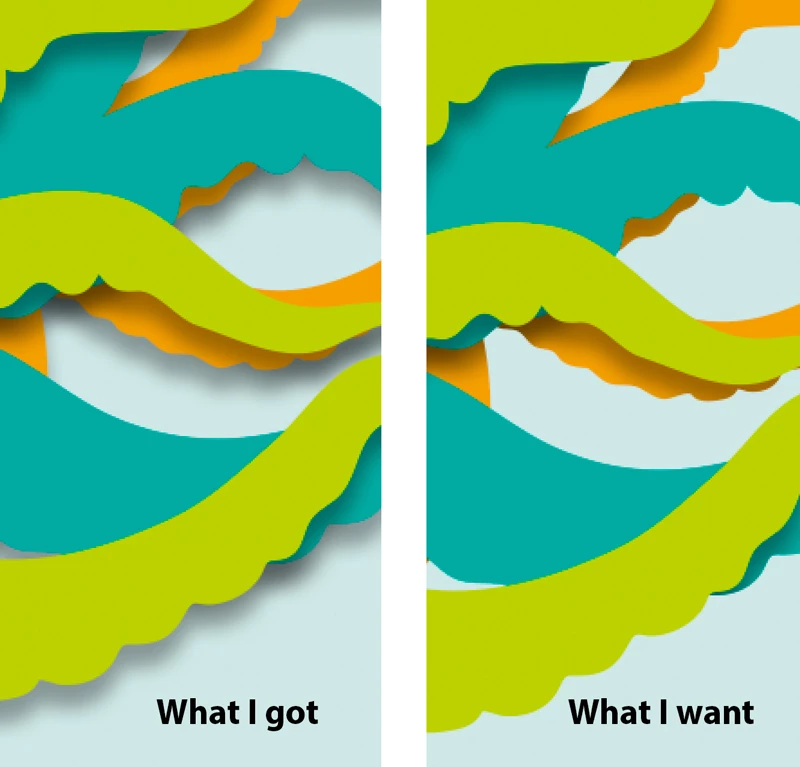
I have three shapes with drop shadows. I only want to make the dropshadow work inside a group and not on the background layer. I want to keep the stype alive and not convert the style into a layer. 

Hope the image wil give enough info
This topic has been closed for replies.
Correct answer Chuck Uebele

I'm not sure an action would work, but a script could most likely accomplish this. An action would require the exact same number of layers, whereas a script could create a loop to take into account however many layers that you have.

1 reply

Chuck Uebele
Community Expert
Community Expert
September 28, 2022

I would add a layer mask to the group, by holding the alt/opt key, so the mask is filled with black. For each layer within the group, I would ctrl/cmd click to create a selection. Then add white using that selection to the group mask.

Rudi Spitzers
Known Participant
September 29, 2022

Thanks Chuck,

that would work. Even better if I could put this into an action.

Chuck Uebele
Community Expert
Chuck UebeleCommunity ExpertCorrect answer
Community Expert
September 29, 2022

I'm not sure an action would work, but a script could most likely accomplish this. An action would require the exact same number of layers, whereas a script could create a loop to take into account however many layers that you have.