
Known Participant
January 9, 2021
Answered

Layers flattened automatically

  • January 9, 2021
  • 3 replies
  • 2100 views

I started a collage yesterday which contained several layers. I wasn't finished with my work and saved it. When I returned today to complete my work all of the layers were flattened into one layer. Is this typical behavior of Photoshop? Is there anything that I could be doing to prevent this in the future? Thank you.
This topic has been closed for replies.
Correct answer Norman Sanders

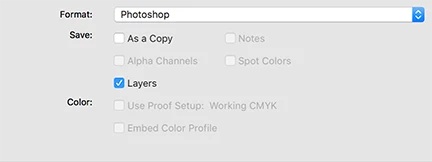
When you Save As >  Format: Photoshiop (psd) file, confirm that Layers is chcked 

3 replies

Participant
February 23, 2024

Im having this issue WHILE USING PHOTOSHOP. Its so frustratiung. Am I hitting a keyboard shortcut on accident?

Norman Sanders
Norman SandersCorrect answer
Legend
January 9, 2021

When you Save As >  Format: Photoshiop (psd) file, confirm that Layers is chcked 

Participant
February 15, 2022

There is a little issue 😉 When you have layered Photoshop file. Then you save it into .pdf file without layers you still see your layers on panel. Next if you will save it into .psd again (layers is still on panel), and open it again your image will be flatten. I lost several files doing things as i described.

You can have situation when you do some changes in your project and first save it to pdf for your client and then save it again in .psd. Afert that you can't go back to this file and edit becouse it'll be flatten when you try to open it again.

davescm
Community Expert
Community Expert
February 15, 2022

Yes - that is an old "gotcha". After saving as PDF without keeping layer compatibility then you need to Save As and ensure that the layers box is rechecked in order to keep your layered PSD file. It has caught out many people at least once! There is a warning when saving the PDF but the significance is often overlooked.

It was temporarily fixed when the changes were made to Save /Save As but was reintroduced when the later version with a legacy Save As option was added.

Dave

davescm
Community Expert
Community Expert
January 9, 2021

In what format did you save (jpeg and png do not support layers)

If you used a format that does support layers (PSD/TIFF/PSB) check that "layers" is ticked in the save dialogue.


Dave


Known Participant
January 9, 2021

Thank you, Dave! I am a PS Newbie and, thus, still on the lower end of the learning curve. I also noticed that when I open a photo (or in this case, a collage) from LR, I am given 3 options. I had been checking to "Edit a Copy with LR Adjustments." When I did that, the result was a flattened collage. When I selected "Edit a Copy" or "Edit Original," the result was my collage with the layers intact. I guess this is a part of my learning the relationship between LR and PS, too. Again, thank you. Your reply was helpful.

Dave