
jack4564
Inspiring
April 10, 2017
Answered

Left and right bracket keys randomly don't work [2017]

  • April 10, 2017
  • 5 replies
  • 13483 views

I have been using Photoshop CC for about a year. the latest updates are installed. Windows 10 up to date. Almost since the beginning the left and right bracket keys randomly do not function to increase or decrease brush size. If I click once or twice on the workspace, often it corrects itself. I have tried 2 different wired keyboards and 2 different wireless keyboards with the same results.

Thanks

JK
This topic has been closed for replies.
Correct answer Terri Stevens

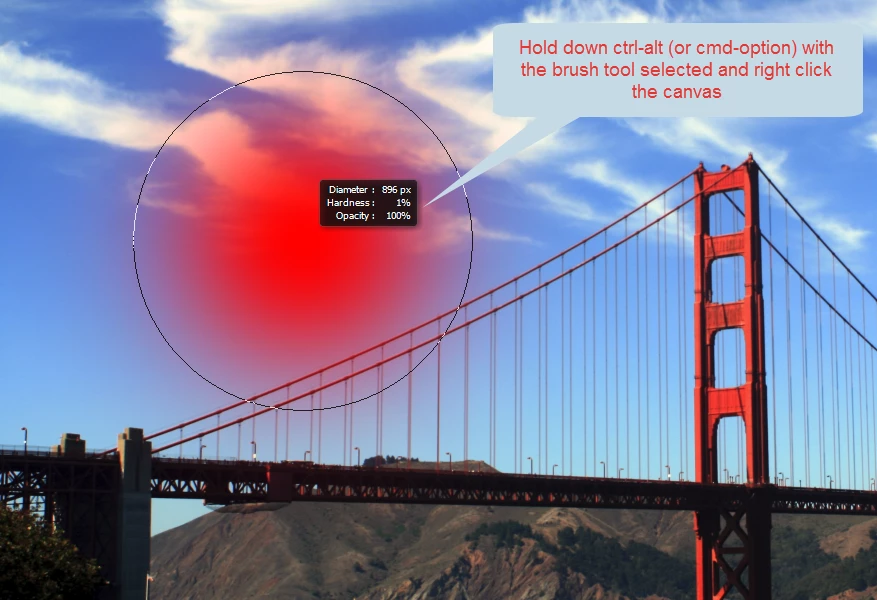
I have seen that also on many versions of Photoshop. If you adjust the brush size through the toolbar that always fixes it, but it is annoying. I prefer to use a different keyboard shortcut that allows not just brush size but also hardness to be changed dynamically. All you do is hold down ctrl-alt on a PC or cmd-option on a Mac and right click the canvas. Moving the mouse left and right and up and down then changes the key brush attributes.

5 replies

Participant
June 10, 2023

Ensuring 'Caps Lock' is OFF solved this issue for me. Hopefully this tip will help someone else if the other fixes don't work.

Participant
September 26, 2021

Do you use the Spanish or alternative keyboard?

The brackets are different. Go back to Enlglish and try again 🙂 

gsmaga2015
Participant
June 1, 2021

Somehow, the keyboard had switched to one of my alternative keyboards (from English to Portuguese) and therefore my brackets stopped working and thus my brush change stopped working. switched the keyboard back to english and it worked again.

Participant
January 7, 2022

I just encountered this problem where the language was switched. Windows has a couple shortcuts that switch the language. Windows-key + space is one of them. Easy to accidentally hit while using photoshop. There doesn't seem to be a simple way to disable the short-cut.

Participant
January 7, 2022


I was using the Spanish Keyboard 😞

--
Boomer Grace
(Personal info removed)

--
This email and any files transmitted with it are confidential and intended
solely for the use of the individual or entity to whom they are addressed.
If you have received this email in error please notify the system manager.

davescm
Community Expert
Community Expert
April 10, 2017

Yes , I have also seen that occasionally. Seems to be "random" in that I've not found a way to reproduce it that I could write up. A minor annoyance.

Dave

Terri Stevens
Terri StevensCorrect answer
Legend
April 10, 2017

I have seen that also on many versions of Photoshop. If you adjust the brush size through the toolbar that always fixes it, but it is annoying. I prefer to use a different keyboard shortcut that allows not just brush size but also hardness to be changed dynamically. All you do is hold down ctrl-alt on a PC or cmd-option on a Mac and right click the canvas. Moving the mouse left and right and up and down then changes the key brush attributes.