
Known Participant
August 1, 2023
Answered

Legacy New Document doesnt work like it used to when selecting artboards

  • August 1, 2023
  • 2 replies
  • 549 views

Hello


So this is a small frustration I'm dealing with on a daily basis now. 

There used to be just a checkbox for making the new document use artboards. This was great because I could
1. Copy an image > 2. File > 3. New (And the canvas size preloads my Copied image dimensions) > 4. Check artboard > 5. Go! (easy, quick, arguably how it should be)

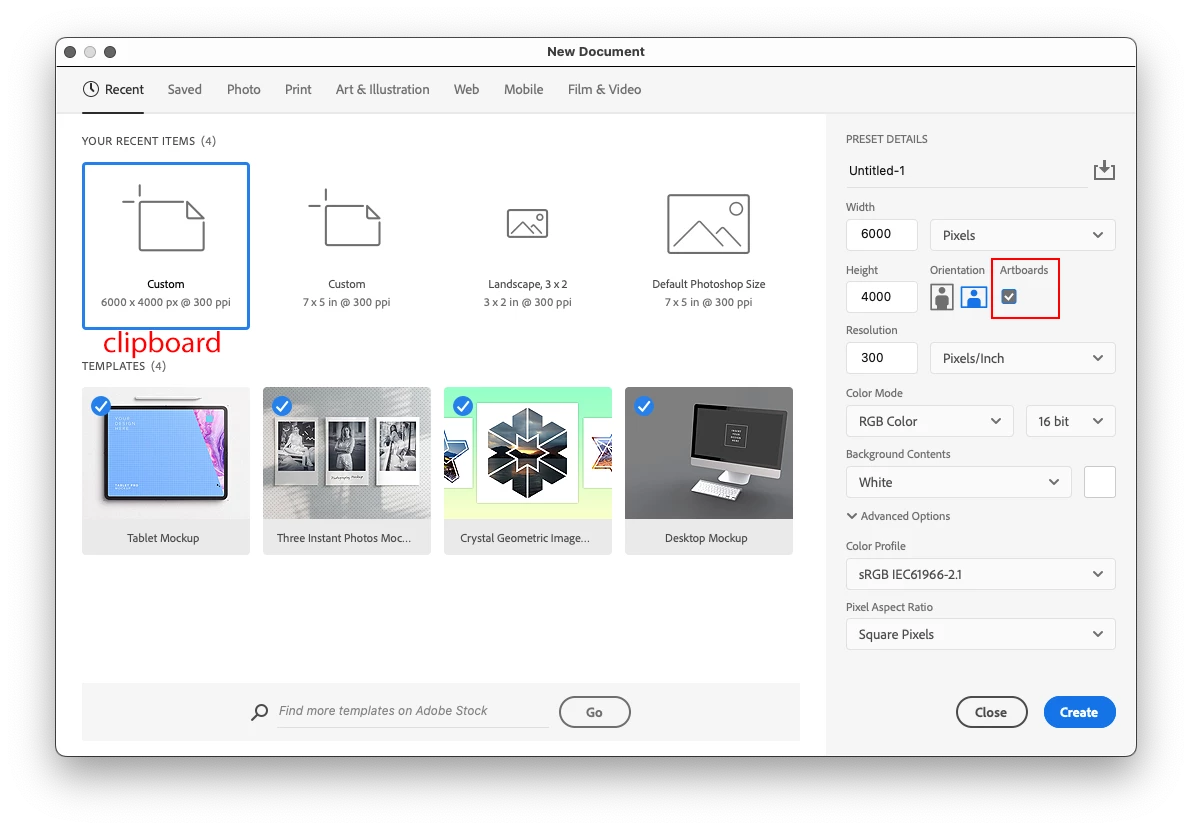
Now however, selecting artboard is an extra step and it erases the preloaded clipboard dimensions, now it looks like this:
1. Copy an image > 2. File > 3. New > 4. Open the dropdown > 5. Select artboard > 6. Now my dimensions disappear and I have to fumble just to FIND what the copied image dimensions were > 7. Enter dimensions manually (This is super annoying) > 8. Go

When you make dozens of new documents per day this gets really annoying. I do have "Legacy New Document" interface checked but that has since been updated to this new format


Is there any way to fix this in settings? Or any chance you can revert the "Legacy New document" interface to how it was?


Thanks
This topic has been closed for replies.
Correct answer Jeff Arola

What if you just use the default New Document dialog instead of the Legacy Document "New Document" Interface?

The default New Document dialog seems to do what you want.


2 replies

Jeff Arola
Community Expert
Jeff ArolaCommunity ExpertCorrect answer
Community Expert
August 3, 2023

What if you just use the default New Document dialog instead of the Legacy Document "New Document" Interface?

The default New Document dialog seems to do what you want.


Known Participant
August 4, 2023

@Jeff Arola thank you! This worked!

What's actually strange is that I was using the legacy feature because of the "New" new document had some bad UX issues, but it looks like they fixed those! 

Its kinda weird that the "legacy new document" was changed to be more like one of the previously updated/glitchy "new" versions. Like why update legacy and still call it legacy. I could swear all they did was reverse legacy and "new" new document functionality and called it a day! 😅

All is good though thanks!


Stephen Marsh
Community Expert
Community Expert
August 2, 2023

@Callingoutn3rds 


A script could probably help you.


  1. Do you copy outside of Photoshop or only from within Photoshop?
  2. Do you want the new Artboard to use the content from the clipboard, or is it a blank new file?
  3. What artboard options do you use? Transparent or Foreground colour etc? Is it always the same or does it vary?
  4. Do you always copy or work with a single bit depth such as 8 bit per channel or does this vary depending on the source that you copy from and you then need to match?
Known Participant
August 2, 2023

A script? does that basically mean adobe considers this a non-issue that wont be fixed?

It's a broken workflow for many thousands of people

Stephen Marsh
Community Expert
Community Expert
August 2, 2023
quote

A script? does that basically mean adobe considers this a non-issue that wont be fixed?

It's a broken workflow for many thousands of people


By @Callingoutn3rds


1) This topic is a "discussion" between end users, not a "bug" or "idea" topic

2) I am not an Adobe employee and can't speak for Adobe


As an end user, I can help you by writing a script to optimise your workflow via the legacy New Document interface, independent of what Adobe may or may not do.