
Inspiring
April 17, 2024
Answered

Legacy Transform is active and cannot be shut off

  • April 17, 2024
  • 5 replies
  • 1117 views

This is one of two problems that has appeared in the past week or so. Legacy free transform has returned, so I once again have to hold the shift key unless I want to warp what I'm resizing. I tried checking the Legacy Transform box, closing Photoshop, opening it again, and deselecting Legacy Transform.

No change.

Then I tried resetting preferences. No change. 

Is this a bug or have I just encountered a surprising new feature?
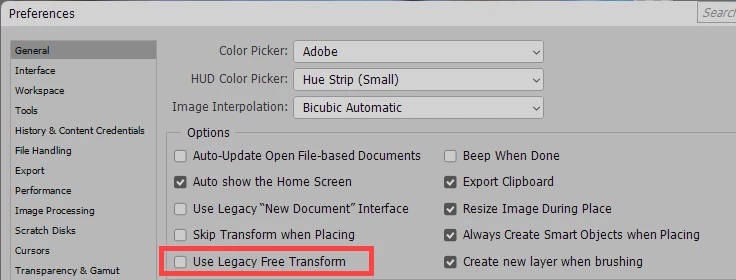
 

Second problem (possibly related; probably not). When I need to save a document and have to navigate to another directory, Photoshop almost always crashes during navigation. The only workaround I've found involves navigating to the directory with a file explorer (Q-Dir or File Explorer), copying the path, and pasting it in to the Save dialog instead of navigating in the normal way.

I'm hoping that somebody has encountered these problems and has found a solution.

Thanks!

Windows 11 64 bit ver 23H2

PS 25.6.0

Correct answer TechByter

PROBABLE SOLUTION:

Wait until Adobe fixes what they broke. The good news is that it works as expected in Photoshop (Beta). It's not advisable to use the beta version for production work, but that's the solution for me for now.

5 replies

Participant
April 28, 2024

Thanks for letting us know!

TechByterAuthorCorrect answer
Inspiring
April 28, 2024

PROBABLE SOLUTION:

Wait until Adobe fixes what they broke. The good news is that it works as expected in Photoshop (Beta). It's not advisable to use the beta version for production work, but that's the solution for me for now.

Jeff Arola
Community Expert
Community Expert
April 25, 2024

In Photoshop with Free Transform enabled go to the Tool Options Bar and click on Maintain Aspect Ratio.


TechByterAuthor
Inspiring
April 25, 2024

That's more work than holding the Shift key down. I was hoping that using the Tool Options Bar would somehow create a sticky setting, but the setting didn't stick even between images, much less between PS Sessions. I suppose the dev team will eventually fix this, but it's a significant annoyance.

vinny dellay
Known Participant
April 24, 2024

I am in the same boat.  A few hours ago, while working, the free transform switched to legacy mode and I now need to hold the shift key down.  I hate it.  and I cannot get it to switch back...

Peru Bob
Community Expert
Community Expert
April 17, 2024
TechByterAuthor
Inspiring
April 18, 2024

Thanks for the suggestion. That's a long and involved process and, unfortunately, it had no effect. I still have to press Shift to maintain proportions.

vinny dellay
Known Participant
April 24, 2024

As of a few hours ago.. I am having the same maddening problem.  Changing the "legacy transform" button in preferences does nothing...