Exit
  • Global community
    • Language:
      • Deutsch
      • English
      • Español
      • Français
      • Português
  • 日本語コミュニティ
  • 한국 커뮤니티
0

Lighting effects tool doesn't work

New Here ,
Apr 24, 2020 Apr 24, 2020

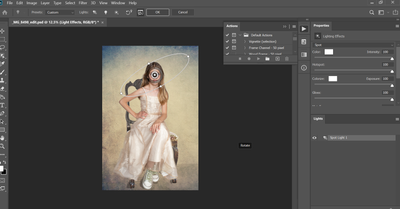
Hello all - I wonder if you can help. My lighting effects too doesn't work.  I have a 2018 Dell XPS13 laptop and have recently downloaded Photoshop 2020.  I've updated the Intel graphics card (as recommended on another post) and this is as far as i get.  I can see the tool, but am not able to create any actual lighting effects regardless of how i set the sliders. It looks like a 3D issue. This image is my first composite but the same thing happens with other RAW files.   I can't believe my Dell could be out of date in 2 years 😞  Any advice would be appreciated. Thanks in advance.


smithster72_0-1587712543567.png


[Moderator: Moved to the PhotoShop forum]


814
Translate
Report
Community guidelines
Be kind and respectful, give credit to the original source of content, and search for duplicates before posting. Learn more
community guidelines
Adobe
Community Expert ,
Apr 24, 2020 Apr 24, 2020

Helleo, we'll need to see the contents of help>system info to know if the graphic card could work.

Kudos for providing a screenshot!

Translate
Report
Community guidelines
Be kind and respectful, give credit to the original source of content, and search for duplicates before posting. Learn more
community guidelines
Community Expert ,
Apr 24, 2020 Apr 24, 2020

Did you also try to change the values using the on-image widget?

You should get a gety half arc with intensity at 100%

Could you show the entierety of the properties panel?

Translate
Report
Community guidelines
Be kind and respectful, give credit to the original source of content, and search for duplicates before posting. Learn more
community guidelines
New Here ,
Oct 03, 2020 Oct 03, 2020

Hi, I am using a iMac  32Gig ram. Latest Photoshop 2020. Older versions of PS Lighting effects worked. On this new, latest PS 2020. When I try to select Lighting Effects it is GREY . Unable to select Lighting Effect . I have set 8bit . What am I missing?

Translate
Report
Community guidelines
Be kind and respectful, give credit to the original source of content, and search for duplicates before posting. Learn more
community guidelines
Community Expert ,
Oct 03, 2020 Oct 03, 2020

On my Mac the Lighting Effects shows a black mask. Let's try a LFX reset.

Press and hold the Option key on your Mac.

The Cancel button at the top changes to Reset. Click on that while still holding down on the option key.

It should set LFX back to defaults.

Translate
Report
Community guidelines
Be kind and respectful, give credit to the original source of content, and search for duplicates before posting. Learn more
community guidelines
Community Expert ,
Oct 03, 2020 Oct 03, 2020
LATEST

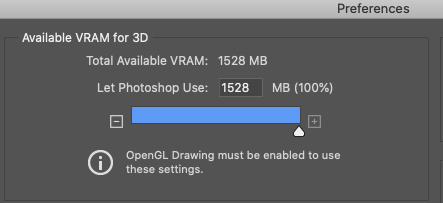
I also have a Intel Graphics card, an older HD4000 in my 2012 MBP In Preferences > 3D make sure you have the maximum ram allocated.

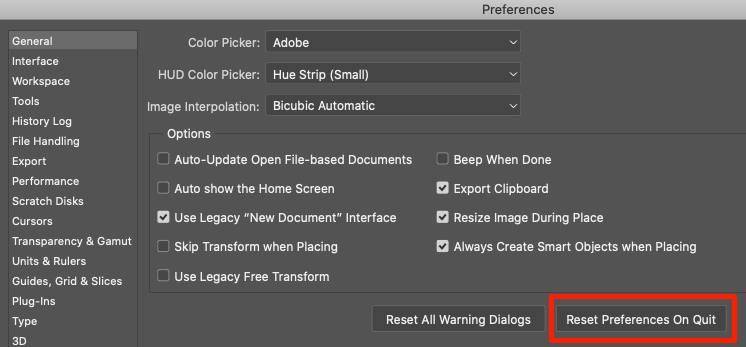
If you have not already, reboot Windows and you may consider reseting Preferences if the above doesn't fix it. See Screenshot.

Screen Shot 2020-10-03 at 1.04.34 PM.png


reset prefs 2020.png

Translate
Report
Community guidelines
Be kind and respectful, give credit to the original source of content, and search for duplicates before posting. Learn more
community guidelines