
Participant
December 6, 2021
Answered

Line drags behind cursor

  • December 6, 2021
  • 3 replies
  • 2447 views

Hello everyone,


Thank you for checking out my post.


I'm new to Photoshop and came across this what you can see in the video below. The line I draw is lagging behind my cursor. I hardly feel like it would be a problem with my PC since I have a 3900X, 32GB of RAM and 1080 Ti.


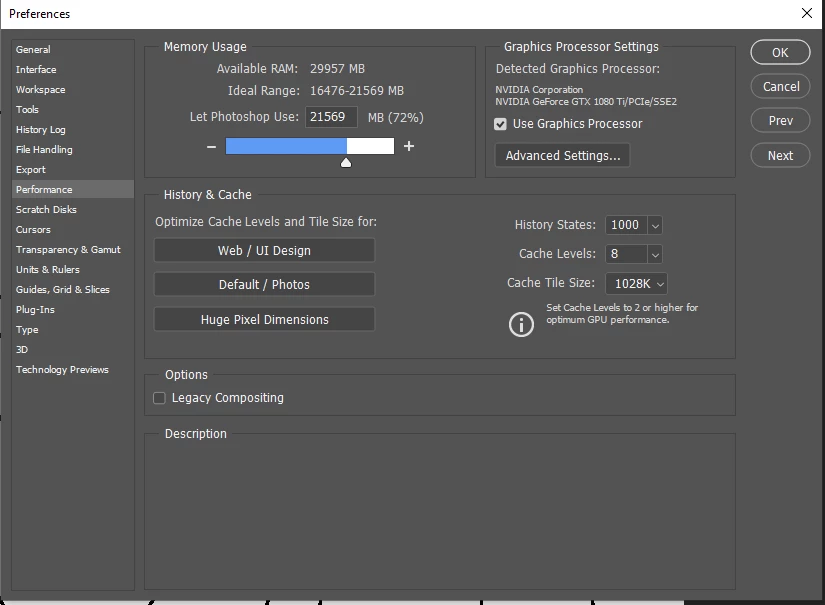
Am I just dumb? What am I doing wrong? It's a clean Photoshop file as well so it couldn't be a bogged down Photoshop client. I tried adjusting some performance settings as you can see in the screenshot below. I also tried putting History States down to 1, problem persists however. I hope someone here can help me out.
 

This topic has been closed for replies.
Correct answer melissapiccone

Your history states are set to 1000 - not one. I suggest you leave it at the default of 50. I think you should reset your preferences. Go under general and check reset preferences on quit and restart PS. 

3 replies

Inspiring
January 2, 2022

In case anyone else has this problem, I was just able to solve it by turning off smoothing in brushes (without resetting preferences). The relevant video is here -- this is actually a "feature" but it presents as a bug. https://www.youtube.com/watch?v=eUPAidoqS-c&list=PL26D5708AC0C24C77&index=1

melissapiccone
Community Expert
melissapicconeCommunity ExpertCorrect answer
Community Expert
December 6, 2021

Your history states are set to 1000 - not one. I suggest you leave it at the default of 50. I think you should reset your preferences. Go under general and check reset preferences on quit and restart PS. 

Melissa Piccone | Adobe Trainer | Online Courses Author | Fine Artist
Participant
December 6, 2021
quote

Your history states are set to 1000 - not one. I suggest you leave it at the default of 50. 


By @melissapiccone


I know, I said that I tried both settings. 50 was default like you said, but that doesn't seem to make a difference for the lag I'm experiencing.


quote

I think you should reset your preferences. Go under general and check reset preferences on quit and restart PS. 


That seems to have fixed it! Thank you so much.

JJMack
Community Expert
Community Expert
December 6, 2021

With poor brush settings on a  huge canvas where you zoom way out and have photoshop changes mega bytes of data with each brush stroke it is easy to make brush strokes lag. If you want even more lag switch to the mixer brush.  On my slow 2GHz PC I think I can start a stroke today an watch it finish tomorrow

JJMack
Participant
December 6, 2021
quote

With poor brush settings on a  huge canvas where you zoom way out and have photoshop changes mega bytes of data with each brush stroke it is easy to make brush strokes lag. 

By @JJMack


Makes sense to me, but this canvas is only 1024 by 1024 pixels. I feel like that's not really a huge canvas is it. And even when I zoom way in, I still get the lag.


quote

 If you want even more lag switch to the mixer brush. 


Well that's weird, trying out the mixer brush makes it lag less.