Inspiring
July 23, 2024
Answered

Line Tool Doesn't Work after latest Update

  • July 23, 2024
  • 4 replies
  • 2083 views

Just did the latest version update of PsCC.

Now LINE TOOL does not work. Yes it draws the line but when I go to save the jpeg, it does NOT show the lin

Just updated PsCC to latest version. Now Line Tool no longer works. Yes I can draw the line! It appears on the image BUT when I "Save Image(jpeg). The Saved file does NOT show it.

Line was drawn on 199F icon.


e drawn.

 

This topic has been closed for replies.
Correct answer Jeff Arola

What are the settings for the Line Tool in the tool options bar?


4 replies

Trevor.Dennis
Community Expert
Community Expert
July 25, 2024

What is the pixel size of the document you are working on?


What are the line settings?

The way to think about this is if your document is fairl big — say 4000 pixels square, and the Line tool was set to 1 pixel, then the line is likely to appear fiant if you are zoomed back from the image, and very unlikely to show in a thumbnail (in Bridge for instance.


If I zoom in to 100% then it becomes easy to see.

Is that is what is going on?

Otherwise, what is the layer opacity?

Does the line color have good contrast with the background?

Are there other layers further up the layer stack that are hiding it?

Trevor.Dennis
Community Expert
Community Expert
July 25, 2024

Incidentally, most of use have been doing this for a long time and answer a LOT of posts on this forum. Christoph is pushing 50,000 posts!!!  It gets frustrating when people give us hardly any information, and don't answer the questions we need the information from to trouble shoot a posters issues.  We are also volunteers, and do this for the love of using the software, and the hope we might learn a new trick or two for ourselves.  

Inspiring
September 16, 2024

Your "solution" did NOT work.

Still many ongoing problems with altest PsCC update.

Thanks

Jeff Arola
Community Expert
Community Expert
July 24, 2024

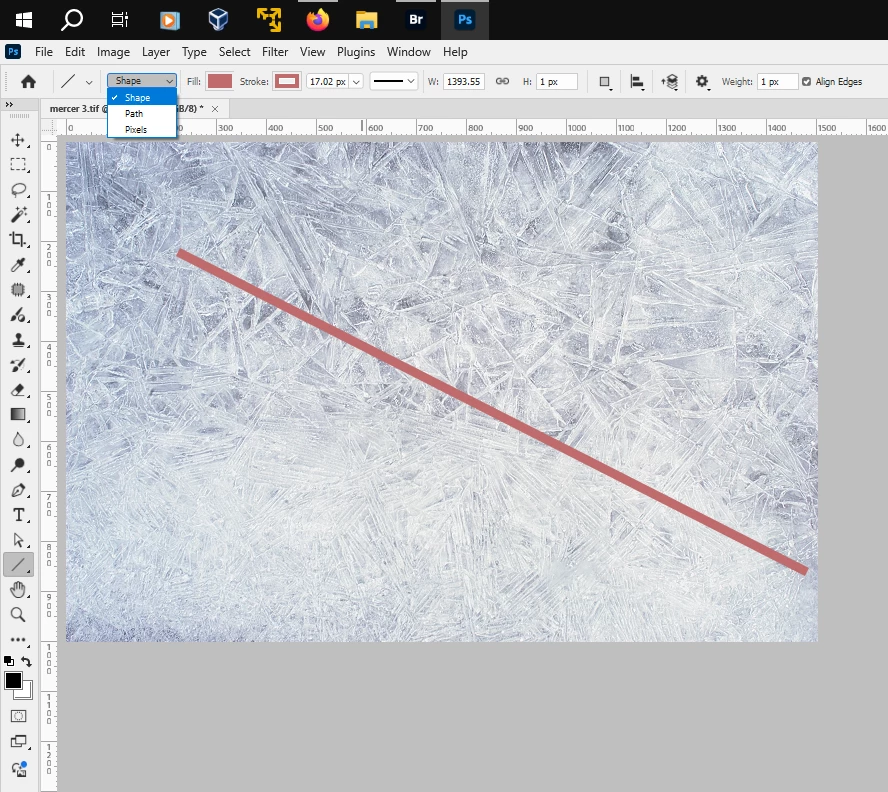
Looks like in your screenshot the Line Tool is set to draw a Path.


In the tool options bar set Shape for the tool mode before drawing out the Line Tool.


Inspiring
July 24, 2024

Thank you! Imeant NO disrespect to your fellow contibutor!

I will give this a try. Also when drawing the line it ended up being a "box" taht you could manipulate but I could never get the drawn line to stay as an arrowheaded line at start. And when I save the file..the file would NOT show the lime.

Thanks!


Inspiring
July 24, 2024

Also it may be a day or so before I can get to this so dont be insulted that I have NOT replied in a proper amount of time.

Txs!

Bojan Živković11378569
Community Expert
Community Expert
July 24, 2024

I don't see any issues on Windows running the Photoshop 25.11.0 release.

Inspiring
July 24, 2024

Good for you but I DO!

c.pfaffenbichler
Community Expert
Community Expert
July 24, 2024
quote

Good for you but I DO!


By @DanPBPhoto14053041

So do something to help people help you and post meaningful screenshots taken with the pertinent Panels (Toolbar, Layers, Options Bar, Paths, …) visible. 

Jeff Arola
Community Expert
Jeff ArolaCommunity ExpertCorrect answer
Community Expert
July 23, 2024

What are the settings for the Line Tool in the tool options bar?


Inspiring
July 24, 2024

The jpeg file when opened shows the arrow/line... In Bridge the thumbnail does not.

Here is screenshots!

Thanks!

c.pfaffenbichler
Community Expert
Community Expert
July 24, 2024

Have you tried setting the Tool to »Shape« (as per @Jeff Arola ’s screenshot)?