Known Participant
September 26, 2022
Question

lines into selection

  • September 26, 2022
  • 3 replies
  • 1287 views

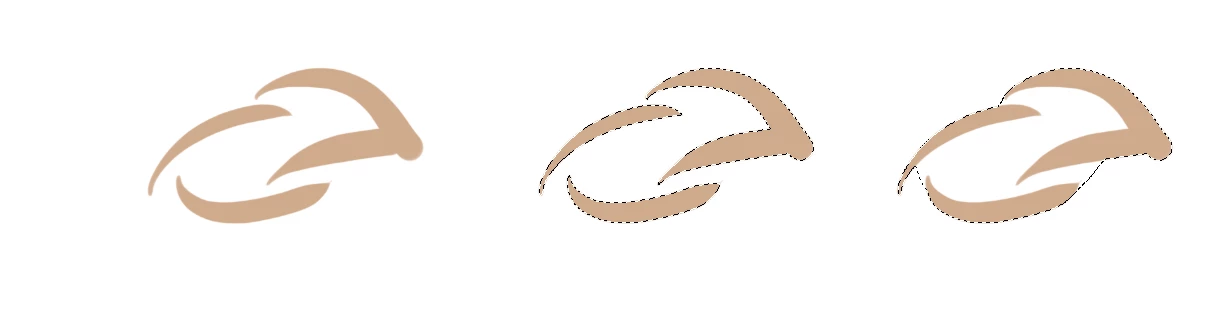
Hello, does a way exist  to convert a drawing (lines or not ) into selection closed zone ?

If simply not maybe with a script ?

thank you !
 

Vincent J

This topic has been closed for replies.

3 replies

Conrad_C
Community Expert
Community Expert
September 27, 2022

This sounds a little like the Live Paint feature in Adobe Illustrator. Live Paint provides some interactive flexibility for colorizing line art, including how to deal with gaps (close them or not, set gap threshold for filling, etc.). You might look into that if you don’t mind working with vector graphics. I don’t think Photoshop has anything like Live Paint.

vincentjAuthor
Known Participant
September 27, 2022

Yes, thank you. I need to vectorise my drawing before to use the live paint , isn't it ?

Conrad_C
Community Expert
Community Expert
September 27, 2022

Yes, if you want to do it with an existing Photoshop document or other image. If you are going to take the pixel document into Illustrator, you could try its Image Trace feature which converts pixels to vectors. But the results of Image Trace are not always easy to work with, even after adjusting trace options.

jane-e
Community Expert
Community Expert
September 26, 2022

One way is to trace around the outer part of the shape with the Pen tool using Path mode, then convert the path to a selection (Ctrl+Enter or use the Paths panel).


Jane


vincentjAuthor
Known Participant
September 26, 2022

Thank you Jane, but the goal is to have it as quickly as possible from a first step CTRL+ left button mouse, and transform that selection into a closed frame (yes my request was not enough clear maybe), because another way is (like you said with the Pen tool) to use the magnetic lasso tool.


c.pfaffenbichler
Community Expert
Community Expert
September 26, 2022

What is to determine how the individual areas are connected? 

vincentjAuthor
Known Participant
September 26, 2022

yes indeed, this is probably the difficulty that would prevent it from being "automatable". Maybe a script with a dev layer ^^.

vincentjAuthor
Known Participant
September 27, 2022

We can convert the selection to paths and get an array of points. Having an array of points using Graham scan or Jarvis march, we can build an outer contour. However, there are many problems that follow:

  • The points will be connected by straight lines. This can cause problems for objects with complex shapes.
  • All internal cavities will also be painted over
  • All external objects will be connected to the main

Those the task can be solved, but it is impossible to achieve an artistic effect - it will take a lot of manual work to bring the image to the desired look.


why not, This may be a good first step, if it doesn't take too long to clean up.

It needs code to convert using graham scan or ... ?