
Participant
May 16, 2019
Answered

Linked smart objects from illustrator - distortion when updating or embedding

  • May 16, 2019
  • 2 replies
  • 1125 views

Hi fellow photoshop users!

I am having a big issue with photoshop:

The work i am doing requires files to be worked on in illustrator (graphs, amongst other things). I usually place the linked AI file in photoshop, then resize (or not), to fit my needs.

The problem is when i need to update the file (even by directly double clicking on the smart object), update the illustrator, then come back to photoshop, the files often gets distorted (changing for no reason at all the scaling of X and Y, and the positioning). This happens even if the item changed is in the middle of the graph, so no effect on the bounding area.

Same goes if i do not modify at all the AI file, and simply embed it. It often becomes distorted / displaced.

Anyone has that problem (the same problem is spread throughout our studio, so i wouldnt think it is a 'user error' lol) and found a workaround / cause?

Thanks!
    This topic has been closed for replies.
    Correct answer Sahil.Chawla

    Hi Marc,

    That shouldn't be happening, as smart objects from Illustrator are getting distorted in Photoshop, could you please let us know the exact version of Photoshop you're working on?

    Also, what operating system are you using?


    Could you try the option File > Place Linked to import the Illustrator file in Photoshop and let us know if it still gets distorted?

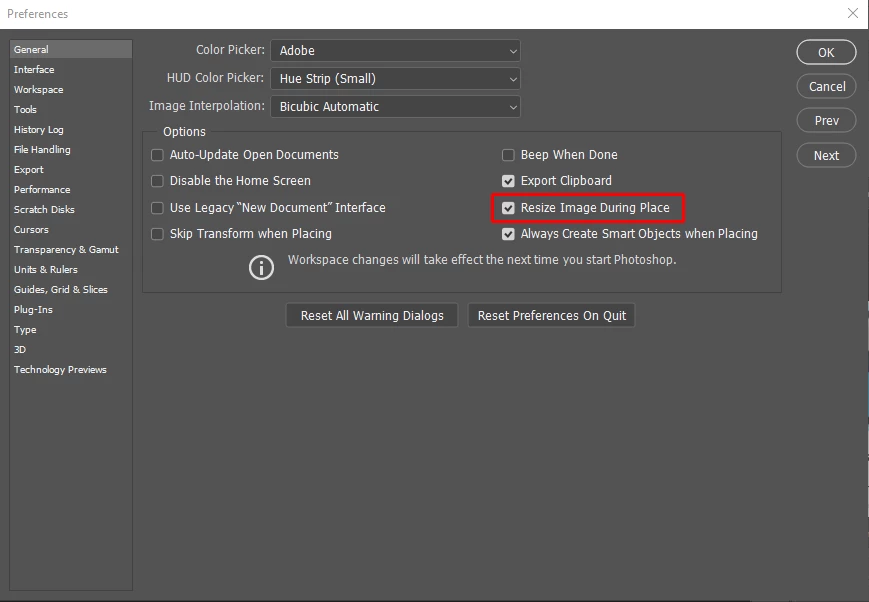
    Also, uncheck Resize Image During Place from Photoshop's Preferences > General and see if it helps.

    Regards,
    Sahil

    2 replies

    Michael Bullo
    Community Expert
    Community Expert
    May 16, 2019

    Sahil has already made some great suggestions. If they don't work you could try resetting the preferences in Photoshop and perhaps even Illustrator…

    Preferences in Photoshop

    How to set preferences in Illustrator

    Sahil.Chawla
    Adobe Employee
    Sahil.ChawlaCorrect answer
    Adobe Employee
    May 16, 2019

    Hi Marc,

    That shouldn't be happening, as smart objects from Illustrator are getting distorted in Photoshop, could you please let us know the exact version of Photoshop you're working on?

    Also, what operating system are you using?


    Could you try the option File > Place Linked to import the Illustrator file in Photoshop and let us know if it still gets distorted?

    Also, uncheck Resize Image During Place from Photoshop's Preferences > General and see if it helps.

    Regards,
    Sahil

    Participant
    May 16, 2019

    We are testing the preference change, so far so good! Thanks!

    Sahil.Chawla
    Adobe Employee
    Adobe Employee
    May 17, 2019

    Glad to know it's working! Please keep us notified about the performance.